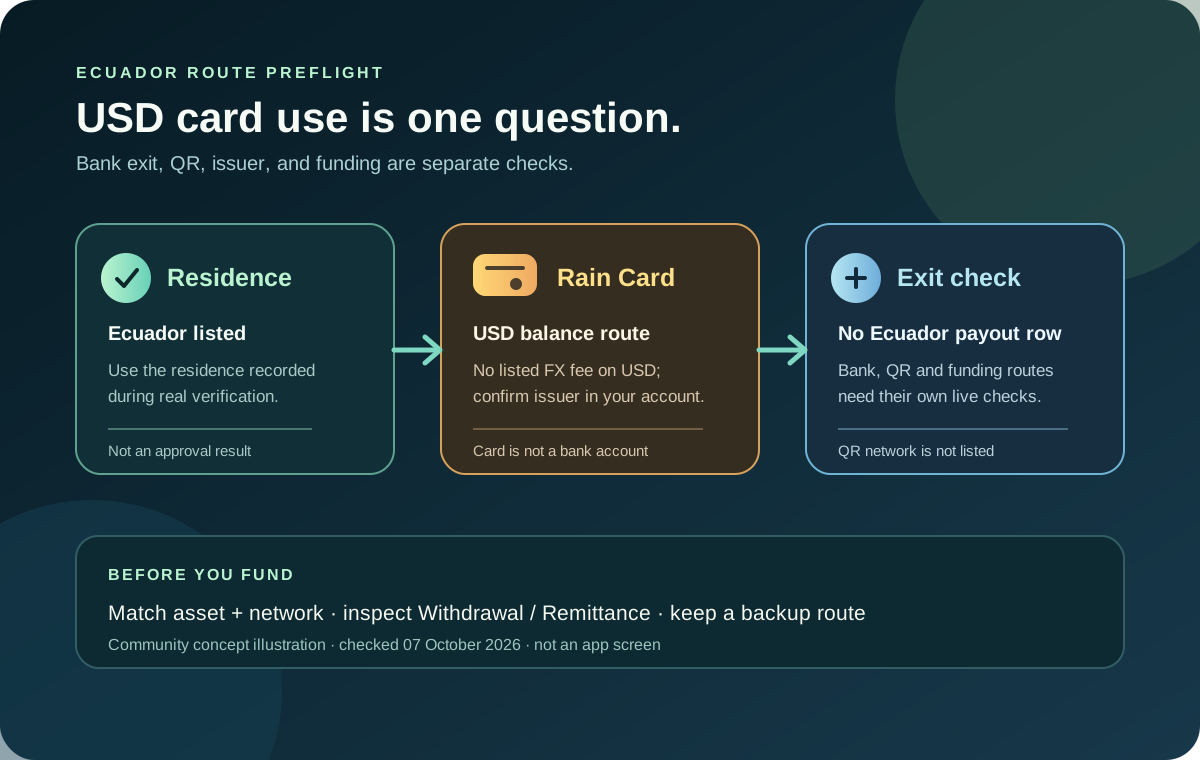
If you’re looking into Jupiter Global Ecuador, treat the Card and the bank exit as two separate questions. Ecuador appears in Jupiter’s current Card residence list, and the public issuer table puts countries outside the named DCS group on Rain. That makes a USD card-spending route worth checking for a genuine Ecuadorian resident, but it does not create an Ecuador-specific payout, QR network, or account approval.
The short answer for Ecuador
- Card residence: Ecuador appears in the current Card country list. A listed residence lets you inspect the official verification flow; it does not guarantee approval or every Spend feature.
- Issuer: Ecuador is outside the named DCS countries, so the public table points toward a Rain-issued Card. Confirm the issuer in the verified account before relying on a fee or limit assumption.
- USD spending: Spend holds the Card balance in USD. A purchase made in US dollars has no listed Card FX conversion fee; a merchant charging Ecuadorian dollars is still a USD transaction, subject to merchant and account controls.
- Ecuador bank payout: The local-payout rows do not name Ecuador as a destination. A SWIFT or other account-specific USD/EUR route may still be shown, but a broad international rail is not a guarantee of a particular Ecuadorian bank credit.
- QR Pay: Ecuador is not in the documented Jupiter QR Pay merchant-network list, and QR Pay currently depends on a DCS-issued Card.
- Funding: The direct Spend address accepts USDC on Solana, Ethereum, Sui, Arbitrum or Base, and USDT on Solana. Match the exact asset and network before sending.
The Jupiter Card documentation bases eligibility on country of residence, not citizenship. The Fees & Limits page, Remittance page and QR Pay page publish separate product tables. Check the live account and current official docs before moving money.
Match the Ecuador search to what you actually need
| What you need to do | What the documentation supports | Check before funding or applying |
|---|---|---|
| Pay an Ecuadorian merchant in USD | A Visa Card purchase may be possible after approval; the balance is held in USD and USD payments have no listed FX conversion fee. | Confirm the Card status, issuer, merchant amount and final confirmation in the app. |
| Receive money in an Ecuadorian bank | Ecuador is not named in the local-payout destination rows. | Ask the live Remittance flow for the exact currency, rail, beneficiary fields, fee and expected credit. |
| Withdraw a crypto-funded balance | Ecuador is not shown in the restricted off-ramp table, but withdrawal remains partner- and account-dependent; only USDC deposits are documented for fiat withdrawal. | Confirm the Withdrawal screen, destination currency, quote, beneficiary and fee. |
| Pay by an Ecuadorian QR code | Ecuador is not in the documented Jupiter QR Pay network list. | Identify the merchant network first; a local bank or wallet QR is not automatically a Jupiter QR route. |
| Fund Spend with crypto | USDC on Solana, Ethereum, Sui, Arbitrum or Base, and USDT on Solana, are documented direct deposit pairs. | Match the asset and network shown in the current receiving instructions exactly. |
Your account screens, beneficiary fields and final confirmation have the final say.
Use your real Ecuador residence in verification
The Card flow follows where you actually live. An Ecuadorian passport held by someone living elsewhere does not establish Ecuadorian residence, and a visitor, employer address or borrowed address should not be used to force a country selection. Keep the name, address and identity details in the official flow accurate and consistent.
The public issuer table names DCS for Australia, Japan, Malaysia, the Philippines, Singapore, South Korea, Taiwan, Thailand and Vietnam. Ecuador is outside that group, so Rain is the planning assumption for an Ecuadorian residence. Issuer assignment is automatic; the Card screen in the verified account is the evidence that matters.
Jupiter’s FAQ describes a five-step verification flow: identity document, phone verification, liveness, personal information and a questionnaire. APAC proof-of-address rules do not automatically describe Ecuador, so follow the exact request in the live Verification Center rather than assuming a particular Ecuadorian document will be accepted. Manual review can take longer than the usual few minutes, typically 3–5 working days. Verification rules
Do not pay an intermediary who promises approval, a faster review or a special Ecuador route. Use official support for an account-specific question, and never send a recovery phrase, private key, password, one-time code or unredacted identity document to a private agent. Security guidance · Official support
What an Ecuadorian Card purchase costs
The app displays the Spend balance in USD; deposited USDC and USDT are not automatically converted to USD on arrival. With Rain, the stablecoins remain on-chain as card collateral. The current fee table lists 1% non-USD FX conversion for Rain and 1.8% for DCS, while USD payments have no listed FX conversion fee. Because Ecuador uses the US dollar, a normal USD merchant amount should not be treated as a non-USD conversion; the merchant’s own pricing, preauthorisation, tip or category rule can still change the final result. Current fee rules
Use an ordinary, low-stakes Visa merchant for a first test and keep a backup method. Hotels, rental cars, subscriptions and restricted categories can create a pending authorisation or decline even when the balance looks sufficient. A working Card also does not prove that QR Pay, a physical-card order or a bank-transfer corridor is active for the same account. The card first-payment checklist and merchant-decline guide cover those separate checks.
An Ecuador bank exit needs a live corridor check
The current local-payout table lists AED, BRL, CAD, EUR, GBP, IDR, INR, MYR, NGN, PHP, SGD, THB, TRY, USD and VND. It does not name Ecuador as a local-payout destination or list an Ecuadorian-currency route. The remittance documentation says SWIFT can reach over 200 countries, but the recipient bank and local rules can restrict a specific corridor. That means USD credited to this Ecuadorian beneficiary is a question for the live Remittance flow, not a promise made by the country list. Global Fiat Remittance
If the bank exit matters, decide where the money needs to end up before funding. Open the current Withdrawal or Remittance screen, confirm whether the account shows Ecuador, the beneficiary currency, the rail, the fee, the expected credited amount and any required reference. Only USDC deposits are documented as eligible for fiat withdrawal; USDT can fund Spend for Card use but is not the documented fiat-exit asset. Read the USDC withdrawal boundary and the Spend-balance versus withdrawal-balance guide before treating a Card balance as bank-ready.
Do not fund a balance because a general SWIFT statement sounds broad. A visible Card route and an account-specific bank route are different product decisions, and the receiving bank can apply its own acceptance or conversion rules. The bank-transfer corridor checklist records the questions without asking you to publish private beneficiary data.
Ecuador is not a documented QR Pay market
Jupiter’s current QR Pay list names Cambodia, Indonesia, Malaysia, Mongolia, the Philippines and Vietnam. Singapore and Thailand are temporarily unavailable, and Ecuador is not listed. QR Pay is also limited to supported DCS-issued cards for now. An Ecuadorian merchant QR code may belong to a bank, wallet or another local network outside Jupiter’s documented route. QR Pay availability
If you need to pay a merchant in Ecuador, check the ordinary Visa Card path, the USD balance and the merchant’s final confirmation. Do not scan repeatedly when the first attempt is pending, and do not treat a supported Card residence as proof that a QR code will work. The QR Pay guide explains the documented networks and limits.
Ecuador funding preflight
Before applying or funding, use this order:
1. Confirm Ecuador is your real country of residence for the official verification flow. 2. Complete Jupiter ID with your own email, phone and identity information; use only the documents requested by the live app. 3. Confirm the assigned issuer and Card status after verification. 4. Decide whether the goal is a USD merchant purchase, an Ecuador bank credit or an account-specific off-ramp. 5. If funding crypto, match USDC on Solana, Ethereum, Sui, Arbitrum or Base, or USDT on Solana, to the exact receiving instructions. 6. If a route is missing or an application is pending, use in-app support with the status message and reference. Never disclose wallet secrets or login codes.
Use the site’s residence and feature checker to record the country and route question, then the Route Finder to name your goal. If you plan to fund with crypto, run the Network Check against the exact asset and chain shown in the app.
Before funding, you should be able to name the route: Ecuador residence → verified Rain Card → USD spending with no listed Card FX conversion, or USDC → an account-specific bank exit with a visible currency, beneficiary and quote. Because Ecuador uses the US dollar, ordinary USD card purchases carry no listed Card FX fee. Read the Jupiter Global app-download guide if you still need to confirm the official mobile route; if the USD Card route fits those checks, create your Jupiter Global account and confirm the live residence, issuer and Card screen yourself. Eligible Jupiter Card purchases earn 2% cashback, up to $100 a month.
Jupiter Global Ecuador FAQ
Can residents of Ecuador use Jupiter Global?
Ecuador appears in the current Jupiter Card residence list, so a genuine resident can inspect the official verification flow. That does not guarantee approval, a physical Card, a particular issuer, a bank route or access to every Spend feature.
Which issuer should an Ecuadorian resident expect?
Ecuador is outside the named DCS country group, so the public table points toward Rain. Issuer assignment is automatic; confirm the issuer shown in the verified account before using the 1% non-USD FX planning figure.
Does Jupiter Global support Ecuadorian bank payouts?
The current local-payout rows do not name Ecuador as a destination. A USD or EUR SWIFT route may be available to an account-specific beneficiary, but the live Remittance screen, receiving bank and final quote decide whether the transfer can complete.
Does Jupiter QR Pay work at an Ecuadorian QR code?
Ecuador is not in the documented Jupiter QR Pay merchant-network list. Local bank or wallet QR systems are separate from Jupiter’s listed networks, and QR Pay also depends on the supported Card issuer.
Can USDT be withdrawn to an Ecuadorian bank?
The current documentation says only USDC deposits are eligible for fiat withdrawal through the off-ramp; USDT deposits cannot be withdrawn to fiat that way. Check the live Withdrawal screen for the account-specific currency, beneficiary, quote and fee before funding.
Is a USD purchase in Ecuador charged the Rain FX fee?
The fee table lists the Rain FX conversion fee for non-USD payments and no listed FX conversion fee for USD payments. Confirm the merchant currency and final transaction screen because a merchant can add its own conversion or preauthorisation.
Sources
Checked against these sources on 21 October 2026.