Community concept illustration—not an actual app screen.
The phrase “cash out to a bank” hides the most important question: what asset is in the Spend balance, and does the account currently show a permitted withdrawal route for your region?
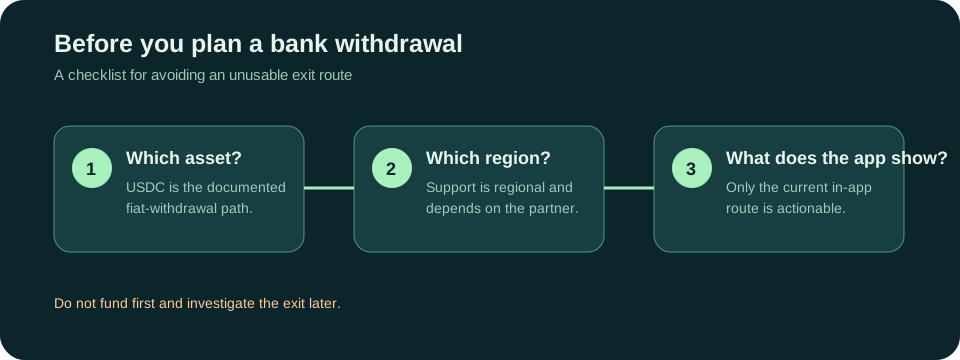
The documented asset rule comes first
Jupiter’s current fees and remittance documentation says only USDC deposits can be withdrawn to fiat. USDT deposits cannot be withdrawn to fiat. That is a product constraint, not a suggestion to swap later without checking the available route, price, and account rules. Fees and withdrawal documentation
This is why the funding decision and the exit decision belong in the same plan. If your objective is a bank payout, check the eventual bank route before depositing. A token that is accepted for card spending can still be the wrong asset for a fiat withdrawal.
Withdrawal support is regional
The off-ramp is powered by a partner and depends on regulatory availability. The published table shows different USD and EUR support by region, with some countries marked as unsupported for both. The list can change, and the current account may require additional checks. China, the United Kingdom, and several other regions appear in the restricted table for particular currencies at the checked date. Current fee and region table
Do not infer that a country can withdraw because it can deposit, hold a card, or send a remittance. These are separate product surfaces with different partners and compliance conditions.
Bank transfer is not the same as off-ramp
Global Fiat Remittance lets verified users receive and send fiat through virtual accounts, SWIFT transfers, and local payouts. That is a transfer service with its own rails, fees, limits, and destination requirements. An off-ramp from the card balance is a different action. The app may show one route and not the other, even when both involve a bank account. Remittance overview
For a bank payout, write down the intended finish line before you fund anything:
- Which currency should arrive?
- Is the destination your own bank account or another person’s?
- Is the route an off-ramp, a local payout, or a virtual-account transfer?
- What fixed and variable fees appear before confirmation?
- What evidence will show that the recipient account was credited?
If you cannot answer those questions from the current app flow, pause. A displayed balance is not proof that a usable bank exit exists.
Use a conservative checking order
1. Verify your Jupiter ID and the residence details on the account. 2. Confirm whether the balance came from USDC or USDT. 3. Open the withdrawal or transfer screen and select the actual destination country and currency. 4. Read the fee, limit, timing, and required bank fields. 5. Only then decide how much to fund, and keep a backup route for time-sensitive money.
Jupiter’s FAQ says withdrawal availability is region-dependent and that current routes should be checked in the app. It also distinguishes Spend from the separate self-custody wallet. Do not send funds to a wallet address when you are trying to complete a bank payout, and do not assume a wallet balance can be withdrawn through Spend without the documented path. Spend FAQ
Include costs that do not look like withdrawal fees
Deposit network costs, conversion spreads, payout fees, and receiving-bank charges can all affect the amount that arrives. The published fee table includes fixed and variable charges for local payouts, plus different funding fees for SEPA, ACH, Fedwire, and SWIFT. Use the current quote rather than an article percentage, and compare the final amount after every listed charge. Published fee table
For a small transfer, a fixed fee can be a large share of the amount. For a large transfer, a percentage fee and compliance review may matter more. The practical comparison is total debit versus final bank credit, with the route and currency held constant.
If the withdrawal option is missing
Do not keep depositing, create a second account, or follow a stranger’s workaround. Capture the route name and any error without sharing identity documents or account secrets. Then use official in-app support. Eligibility can depend on the current issuer, partner coverage, and regulatory status.
The safest plan is simple: choose the exit first, verify the asset and region, then fund only what you are prepared to leave in that route while you test it. This guide explains the questions; it cannot see or approve your account.
Sources & what was checked
Public documentation reviewed 23 September 2026. This is a documentation-based guide, not a first-hand account, identity-verification or payment test. Open the current sources before acting.