Community concept illustration—not an actual app screen.
A card decline is a state, not an explanation. The useful next question is whether the problem came from the balance, the merchant category, the issuer, the card state, the network, or a risk decision.
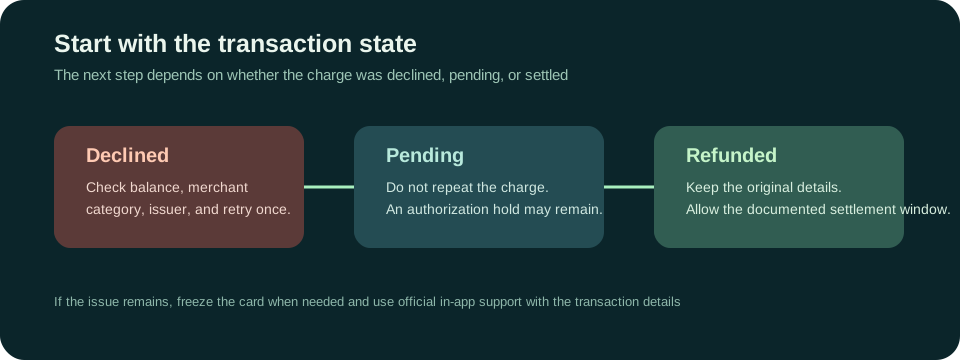
Check the simple facts first
Before repeating a payment, check the Spend balance, the amount the merchant attempted to authorise, the card’s freeze status, and the currency shown at checkout. An authorisation can be higher than the visible purchase price when a merchant uses a deposit or estimated amount.
Check that the card details, PIN, expiry, and billing information were entered correctly. A virtual card can be active while a merchant’s own payment processor still rejects the transaction. If the app shows a specific message, keep that wording for support rather than guessing what it means.
Merchant categories can be restricted
Jupiter’s fee and limits documentation lists restricted categories that can be automatically declined. Examples include money transfers, remittance services, stored-value loads, securities and some financial institutions, gambling, certain government services, and other high-risk categories. The documentation also says merchants can be dynamically restricted by fraud and risk monitoring. Restricted categories
That means a card that works at a restaurant can still fail at a money-transfer website, a crypto purchase flow, or a merchant that has been classified differently by its payment processor. Do not keep retrying a category that the provider may intentionally block.
Travel adds another failure point
The Jupiter Card FAQ says the card can be used anywhere Visa is accepted, but acceptance is still subject to issuer, merchant, network, and local conditions. Non-USD payments can carry the issuer’s foreign-exchange fee. A terminal that offers to convert the purchase into your home currency may also add its own conversion margin. Card and FX guidance
Before travel, make a small ordinary purchase while you still have a backup payment method. Add the card to a supported mobile wallet if that route is available in your region. Apple Pay and Google Pay availability can differ from card availability, so confirm the wallet actually completes setup rather than assuming it will work abroad.
Do not confuse a decline with a pending hold
If the first attempt created a pending authorisation, the correct action is different. Jupiter’s FAQ says an uncaptured authorisation can take up to 30 days to drop depending on the merchant. Ask the merchant whether it captured the original transaction and do not create a second charge simply because the first one is not settled yet. Pending authorisation FAQ
If the transaction settled and the merchant issued a refund, the card documentation says the credit can take up to seven business days. Keep the original transaction and refund reference together. This is a different workflow from a new decline.
Try once, then escalate with evidence
For a normal purchase with enough balance and no restricted-category signal, correct any obvious checkout error and retry once. If it fails again, use a backup method and stop experimenting. Repeated attempts can create multiple holds or make it harder to tell which transaction the merchant is discussing.
If you contact support, include the date, merchant, amount, currency, visible status, and the exact message. Use the verified in-app support path. Do not send a seed phrase, private key, one-time code, full card security code, or identity document to a person who reaches out through social media.
The practical rule
Treat a decline as a prompt to identify the state and category before you move more money. A balance top-up cannot make a prohibited merchant category eligible, and a second attempt cannot repair a pending authorisation. Check the route, keep a backup, and let the official issuer or provider explain the transaction record.
Sources & what was checked
Public documentation reviewed 23 September 2026. This is a documentation-based guide, not a first-hand account, identity-verification or payment test. Open the current sources before acting.