“Can I send Jupiter Global money to this country?” sounds like a yes-or-no question. A useful answer needs more detail. A destination can appear in a broad coverage statement while the chosen currency, rail, recipient bank, residence, or compliance review still prevents the transfer from completing.
The route comparison tool doesn’t check bank corridors, so use the country and remittance sources below to see whether a corridor covers your destination. A “candidate” result means the pairing appears in Jupiter’s published material. It doesn’t mean your account is approved or that the bank will credit the recipient. The Jupiter Global guides directory groups the corridor, currency, beneficiary, delay and fee guides if you need a narrower check.
Start with the destination, not the headline
Jupiter’s current remittance documentation says Global Fiat Remittance supports virtual accounts, SWIFT transfers and local payouts. It also says SWIFT covers more than 200 countries, while specific corridors can be restricted by the recipient’s bank and local regulations. That distinction matters. “Over 200 countries” describes the reach of a rail; it is not a guarantee for every beneficiary, currency or account. Read the remittance limitations
The current FAQ says the full destination list is visible in the app when selecting a bank-transfer destination. Treat that picker and the quote screen as the current authority for the individual transfer. A search result, a social post, or a guide written for another residence cannot replace it.
Match the currency to the published route
The published local-payout currencies are AED, BRL, CAD, EUR, GBP, IDR, INR, MYR, NGN, PHP, SGD, THB, TRY, USD and VND. The same documentation lists JPY, MAD, MXN, SAR and TWD as planned support. Planned support is useful for understanding the roadmap, but it is not a route you should fund today. Nigeria has its own NGN route guide because the current card status and local payout row must be read separately. See the current currency list
Some of the local pairings are straightforward: PHP for the Philippines, VND for Vietnam, MYR for Malaysia, SGD for Singapore, and GBP for the United Kingdom. The destination still matters because the currency name alone does not identify the recipient bank or the delivery method. The app may ask for different fields or show a different option for the same currency in a different country.
USD has separate published domestic rails: ACH and Fedwire for the United States. EUR has a sharper boundary. Jupiter’s remittance page says EUR remittances are supported through SEPA only; a SWIFT EUR transfer may fail or may not be credited. If a recipient gives you a EUR account, do not assume a SWIFT wire is an equivalent substitute. Read the current rail rules
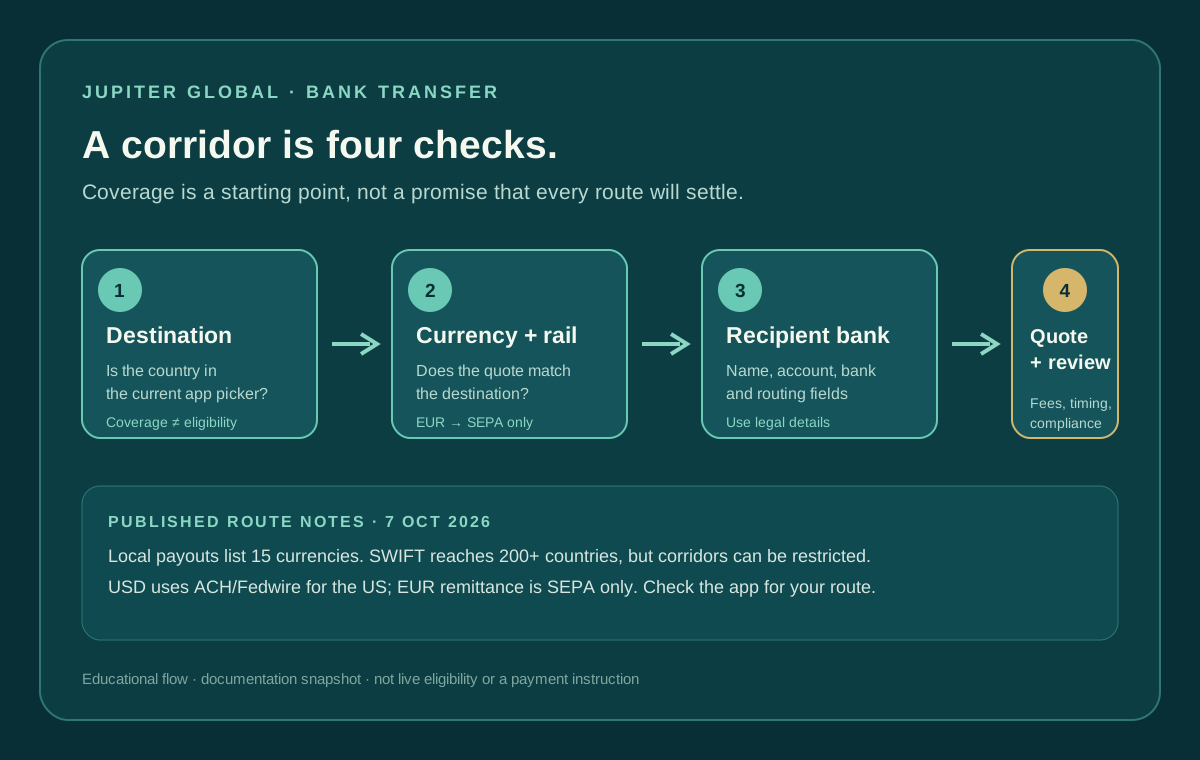
Four gates to check before funding
Use this order so a low advertised fee does not distract you from a route that cannot finish:
- Destination: Is the country or region available in the app’s current bank-transfer picker?
- Currency: Is the desired payout currency listed for that route, or are you relying on a planned or assumed option?
- Rail: Does the quote show the right rail (local payout, SEPA, ACH, Fedwire or SWIFT) for that currency and destination?
- Beneficiary and review: Can the recipient provide the exact name, bank, account number and country-specific routing details, and are you ready for a possible compliance review?
The FAQ says bank transfers require the recipient’s full name, bank name, account number and the routing details required by the country, such as a SWIFT/BIC or US routing number. A legal beneficiary name and a valid account number are part of the corridor; they are not paperwork to fill in after choosing a route. Check the required fields
What “candidate” does and does not mean
The checker reports a published pairing, a hard mismatch, or a route that needs the app’s current confirmation. It does not query Jupiter, Noah, a receiving bank, or an eligibility database. It cannot see your residence, verification state, account limits, quote expiry, intermediary bank, or sanctions screening.
For a local payout, a matching currency and destination are a sensible starting point. For SWIFT, the checker keeps the result cautious because the published documentation explicitly leaves corridor restrictions with the recipient bank and local rules. For EUR, the checker blocks SWIFT rather than inventing confidence. For planned currencies, it stops before a reader mistakes a roadmap note for availability.
Add fees and timing after the route fits
Only compare cost after the corridor passes the first checks. The current fee table lists fixed plus variable charges for both pay-ins and payouts. For example, PHP and VND payouts are each listed at $2.50 plus 0.45%, while USD ACH is $2 plus 0.05% and international SWIFT is $30 plus 0.05%. Fees are only one part of the result: the documentation says currency conversion uses the market rate, and fee structures may evolve. Open the current fee table
Use the fee break-even calculator to understand how fixed and percentage charges change with amount. Then request the live quote in the official app and compare the final source debit, recipient amount, delivery method and expiry. You can also use the Route Finder to organize the country and goal checks before opening the quote. Do not treat the calculator or a dated table as a live price.
The FAQ says most transfers arrive within 1–3 business days, but timing depends on the destination country and receiving bank. Outbound transfers are screened by a regulated partner, and unusual or high-value transfers may require supporting documents. A corridor that fits the published table can still take longer or be held for review. Read the transfer FAQ
Keep the transfer traceable
Before sending, save the quote and transfer reference privately. Confirm the recipient’s bank can receive the selected currency and rail. Check the route again if the app changes the destination, asks for a different currency, or shows a new fee. If the transfer is delayed, do not create a duplicate just because the recipient has not seen the credit; use the reference and official support path.
For a closer look at recipient-side delays, read what to check when a bank transfer is sent but not credited. For a first small test, use the international transfer checklist. If the corridor checks out, create your Jupiter Global account and confirm the destination, currency and recipient fields in the app before funding. Signing up also earns you 2% cashback on eligible Jupiter Card purchases, up to $100 a month; bank transfers don’t earn it. If a route disagrees with the documentation, use official Jupiter support and Spend safety guidance.
Jupiter Global bank transfer corridor FAQ
Does “more than 200 countries” mean every bank corridor is available?
No. The remittance documentation describes SWIFT reach, while the recipient bank, selected currency, rail, local rules and compliance review can still restrict an individual corridor. Use the live destination picker and quote for the actual account.
What beneficiary details are needed for a Jupiter bank transfer?
The checked FAQ requires the recipient’s full name, bank name, account number and the country-specific routing details, such as a SWIFT/BIC or US routing number. Confirm those fields before funding rather than after choosing a route.
Can I send EUR by SWIFT?
The current remittance documentation describes EUR remittances through SEPA only. A EUR account does not automatically mean a SWIFT EUR route will work or be credited.
How long does a Jupiter bank transfer take?
The current FAQ says most transfers arrive within 1–3 business days, but destination-country rules, the receiving bank, intermediary banks and compliance review can extend that window. Save the quote and transfer reference.
Does the corridor checker verify my live Jupiter account?
No. It compares published destination, currency and rail information. It cannot see your residence, verification state, account limits, quote expiry, intermediary bank or sanctions review, so the official app’s current quote remains authoritative.
Sources
Checked against these sources on 7 October 2026.