Thailand is listed in Jupiter’s card documentation, but the current QR documentation gives a narrower answer: Thailand PromptPay is temporarily unavailable. A Thai card, a DCS issuer, or an activation date that meets the documented card-side condition does not reopen a QR network that is paused. Current QR availability
Jup Global Community is an independent learning site published by StonkBuilder.
The short answer for Thailand
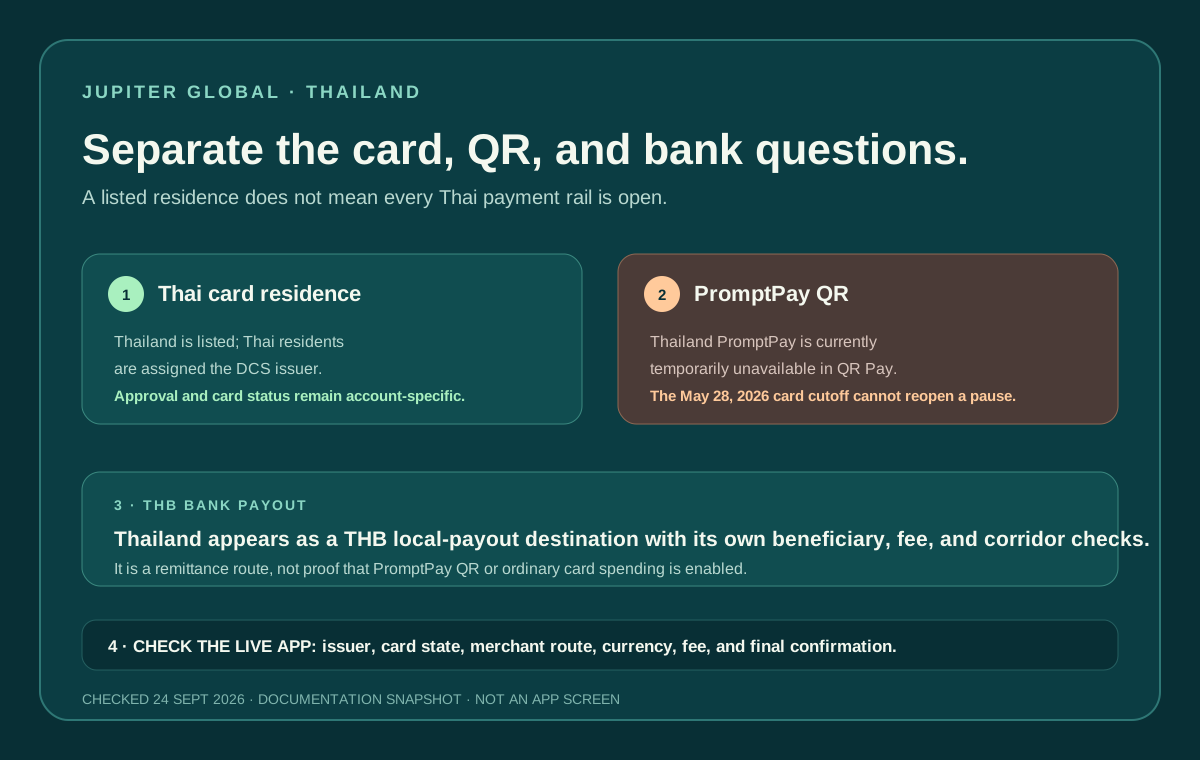
If you want to scan a Thai merchant’s PromptPay QR code with Jupiter QR Pay, treat the current answer as wait: the network is temporarily unavailable. The QR page lists a Thailand card activation cutoff of before May 28, 2026, but that condition is only one gate. It cannot override the separate PromptPay pause. Do not plan a trip or a merchant payment around an old screenshot or another user’s card. QR card conditions
That does not mean “Jupiter does not work in Thailand.” The Card page lists Thailand as a supported residence and assigns Thai residents to the DCS issuer. An ordinary Visa merchant payment is a separate route with its own balance, merchant-category, issuer and foreign-exchange checks. Thai card residence and issuer
Thailand also appears in the local-payout currency list as THB. A bank payout is a third route with beneficiary fields, a quote, fees and corridor restrictions. A visible THB payout option does not prove that PromptPay QR is enabled, and a successful card purchase does not prove that a THB payout is available. Global Fiat Remittance
Ask three different questions
1. Can your residence receive a card?
Eligibility follows the country of residence recorded during KYC. Thailand is listed, and the current Card page says Thai residents are assigned DCS rather than Rain. The issuer is assigned automatically; you do not choose it at checkout. DCS has its own fee and spending-limit rules, including a 1.8% FX fee on non-USD card payments in the current table. Issuer and fee rules · Current fees
Being physically in Thailand while travelling does not convert a different residence into a Thai account. If your residence is elsewhere, use your own KYC context and treat Thailand as a travel destination. The card may work anywhere Visa is accepted, but a merchant’s local QR code still follows the QR route and network status.
2. Can the merchant accept PromptPay through QR Pay?
The QR documentation currently lists PromptPay as temporarily unavailable. When the network becomes available again, QR Pay will still depend on the card and activation conditions shown in the current table. Spend-balance QR Pay is currently limited to eligible DCS-issued cards, and the documented general limit is $500 per transaction and $5,000 per day, with no payer or recipient fee. QR limits and restrictions
Those limits are useful only when the route is live. They do not turn a paused PromptPay network into an available payment method. QR payments are also a merchant route; a person-to-person request or a generic QR-looking image can belong to another service.
3. Is a THB bank payout available?
The remittance documentation lists THB as a local-payout currency. The current fee table lists a $2.50 fixed fee plus 0.45% for Thailand bank payouts. That’s the published rate, not your personal quote: the final app route can require specific beneficiary details, identity checks, a supported bank and a current corridor. THB payout row
Do not use a THB payout as a substitute for a merchant payment. A bank transfer can take a different route and timing, and it may involve a recipient account rather than a checkout. Before funding, write down where the money is actually going: a Thai shop, your own bank account, or another person’s account.
A Thailand travel preflight
If you already have a supported card and are travelling in Thailand:
1. Check the issuer and card state in the official app. 2. Treat PromptPay QR as unavailable unless the current app and official documentation explicitly change. 3. For an ordinary Visa purchase, confirm the merchant currency and leave room for the DCS FX charge on a non-USD payment. 4. Carry a second payment route for a deadline-sensitive purchase. 5. Keep the merchant receipt and in-app reference private until the transaction settles.
If the merchant presents a PromptPay code, ask whether another supported payment method is available. Do not repeatedly scan a paused route or hand your card details to someone who says they can get around the pause. Security guidance
If a Thailand route is missing
- PromptPay option missing: the documented pause is the first explanation; wait for an official status change.
- Card option missing: check residence, KYC, issuer and the current country list rather than changing your location.
- THB payout missing: check whether the account, beneficiary bank and corridor are currently supported; do not assume the card route controls remittance.
- Payment status unclear: preserve the original reference and avoid a duplicate payment while the app or merchant reconciles it. Payment troubleshooting
The Singapore route guide covers a similar QR pause with different local facts. For the general travel sequence, use the payment preflight, and for a wider route choice use the payment-route guide.
Use the Route Finder to separate the paused PromptPay question from ordinary Card spending and the THB payout route, and read the official app-download guide before opening the app.
Thailand being listed is only the starting point. The current network status and your account state decide what you can do.
If card spending or a THB payout fits your plans, open a Jupiter Global account and check the live issuer and payout fields before moving funds. There’s 2% cashback on eligible card spending too, up to $100 a month.
Jupiter Global Thailand FAQ
Can Jupiter Global QR Pay use PromptPay in Thailand?
The checked QR documentation says Thailand PromptPay is temporarily unavailable. Treat the route as paused until the current official app and documentation show a change; a Thai card or suitable activation date cannot override that network status.
Can Thai residents use a Jupiter Global Card?
Thailand is listed as a supported card-residence market in the checked documentation, and Thai residents are assigned DCS. Use genuine residence and KYC details, then verify the live card state and issuer in the account.
Can I use the Card for ordinary Visa purchases in Thailand?
That is a separate route from PromptPay QR. Check merchant acceptance, available USD balance, DCS non-USD FX treatment, category restrictions and a backup payment method before relying on it for travel.
Can Jupiter Global send THB to a Thai bank account?
The checked remittance table lists THB as a local-payout currency, with a published fee row. The live route, beneficiary bank, account eligibility and current quote determine whether a specific payout can proceed.
What should I do if a PromptPay payment is missing or pending?
Do not keep scanning a paused or unresolved route. Preserve the merchant, amount, currency, time and in-app reference, then wait for the original state to reconcile or use official support with the evidence.
Sources
Checked against these sources on 21 October 2026.