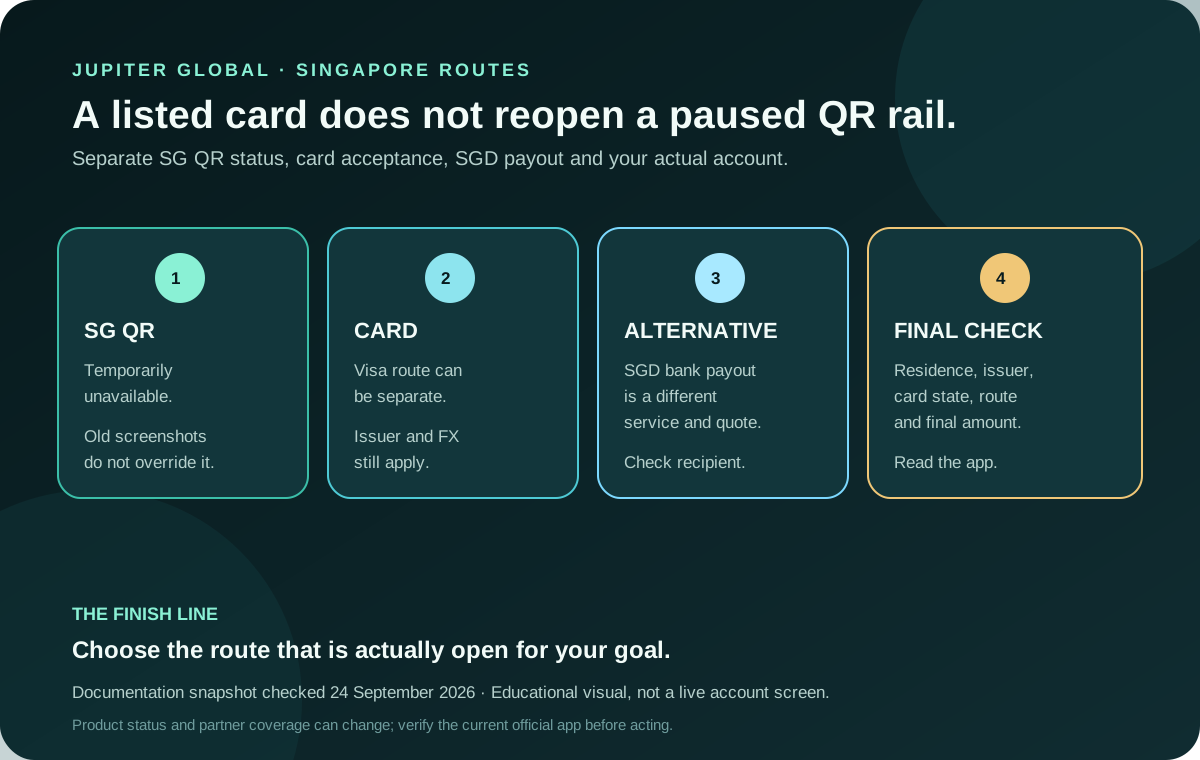
Singapore is listed in Jupiter’s card documentation, but not every Singapore payment route is open. In the current QR documentation, SG QR is temporarily unavailable. The same page lists a pre-mid-May 2026 activation condition for Singapore cards, but that card condition does not override the network pause. This reflects the documentation on the review date and can change.
Jup Global Community is an independent learning site published by StonkBuilder.
The short answer for Singapore
If your goal is to scan a Singapore merchant’s SG QR code with Jupiter QR Pay, the current documentation says wait: the network is temporarily unavailable. A DCS card, an older activation date, a funded Spend balance or a successful card purchase does not reopen SG QR. Current QR availability
That answer is narrower than “Jupiter does not work in Singapore.” Jupiter’s Card documentation lists Singapore among card-supported residences, and the Card is a Visa card that draws from a USD Spend balance. A normal Visa merchant payment is a separate route with its own issuer, merchant-category, balance and foreign-exchange checks. Card availability and mechanics
An SGD bank payout is a third route. The remittance documentation lists SGD among local-payout currencies, but payout availability, recipient-bank fields, fees and corridor restrictions are checked separately from card and QR access. Global Fiat Remittance
Separate the three questions
1. Can you complete identity and card onboarding?
Eligibility is based on the country of residence and the verification flow, not simply where you are standing. The Card page says users are assigned Rain or DCS according to residence and cannot hold both issuers. A Singapore residence listing therefore starts an account-specific check; it does not certify an approval, issuer, physical-card order or every feature. Issuer and residence rules
For Singapore QR specifically, the documentation table says cards activated before mid-May 2026 meet the card-side condition. That date is not enough on its own because SG QR itself is marked temporarily unavailable. Do not rely on an old activation screenshot or another user’s account state.
2. Can you pay an ordinary merchant?
The Card page describes Visa acceptance, but it also notes issuer, merchant and regional limitations. The card balance is held in USD. Non-USD card payments carry the issuer’s published FX fee (1% for Rain or 1.8% for DCS in the current fee table), and the assigned issuer depends on residence. Current Card fees
Before a Singapore purchase, check:
- the active card and assigned issuer in the official app;
- the merchant’s final currency and amount;
- the available USD Spend balance, including room for the issuer’s FX cost;
- the merchant category and any dynamic risk decision; and
- a backup payment method for a time-sensitive purchase.
If the merchant is offering a QR code, ask which network it uses. A code that is valid for another bank or wallet may still be outside Jupiter’s current SG QR route. Do not scan repeatedly when the app reports that the feature is unavailable.
3. Can you send SGD to a bank?
SGD appears in the current local-payout list, but a bank payout is not a QR payment and not a card refund. It requires the recipient and destination details shown in the remittance flow, a current quote, and any applicable fixed or percentage fee. Payout limits are set for each currency and shown in the app, while actual corridor availability can depend on the recipient bank and local rules. Remittance limits
Before funding, write down where the money needs to go: “SGD credited to this recipient bank account.” Then confirm whether the app shows a local payout, a SWIFT route or no route for your account. A visible SGD example in a guide or display selector is not evidence that a specific beneficiary is available.
A Singapore travel preflight
If you live elsewhere and are travelling in Singapore, your card issuer still follows your residence and KYC context. Standing in Singapore does not convert a Rain card into a DCS card or turn SG QR back on. Use this sequence before leaving for a purchase:
1. Confirm the card is active and not frozen. 2. Confirm the merchant accepts ordinary Visa if you intend to use the Card route. 3. Check the charge currency and the balance buffer for issuer FX. 4. Treat SG QR as unavailable unless the current official app and documentation explicitly change. 5. Keep a backup card or payment method for transport, lodging and time-sensitive purchases.
For a first payment, preserve the merchant receipt and the app reference. The first-card checklist explains how to match the amount and status without creating duplicate attempts. If a QR attempt is already pending, use the QR troubleshooting guide rather than scanning a second time.
What the current limits do and don’t prove
When QR Pay is available in a supported market, the documentation lists a $500 per-transaction limit and a $5,000 daily limit with no payer or recipient fee. Those figures do not make SG QR available while the network is paused, and they do not apply to an ordinary Visa purchase or an SGD bank payout. QR limits
Likewise, a completed card payment proves only that one merchant transaction passed. It does not prove a QR network, a physical-card order, an SGD payout or a future withdrawal. Keep each route’s evidence separate.
If a Singapore route is missing
- SG QR option missing: treat the documented pause as the explanation; don’t look for an unofficial workaround.
- Card payment declined: check issuer, balance, currency, card state and merchant category, then use official support if the original reference needs review.
- SGD payout absent: recheck residence, recipient fields, quote and current account availability before funding.
- A message asks for secrets: stop. Never provide a recovery phrase, private key, password, one-time code or full card security data to a supposed helper.
If the card route fits after these checks, confirm the live issuer, card state and route in the app before moving funds.
What you need is a confirmed route for your exact goal: a Visa merchant payment, an available SGD bank payout, or SG QR once the official documentation shows it has reopened.
Jupiter Global Singapore FAQ
Is Jupiter Global QR Pay available in Singapore?
The current QR documentation marks SG QR as temporarily unavailable. A Singapore residence listing, a DCS-issued Card, or an older Card activation date does not override that network status. Recheck the official app and documentation before planning a merchant QR payment.
Can Singapore residents get the Jupiter Card?
Singapore appears in the Card residence list and the issuer table assigns DCS to Singapore, but that is a starting eligibility check rather than an approval. Verification, the live Card screen, account status, merchant rules, and current product conditions still decide whether a particular account can spend.
Can Jupiter Global send SGD to a Singapore bank?
SGD appears in the documented local-payout currencies. The available route still depends on the account, beneficiary fields, corridor, quote, fees and receiving bank. A visible SGD currency option does not guarantee that a specific recipient can be credited.
What fee applies to Singapore card spending?
The current fee table lists a 1.8% non-USD FX charge for DCS-issued cards. A USD card purchase, a QR payment and an SGD bank payout are different rails, so check the exact currency, route and final confirmation rather than applying one fee to every feature.
Is an SGD payout the same as SG QR Pay? No. An SGD payout is a bank-transfer route with beneficiary, quote, fee and corridor checks. SG QR is a merchant-payment route, and the checked documentation currently marks that network temporarily unavailable.
The Route Finder helps you name the Singapore spending, QR or bank-payout goal, and the official app-download guide shows the safe way to install. If the card or SGD payout route fits, sign up for Jupiter Global here and get 2% cashback on eligible card spending, up to $100 a month.
Sources
Checked against these sources on 21 October 2026.