If you live in South Africa and are considering Jupiter Global, separate the card question from the bank-exit question. The official Card page lists South Africa among supported countries of residence. The same page assigns DCS only to a named Asia-Pacific list; residents of other supported countries receive a Rain-issued card. That published table points to Rain for a South African residence, though your own account approval has the final say. Jupiter Card eligibility and issuers
The short South Africa answer
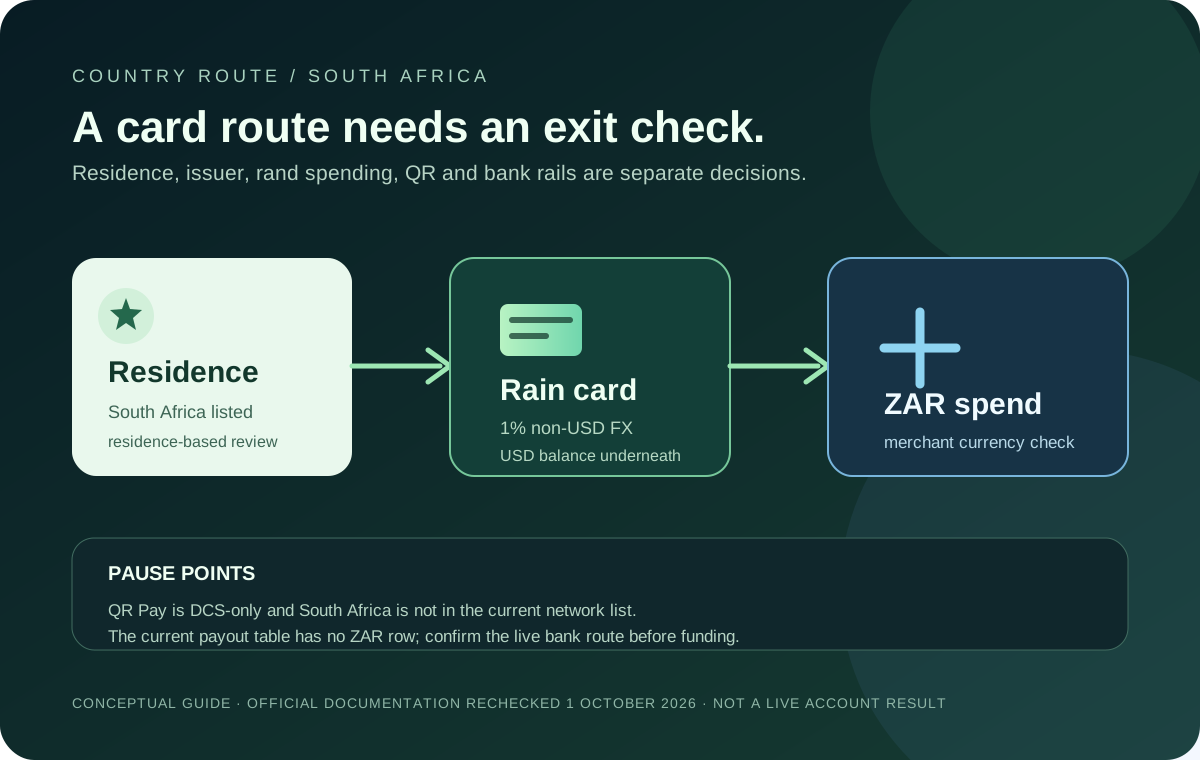
South Africa is listed for the Jupiter Card. A South African user should plan around these boundaries:
- The balance used by the card is held in USD, even when a merchant charges rand.
- The published Rain fee is 1% on non-USD card payments; USD payments have no listed FX conversion fee.
- The card is virtual in the app, while physical-card availability is still being rolled out in phases.
- Spend-balance QR Pay depends on an eligible DCS-issued card, so a Rain-issued South African card should not be assumed to support QR Pay.
- The current payout table does not list a ZAR bank-transfer corridor. Withdrawals are region-dependent and must be checked in the account route before funding.
Those are product-documentation boundaries, not a promise that a particular South African account will be approved or receive every feature. Current fees and limits · Risk and availability notes
Residence decides the first checkpoint
Card eligibility is based on country of residence, not citizenship. A South African passport does not establish eligibility while living elsewhere, and visiting South Africa does not change the residence recorded during verification. Use current information in the official flow and keep any address evidence consistent with it. Residence rules
The issuer assignment is automatic. The current Card page names DCS for Australia, Japan, Malaysia, the Philippines, Singapore, South Korea, Taiwan, Thailand and Vietnam. South Africa is outside that list, so the published issuer table points to Rain. Check the issuer shown in the live account before applying a fee or spending-limit estimate.
What a rand purchase actually means
The Card balance is held in USD. The app displays the Spend balance in USD; deposited USDC and USDT are not automatically converted to USD on arrival. With Rain, the stablecoins remain on-chain as card collateral. A South African merchant can charge ZAR, but that does not turn the balance into a rand account or guarantee the merchant’s exchange rate. The current fee table lists 1% Rain FX conversion on non-USD payments and no Jupiter fee on USD payments. A merchant’s own conversion, preauthorisation or ATM charge is a separate amount. Card process · Fee table
Before a first rand purchase:
1. Read the final ZAR amount at the merchant. 2. Keep enough USD balance for the purchase and the current Rain FX percentage. 3. Confirm that the merchant is using an ordinary Visa payment rather than a QR or cash-out route. 4. Check the currency and total on the authorization screen. 5. Keep a second payment method for a time-sensitive purchase.
Do not treat a USD display setting as proof that a ZAR payment is fee-free. The balance display and the merchant currency are different checks.
QR Pay is a separate DCS-only path
The current QR Pay documentation lists Cambodia, Indonesia, Malaysia, Mongolia, the Philippines and Vietnam as merchant QR networks. Singapore SG QR and Thailand PromptPay are temporarily unavailable, South Africa is not in the network list, and the feature currently depends on a DCS-issued card. A Rain-issued South African card therefore should not be treated as a QR Pay card simply because South Africa is supported for the Card. QR Pay availability · Jupiter QR Pay guide
A South African merchant’s QR code may belong to a local bank or payment app and still be outside Jupiter’s documented route. Use the ordinary Card route when it fits, or ask official support about the exact feature shown in your account. Do not repeat a scan while the first attempt is pending.
A ZAR bank exit is not documented by the current table
The current Fees & Limits page publishes payout rows for selected currencies and destinations, but it does not list ZAR → South Africa. It also says withdrawal support is region-dependent and that only USDC deposits can be withdrawn to fiat; USDT deposits cannot. A successful deposit is therefore not evidence that a South African bank payout is available. Withdrawals and payout table · Spend FAQ
Before funding for any bank-exit goal, open the live route and confirm:
- whether a withdrawal or remittance option is available to your account;
- which currency the receiving bank would receive;
- the beneficiary fields and final quoted amount;
- the fixed, variable and network charges; and
- the delivery estimate and any per-transfer limit.
If the South African route is missing, do not substitute a different currency or send funds to an unverified beneficiary. The bank-transfer corridor checker explains how to check where the money will actually land, and the Quote Compare tool can compare a current quote without pretending to verify a corridor.
Funding still has an exact-asset rule
The direct Spend deposit route currently accepts USDC on Solana, Ethereum, Sui, Arbitrum or Base and USDT on Solana. The official FAQ warns that another asset or unsupported network sent to the deposit address may be permanently unrecoverable. If the funds already sit in Jupiter Mobile, Send → Send to Spend is the safer conversion path because the app shows the swap result and fees before confirmation. Funding overview · Deposit safety guide
If your goal is a South African bank payout, check the exit before choosing the asset. USDT cannot be withdrawn to fiat under the current documentation, and the presence of a deposit address does not establish a ZAR bank route.
Wallets and physical cards need their own check
Apple Pay and Google Pay have separate regional and device requirements. The Card page explains how to add a virtual card from “Show Details,” but wallet services may be unavailable in a country where the card itself is supported. Check the phone wallet’s verification result rather than treating South African residence as a guarantee. Mobile-wallet setup
Physical cards are rolling out in phases. If the order option appears in your account, the current listed price is $13.13 plus shipping, charged to the Spend balance. That price does not establish delivery availability, delivery time, or local ATM acceptance. Physical-card guide
A South Africa signup preflight
Before opening the app, write down what you actually need:
1. Card spending: South African residence, issuer shown, USD balance, rand merchant total and Rain FX check. 2. QR payment: do not assume availability; look for a documented network and an eligible card in the live app. 3. Bank exit: confirm a visible route, receiving currency, beneficiary details and final quote before funding. 4. Funding: match the asset and network exactly, or use Send to Spend from Jupiter Mobile. 5. First use: make one small test and keep the transaction reference until the result is clear.
The Jupiter Global review explains what the product does and doesn’t cover, and the first-payment checklist walks through a cautious card test. Planning to use the card from South Africa? Create your Jupiter Global account, then check the assigned issuer, USD balance and card controls before funding. You’ll earn 2% cashback on eligible Jupiter Card purchases, up to $100 a month.
Jupiter Global South Africa FAQ
Can South African residents apply for the Jupiter Global Card?
South Africa is listed in the current Card country-of-residence table. Approval still depends on genuine residence evidence, identity verification and the live account decision; citizenship or a short visit does not establish eligibility.
Which Jupiter Global card issuer is mapped to South Africa?
The published issuer table names DCS for a separate Asia-Pacific list and maps other supported countries to Rain. That points to Rain for a South African residence, but the issuer shown in the live Card screen is the evidence to use for fees and limits.
What fee applies when I pay a South African merchant in rand?
The checked Rain fee table lists a 1% FX fee for non-USD card payments. A ZAR purchase is therefore a non-USD payment; merchant conversion, preauthorisation and ATM charges can be separate from the Jupiter or issuer fee.
Can Jupiter Global withdraw money to a South African bank in ZAR?
The current local-payout table does not list a ZAR-to-South-Africa corridor. Card availability does not prove that a ZAR bank exit exists, so confirm the receiving currency, beneficiary fields and final quote in the live remittance route before funding.
Does Jupiter QR Pay work with a South African merchant QR code?
South Africa is not listed among the documented QR Pay networks, and the feature currently depends on a DCS-issued card. A local bank or wallet QR may work in its own service while remaining outside Jupiter’s documented QR route.
Sources
Checked against these sources on 21 October 2026.