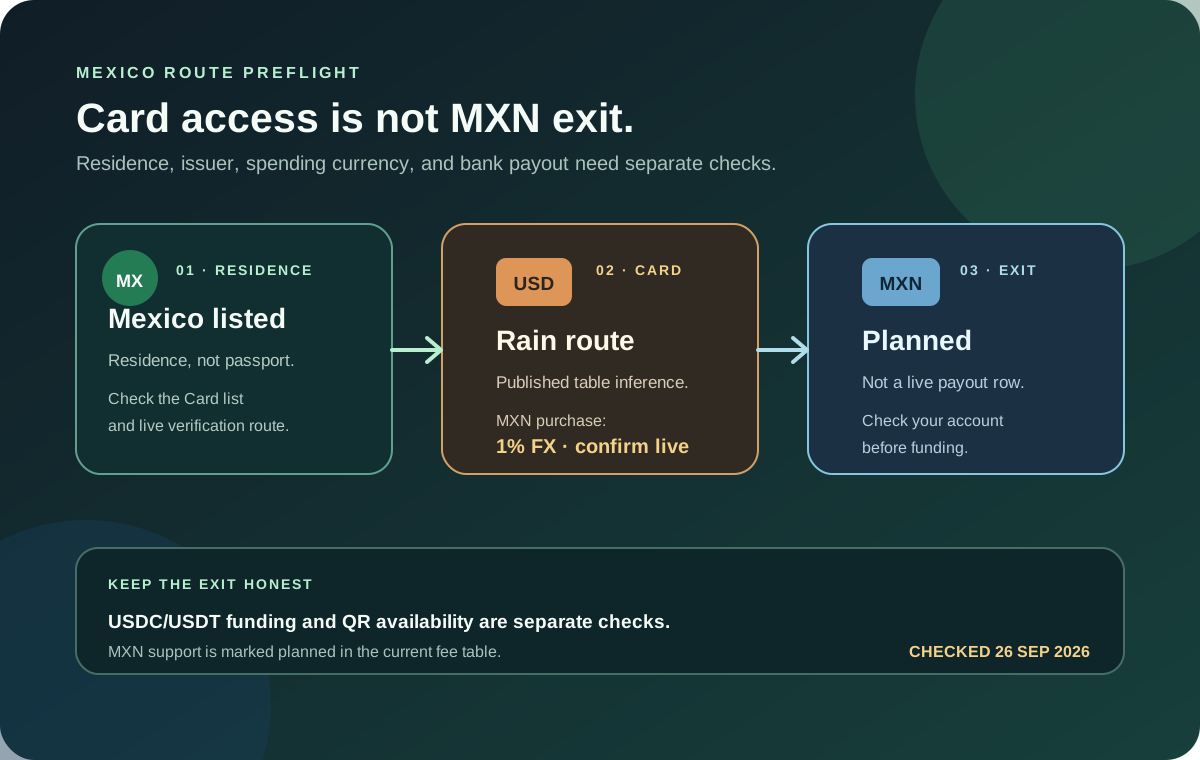
If you live in Mexico and are researching Jupiter Global, separate the card question from the bank-payout question. The current Card documentation lists Mexico as a supported country of residence. The current remittance fee table lists several local payout currencies, but MXN is marked as planned rather than a current payout row. That means a Mexican resident may be able to use a card route while still lacking a documented MXN bank exit in the account.
The short Mexico answer
The current documentation supports this careful summary:
- Residence: Mexico appears in the Card country list; residence matters more than citizenship.
- Issuer: Mexico is not in the documented DCS country group, so the published table points toward Rain. Confirm the actual issuer in the app.
- Card balance: the Spend balance is displayed in USD, even if the interface displays another currency.
- MXN spending: a non-USD card purchase follows the issuer’s current FX rule; the Rain table lists 1%.
- MXN payout: the fee table says support for MXN is planned, so do not treat a future currency row as a live bank route.
- QR Pay: Mexico is outside the current documented merchant QR network list.
- Funding: the Spend deposit address accepts only the documented USDC and USDT network pairs.
These facts narrow the route. They do not approve an account, guarantee an issuer, or prove that a particular Mexican bank or merchant will be available. Jupiter Card country list · Fees and limits
Residence is the first check
Jupiter’s Card page bases eligibility on the country where you reside, not on the passport you hold. Use the current Mexican residence and address information in the official verification flow. Do not borrow an address, choose a nearby country or treat a trip to Mexico as a change of residence. If the provider requests proof of address, use only the documents and formats it currently accepts. Residence rules
The same Card page names Rain and DCS as issuers. DCS is currently listed for Australia, Japan, Malaysia, the Philippines, Singapore, South Korea, Taiwan, Thailand and Vietnam. Residents of other supported countries are described as receiving Rain. Mexico is in the supported country list and outside that DCS group, so the public table points to Rain for a Mexican residence. Treat that as a documentation inference until the live account shows the issuer.
What a Mexican card purchase costs
The app displays the Spend balance in USD; deposited USDC and USDT are not automatically converted to USD on arrival. With Rain, the stablecoins remain on-chain as card collateral. The card then spends from that balance. A Mexican merchant can charge in MXN, which makes the purchase non-USD even when the app shows a USD balance. The current fee table lists no fee for USD payments and a 1% Rain FX conversion fee for non-USD payments. Merchant conversion, tips, temporary holds and restricted categories are separate checks. Card mechanics · Current FX table
Before a first MXN purchase:
1. Read the final merchant currency and amount. 2. Keep enough USD balance for the purchase and current FX cost. 3. Check the merchant category instead of assuming Visa acceptance guarantees approval. 4. Save the merchant receipt and the transaction reference privately. 5. Keep a second payment method for an urgent or travel purchase.
Start with an ordinary, modest purchase. A hotel deposit, rental-car hold or large online order can create a confusing pending state and is a poor first test. If the merchant says a payment failed while the app shows it pending, pause before trying again. The first-payment checklist and merchant-decline guide cover the evidence sequence.
MXN bank payouts need a separate answer
The current Fees & Limits page lists local payout currencies such as BRL, CAD, EUR, GBP, INR, PHP and USD, but it states that MXN support is planned. The Remittance page also says that corridor availability depends on the destination bank and local rules. A planned currency is not a live route, and a USD or EUR virtual account is not the same thing as a Mexican-peso bank payout. Current payout table · Global Fiat Remittance
Before funding with a Mexican bank exit in mind, open the current account flow and look for all of these:
- whether an MXN destination is actually selectable;
- the beneficiary and bank fields required;
- the currency-conversion quote and total fee;
- the delivery estimate and transfer limit; and
- the reference you can use if the recipient is not credited.
Do not send money because a search result, old screenshot or third-party comparison mentions MXN. If the route is absent, use a documented alternative only after checking its complete quote and where the money actually lands. The Quote Compare tool can compare figures you enter, but it cannot create a payout route or confirm bank eligibility.
QR Pay is not a Mexico shortcut
The current QR Pay documentation lists merchant networks in Cambodia, Indonesia, Malaysia, Mongolia, the Philippines, Singapore and Vietnam. Mexico is not in that list, and Spend-balance QR Pay depends on an eligible DCS-issued card. A Mexican residence or a Mexican QR code should therefore not be treated as evidence that Jupiter QR Pay will work. QR Pay availability
A QR code can belong to a bank transfer or another local payment service while looking similar to a supported merchant code. Read the network shown in the official app and confirm the merchant and amount before authorizing. Never scan repeatedly while the first payment is pending.
Fund only after choosing the exit
The documented Spend deposit address accepts USDC on Solana, Ethereum, Sui, Arbitrum or Base, and USDT on Solana. The official FAQ warns that another asset or unsupported network sent to the address may be permanently lost. If funds are already in Jupiter Mobile, Send → Send to Spend is a different conversion route that shows the swap result and fees before confirmation. Funding overview · Deposit FAQ
If your goal is a future MXN bank payout, do not assume that any accepted deposit asset will work for that exit. The current documentation says only USDC deposits can be withdrawn to fiat; USDT deposits cannot. A successful deposit proves only that one funding checkpoint worked. It does not prove that your Mexican bank route exists.
Mexico signup preflight
Use this order:
1. Confirm Mexican residence and current verification requirements. 2. Decide whether you need an MXN card purchase, a USD-priced merchant, or an MXN bank credit. 3. Check the issuer and current FX screen shown for your account. 4. Check whether the bank route is live rather than planned. 5. Match the exact stablecoin and network before sending funds. 6. Make one modest test and preserve its reference privately.
Jupiter Global Mexico FAQ
Is Jupiter Global available to residents of Mexico?
Mexico appears in the current Jupiter Card residence list. Residence is the first gate; the live verification flow, issuer assignment, account state and feature availability still decide what a specific account can use.
Can Jupiter Global send MXN to a Mexican bank?
The current fee documentation marks MXN support as planned rather than a current local-payout route. Do not fund a Mexican bank-exit plan until the live account shows an available MXN destination, beneficiary fields and a complete quote.
What FX fee applies to a Mexican card purchase?
The public issuer table lists Rain at 1% for non-USD card payments. A Mexican merchant charging MXN is therefore a non-USD card event even though the Spend balance is displayed in USD. Check the final billing currency and live issuer before paying.
Is Jupiter Global better than Wise in Mexico?
Jupiter may fit a supported stablecoin-funded card or USD Spend balance. Wise may fit a fiat-first MXN bank transfer. Compare the same source amount, destination, total debit, recipient amount and delivery timing instead of comparing a card purchase with a bank payout.
For the broader country comparison, read the supported-countries guide. If a card route is what you need in Mexico, sign up for Jupiter Global, keeping in mind that MXN bank payouts are still listed as planned. You get 2% cashback on eligible Jupiter Card purchases, capped at $100 a month.
Sources
Checked against these sources on 21 October 2026.