Community concept illustration—not an actual app screen.
Using a card abroad is easiest when you know which part of the trip is predictable and which part depends on the issuer, merchant, network, or region. A working card is not the same thing as a zero-cost foreign exchange route.

The issuer determines the published FX rate
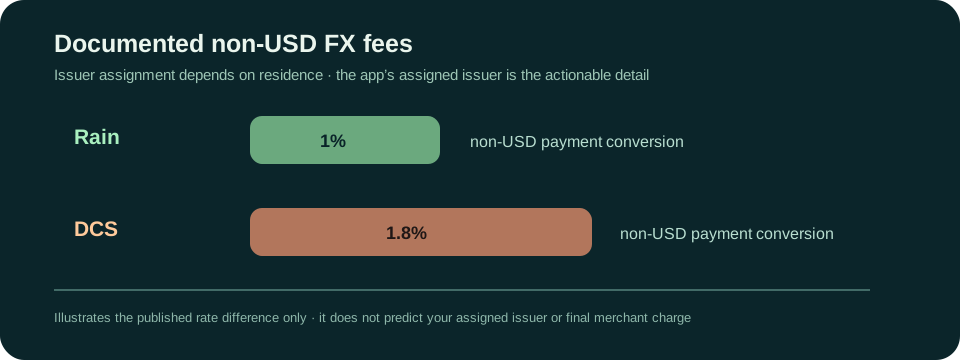
Jupiter’s card documentation describes Rain and DCS as issuing partners assigned according to the user’s country of residence. The current fee table lists a 1% FX conversion fee for Rain and 1.8% for DCS on non-USD payments. USD payments have no fee in that table. Issuer and fee details
The rate is therefore not chosen by the country you visit. Your issuer is assigned during the account process, and the app’s card details and fee information are more relevant than a travel blog’s general statement. Check the assigned issuer before you rely on a cost estimate.
Make the merchant-currency choice deliberately
When a terminal or website offers to convert a purchase into your home currency, compare that offer with paying in the merchant’s local currency. A merchant’s dynamic currency conversion can add its own margin. The Jupiter documentation describes its own non-USD conversion fee, but it cannot tell you what an individual merchant or ATM operator will add.
Read the confirmation screen, the currency, and the final amount. Keep the receipt. A transaction shown in USD may not mean that the merchant gave you a better exchange rate; it may mean the merchant performed the conversion before the card network did.
Card, wallet, and QR are different checks
The card can be added to Apple Pay or Google Pay where the mobile-wallet service and region allow it. Jupiter’s documentation says there is no Jupiter fee for adding or using the card in those wallets, while the issuer’s standard FX fee still applies to non-USD payments. Wallet availability can be restricted by Apple or Google even when the card itself is supported. Mobile-wallet guidance
QR Pay is a separate product route with its own card requirement, markets, limits, and merchant-network rules. Do not assume a successful card purchase proves that a local QR code will work. Check the exact network in the app before leaving a backup card at home.
Prepare for a pending charge or refund
The card FAQ says a refund can take up to seven business days to settle. If a transaction is still pending, the original charge may reverse; if it has already settled, the refund can appear as a separate credit. The FX rate used for a settled refund may be the rate on the refund date, and the original FX fee may not be returned. Refund guidance
That is a reason to keep enough available balance for the rest of the trip. Do not treat a pending refund as spendable cash until the balance has actually updated.
A simple travel preflight
- Confirm the card is active and the assigned issuer is visible.
- Add the card to a supported mobile wallet before departure, if you plan to use one.
- Test an ordinary, low-stakes purchase while you still have another payment method.
- Record the support route and keep a private copy of the transaction details.
- Carry a backup card or payment method and enough local cash for a connectivity problem.
- Check every terminal’s currency choice before confirming.
Jupiter’s card can be used anywhere Visa is accepted according to the FAQ, but merchant category restrictions, issuer controls, connectivity, and local acceptance still matter. A travel plan should assume that one payment method can fail.
What the fee guide cannot predict
The published percentage does not predict a final charge for a particular merchant, country, exchange rate, tip, preauthorisation, or refund. Use it to understand the structure, then check the amount and currency on the transaction screen. The best travel setup is one you can explain before you tap: what balance is used, what currency is charged, which fee may apply, and what backup you have if the payment remains pending.
Sources & what was checked
Public documentation reviewed 23 September 2026. This is a documentation-based guide, not a first-hand account, identity-verification or payment test. Open the current sources before acting.