A recurring card payment can fail for several different reasons. A Jupiter Global subscription decline may be a frozen card, an insufficient USD Spend balance, an issuer limit, a restricted merchant category, a non-USD conversion issue, or a pending authorisation that has not finished. Treating every decline as a balance problem can create repeated attempts and extra holds. For the wider product and route map, keep the Jupiter Global guides directory nearby while you identify the blocked step.
The short answer
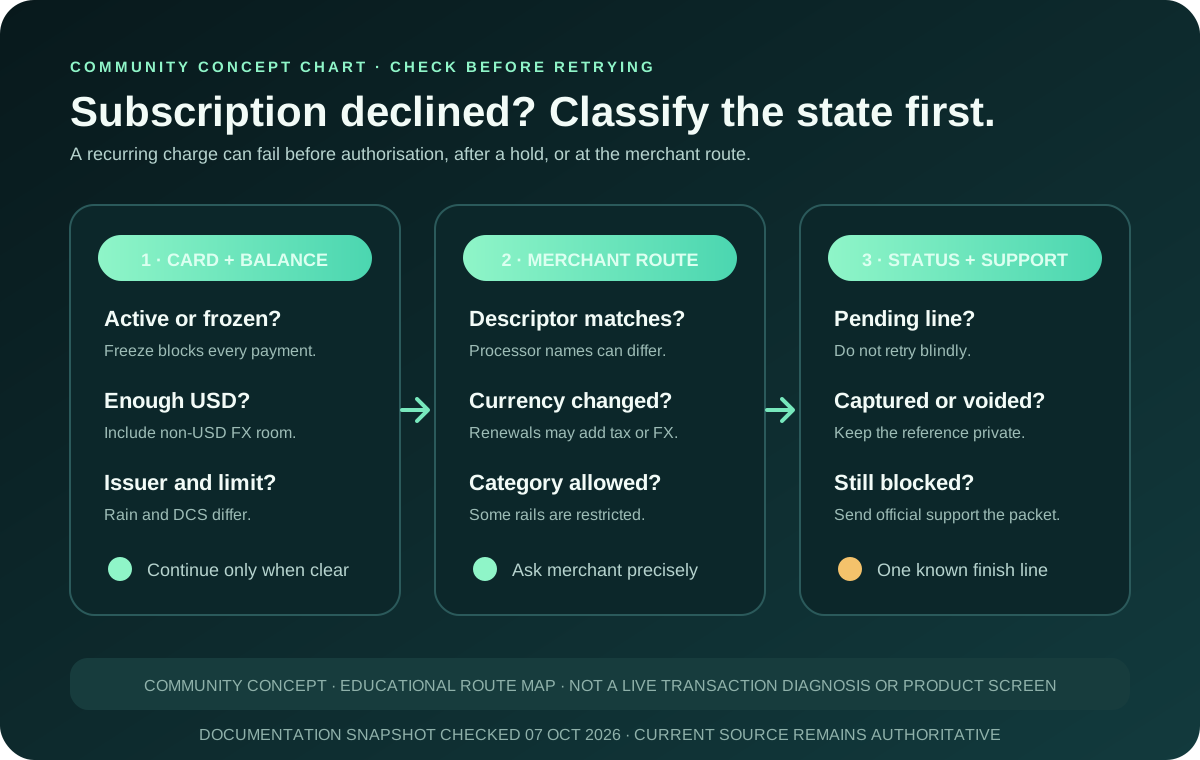
1. Open the official app and confirm that the card is active rather than frozen. 2. Check the available USD Spend balance against the subscription amount and any non-USD conversion fee. 3. Record the merchant descriptor, currency, amount, time, and whether the line is pending or declined. 4. Check whether the subscription merchant, digital service, financial category, or recurring retry is restricted. 5. Do not keep pressing “pay” while a pending authorisation is visible. 6. If the checks pass and the payment still fails, contact official support with the transaction details and ask the merchant whether the recurring charge was blocked or retried.
Jupiter’s current FAQ lists insufficient balance, a frozen card, issuer spending limits, and restricted merchants among the common decline reasons. It also says a non-captured authorisation can remain pending for up to 30 days, depending on the merchant. Read the current card decline and authorisation guidance
Classify the subscription failure first
| What you see | What it may mean | Safe next check |
|---|---|---|
| No transaction line appears | The merchant may have rejected the card before an authorisation was created, or its billing system may not support the card route. | Check the merchant’s payment method and billing currency; do not assume Jupiter received a charge request. |
| A declined line appears immediately | The card, balance, issuer limit, merchant category, or fraud controls may have rejected the attempt. | Save the descriptor, amount and currency, then run the card and merchant checks below. |
| A pending line appears after the failure | The merchant may have created an authorisation even though its page reported an error. | Do not retry until you know whether the hold is captured, voided, or still pending. |
| The subscription later retries automatically | The merchant’s recurring billing system may submit a new attempt with a different amount or descriptor. | Review each attempt separately; compare the invoice, currency, and transaction status. |
| One attempt is settled and another is pending | One billing attempt may have completed while another hold waits for release. | Ask the merchant which reference was captured and which was voided. |
The current app status, merchant record, and assigned issuer have the final word.
Check the card state and balance
A frozen card blocks every transaction until it is unfrozen in the official app. If you froze the card after a suspicious login or a lost-device event, leave it frozen while you verify the merchant. Unfreezing is not the same as approving a subscription; it only removes one possible block. Review the card-security and freeze route
The card draws from a USD Spend balance. A subscription priced in USD must fit the available balance, while a non-USD subscription also needs room for the issuer’s foreign-exchange conversion fee. The current documentation lists a 1% non-USD conversion fee for Rain and 1.8% for DCS. Your assigned issuer depends on country of residence, so confirm the issuer shown in the account before using either figure. Check current card fees and limits · Read how the USD card balance works
Issuer limits are a separate check: Rain-issued cards have no documented spending limit, while DCS-issued cards have a $50,000 daily limit and a $990,000 annual limit. A recurring charge can still fail below those ceilings because balance, merchant category, FX, card state and risk controls remain separate.
Do not top up blindly after a decline. First identify the amount the merchant actually attempted, including tax, a changed renewal price, or a temporary verification charge. A subscription can be billed in a different currency from the price shown on its marketing page.
Check the recurring merchant and category
A Visa acceptance mark does not guarantee that every recurring charge will be approved. Jupiter’s documentation says some merchant categories are restricted automatically for compliance and risk reasons, and some merchants can be restricted dynamically by fraud monitoring. A financial service, money-transfer product, gambling service, government payment, or another restricted category may fail even when an ordinary retail payment works.
Record the exact descriptor from the app rather than the brand name you remember. A streaming service may bill through a payment processor with a different descriptor; a cloud provider may add tax or change the currency; a trial may convert into a larger renewal. Give the merchant the descriptor, amount, date, and currency when asking whether it submitted a recurring authorisation.
If the same merchant worked previously and only the renewal failed, compare the new invoice to the first successful charge. A changed billing entity, a new currency, a higher amount, or a different merchant category can change the outcome. The merchant-decline guide and card-declined-after-working guide cover the broader one-retry diagnostic.
Treat pending authorisations as a separate state
A subscription page can report “payment failed” while a card authorisation remains pending. The pending amount reduces available balance until the merchant captures it or releases it. Jupiter says the hold can take up to 30 days to drop, depending on the merchant; that is an upper documented window, not a promise that every hold will last that long.
Keep the invoice, the failed checkout message, and the transaction reference privately. Ask the merchant a precise question: Was this authorisation captured, voided, or scheduled for another retry? Do not create a second account or keep retrying from different devices to make the first line disappear.
If the merchant confirms that the charge was captured, wait for the settled status before deciding whether the subscription is active. If it confirms that the charge was voided, allow the hold to release. The payment-reversal guide explains how a pending authorisation differs from a settled refund.
What to send to support
If the card is active, the balance is sufficient, the currency and issuer are understood, and the merchant still cannot process the recurring payment, contact official in-app support. Include:
- the merchant descriptor exactly as shown;
- the subscription invoice or renewal amount;
- currency, date, time zone, and attempted amount;
- the transaction reference and current status;
- whether the card is virtual or physical and which issuer the app shows;
- whether the merchant says it captured, voided, or retried the charge.
Do not send a recovery phrase, password, one-time code, full card number, or unredacted identity document to a private “subscription support” account. Jupiter’s security guidance says to use official support and freeze the card when activity is suspicious. Open official support · Read the security guidance
You’re done when the subscription is paid, the authorisation is released, the merchant has changed its billing method, or an official support case contains the original reference. Use the safety practice tool to rehearse the pause-and-verify sequence, then use Quote Compare and the complete fees guide to check the route cost before adding funds. If the card works for your subscriptions, sign up for Jupiter Global and keep a USD buffer for renewals. Eligible Jupiter Card purchases earn 2% cashback, up to $100 a month.
Jupiter Global card subscription declined FAQ
Why was my recurring card payment declined?
Common documented causes include a frozen card, insufficient USD Spend balance, issuer spending limits, a restricted merchant category, or a non-USD conversion issue. Check the exact merchant descriptor, amount, currency and transaction state before retrying.
Should I add more money after a subscription decline?
Not until you know the attempted amount and whether a pending authorisation already reduced the available balance. A renewal can include tax, a changed price, FX conversion or a verification hold. Adding funds blindly can leave the original issue unresolved.
What if the subscription page says failed but the card line is pending?
Treat the pending line as a separate authorisation state. Ask the merchant whether it was captured, voided or scheduled for another retry, and wait for a clear state before submitting the payment again. A pending hold can take up to 30 days to drop, depending on the merchant.
Can a subscription fail even when another card purchase worked?
Yes. Recurring billing can use a different descriptor, currency, amount, payment processor or merchant category. Compare the failed renewal with the earlier successful charge and check whether the merchant or category is restricted.
What should I send official support?
Send the exact descriptor, invoice amount, currency, date, time zone, transaction reference and current status, plus the issuer shown in the app and whether the merchant says it captured, voided or retried the charge. Redact passwords, one-time codes, recovery phrases, full card numbers and unnecessary identity documents.
Sources
Checked against these sources on 7 October 2026.