A frozen Jupiter Card is a deliberate pause. It blocks card transactions until you unfreeze it in the app, but it does not tell you why a payment failed or whether an earlier transaction is safe to repeat. Use the state of the account and the reason for the freeze to choose the next step.
First decide whether the freeze was protective
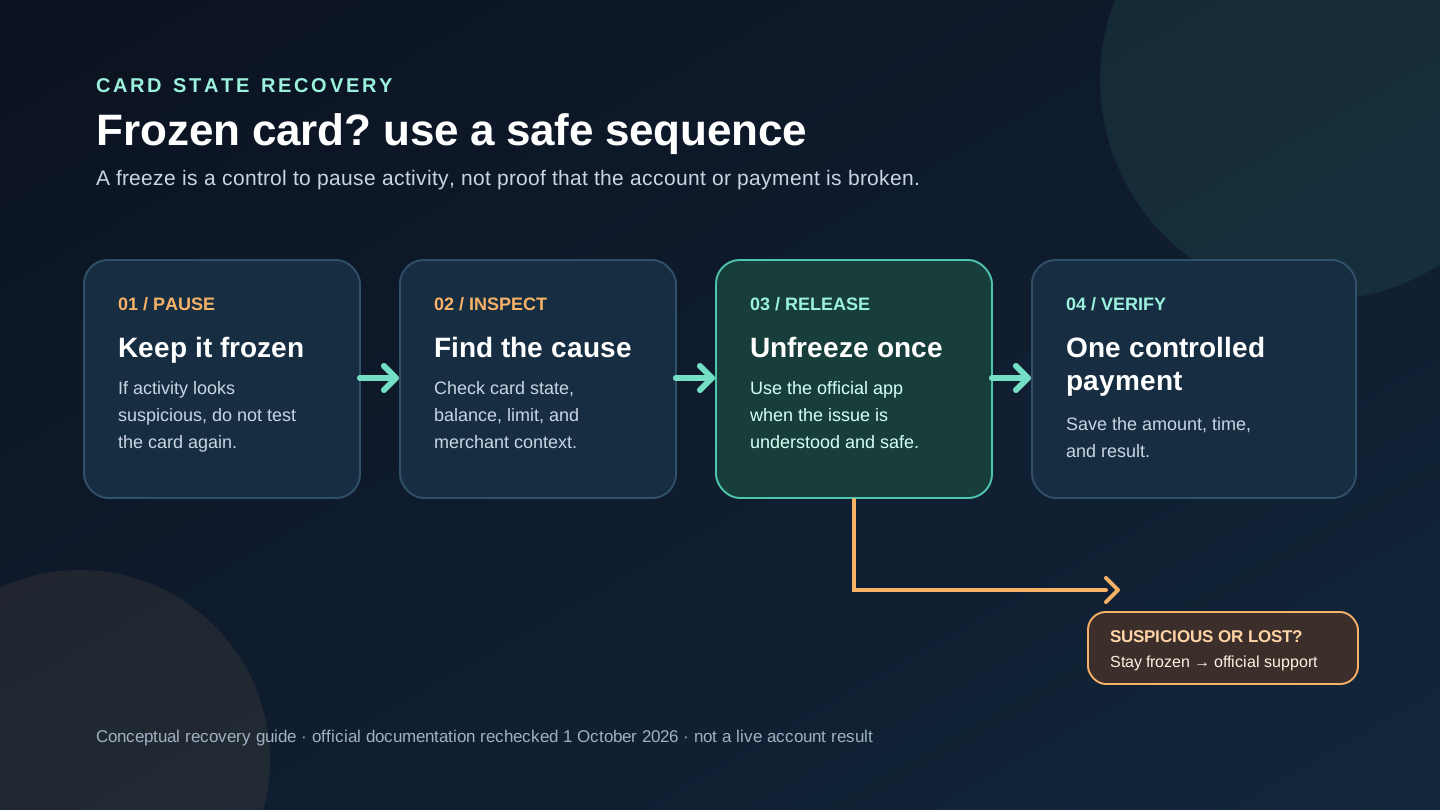
If you froze the card because it was lost, stolen, or showed a transaction you do not recognise, leave it frozen. Jupiter’s card guidance says to freeze immediately to block further transactions, then contact support to deactivate the existing card and request a replacement. Finding the card later is not a reason to unfreeze it before the official process confirms that the original card remains usable. Lost-card and security guidance
If you know you tapped Freeze by mistake and the card is still in your possession, the recovery path is different. You can inspect the state first and then use the app’s card control when you understand what you are releasing.
Use the official Cards screen to unfreeze
Open the legitimate Jupiter app and go to Spend → Card. The current Card documentation lists Freeze, Show Details, and Manage on the card screen. Use the card control there to unfreeze it; do not follow a link from a direct message or ask an online “helper” to change the state for you. Card management
Never send a supposed helper your password, one-time code, full security code, PIN, recovery phrase, private key, or identity document. Jupiter says Spend products are operated through regulated partners, so an account-specific decision belongs in the official app or support channel. Partner and security boundaries
Check the reason before trying a payment again
Jupiter’s FAQ lists a frozen card as one of the common reasons a payment is declined. It also lists insufficient USD balance, a DCS spending limit, restricted merchant categories, and dynamic risk controls. A successful unfreeze only removes one possible blocker; it does not make every merchant or amount acceptable. Card decline reasons
Before a retry, confirm the available Spend balance covers the payment and any relevant transaction conditions. The card draws from the USD balance, even when the app or merchant displays another currency. If the decline was at a particular merchant, record the merchant, amount, currency, time, and exact message before changing anything else. A single controlled retry is easier to reconcile than several identical authorisations.
If the payment is a recurring subscription, use the subscription preflight. If the checkout is online, use the virtual-card decline guide. If the merchant category may be restricted, use the restricted-merchant guide.
Know what a freeze does to refunds and pending holds
Freezing the card does not erase an earlier transaction. Jupiter’s FAQ says incoming refunds still credit a frozen card account. A refund can take up to 7 business days, while an authorised payment that the merchant has not captured can remain a pending hold for up to 30 days. Do not unfreeze or retry solely because a pending line has not disappeared yet, and do not assume a freeze is a dispute or a guarantee of reimbursement. Refund and authorisation timing
If a merchant says the payment failed but the app shows a pending authorisation, save the reference and wait for the transaction state to resolve or contact official support. A second checkout can create another hold. If the transaction is unauthorised, keep the card frozen and follow the issuer or support route instead of negotiating with an unknown account.
When support is the correct next step
Use official support when the card is lost or stolen, suspicious activity continues, the app cannot change the state, or the same decline remains after one careful retry. Include the original transaction details: merchant, amount, currency, timestamp, card state, and exact error. Ask whether the event is pending, declined, reversed, or absent from the card history. Official support hub
Any of these outcomes settles it: the card is safely unfrozen and one normal payment succeeds, the card remains frozen while a replacement is arranged, or an official case is tracing a pending or unauthorised transaction. If you are researching a new Jupiter route rather than recovering this card, use the residence and feature checker and Route Finder first. If the Card, QR Pay or bank route fits what you need, sign up for Jupiter Global and check the official screen before funding. Eligible Jupiter Card purchases earn 2% cashback, up to $100 a month.
If you are researching the product rather than recovering an existing card, use the residence and feature checker and Route Finder to separate Card spending, QR Pay, bank payouts and crypto funding.
Jupiter Global card frozen FAQ
How do I unfreeze my Jupiter Global card?
Open the legitimate Jupiter app, go to Spend → Card and use the card control shown there. Unfreeze only when you still have the card, recognise the activity and understand the payment you are about to release. A private helper cannot safely change the account state for you.
Should I unfreeze a card that was lost or shows an unknown charge?
No. Leave it frozen and use official support to deactivate the card and arrange the correct replacement or investigation path. Do not unfreeze a card merely because it was later found or because someone says they can “verify” it.
Does unfreezing guarantee that the next payment will work?
No. A frozen card is only one possible decline cause. Balance, issuer limits, restricted merchants, currency, account controls and pending authorisations can still affect the next payment.
Does freezing stop a refund or remove a pending hold?
Freezing does not erase earlier transactions. Incoming refunds can still credit the account, while a settled refund can take up to 7 business days and an uncaptured authorisation can remain pending for up to 30 days, depending on the merchant.
What should I send official support if the card will not unfreeze?
Send the card state, exact app error, merchant and transaction details when relevant, timestamp, currency and original reference. Redact passwords, one-time codes, PINs, full card security details, recovery phrases and identity documents.
Sources
Checked against these sources on 1 October 2026.