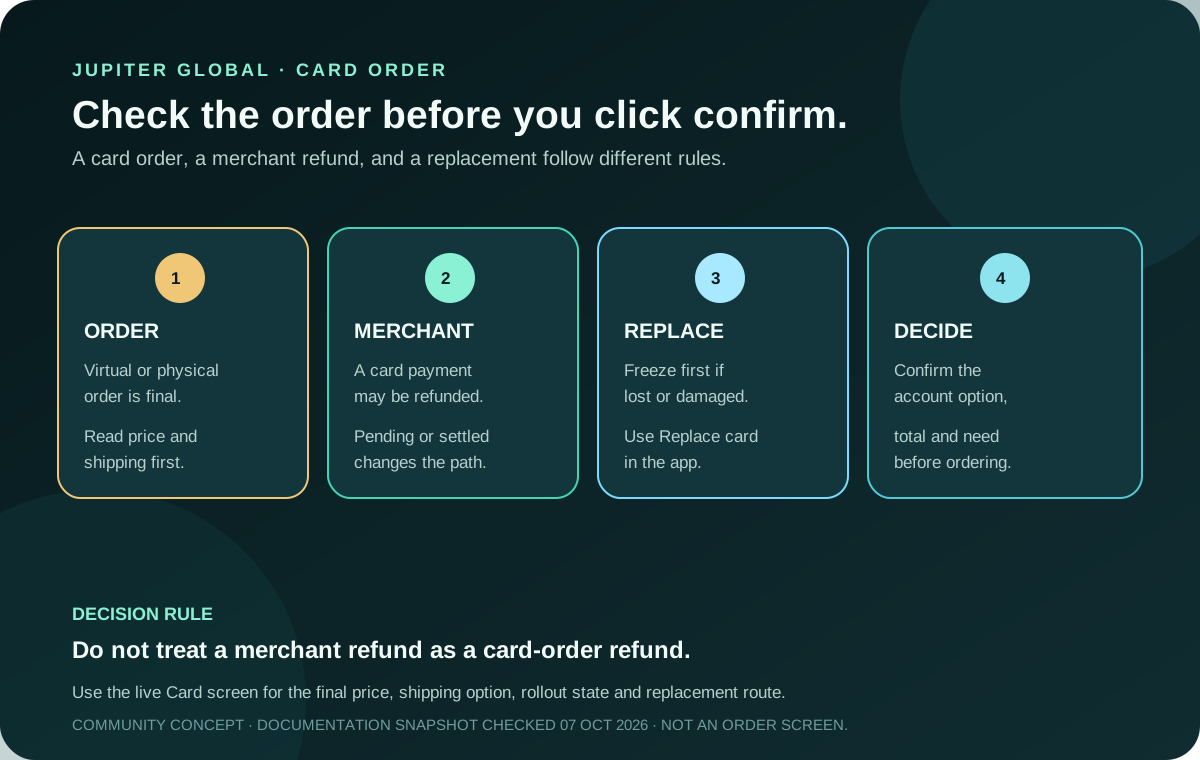
Can you refund a Jupiter Global card order? The current Card documentation says virtual and physical card orders are non-refundable once placed. That is a different rule from a merchant refund after you use the card. Read the form factor, price, shipping choice and account-specific availability before confirming the order. Current Jupiter Card rules
The two refund questions are different
| What happened? | Current boundary | What to do next |
|---|---|---|
| You placed a virtual or physical card order | The order is non-refundable once placed. | Check the selected card, price and shipping before you confirm. |
| A merchant payment needs a refund or was voided | The transaction follows the card issuer’s refund timeline, up to seven business days in the current documentation. | Keep the original transaction details and distinguish a pending reversal from a settled refund. |
The word “refund” does not identify the same event. An order buys the card itself; a merchant refund reverses or credits a payment made with that card. Treat them as separate records when you contact support. Card refunds · Spend FAQ
What to check before ordering
The physical card is rolling out in phases, with the current documentation planning full rollout by the end of 2026. A supported residence or an available virtual card still does not prove that the physical-order option is visible in your account. The live Spend → Card screen is the authority for whether you can order. Physical-card route
Before you confirm, check all of these in the official app:
1. Form factor: virtual or physical, and whether the option is actually enabled for this account. 2. One-time charge: the current Card documentation lists $13.13 plus shipping for the physical card. 3. Shipping method: read the tracked or untracked price shown at checkout; the documented $30 discount applies only to tracked shipping when the available Spend balance is at least $1,500. 4. Residence and issuer: eligibility is based on residence, and the assigned issuer affects card rules and non-USD FX costs. 5. Need: if online payments or a mobile wallet solve the job, compare the virtual route before paying for a physical card.
There is no annual maintenance fee listed in the current fee table, but that does not make an order free. Card price, shipping, non-USD FX, funding and merchant costs are separate decisions. Current fee table
If the merchant payment is the part you want refunded
The current Card documentation gives two useful states:
- If the payment is still pending and the merchant voids or refunds it before settlement, the original transaction is reversed and is not deducted from the balance.
- If the payment has already settled, the refund appears as a separate credit marked “Reversed” under the original transaction. The refund uses the FX rate on the day it is issued, and the original FX fee is not refunded.
The documentation says merchant refunds can take up to seven business days. If that window passes, keep the original transaction, merchant, amount, currency, date and reference, then use official support. A refund timeline does not make a non-refundable card order refundable. Card refund guide · Support evidence guide
For a Rain-issued card, the FAQ says a merchant refund is added to your Spend balance so you can keep using it, but it cannot be withdrawn. Treat that credit as a card-balance outcome, not as proof that a bank payout is available. Spend FAQ
Freezing the card does not block an incoming merchant refund. Keep the card frozen when the issue involves loss, theft or suspicious activity; the refund can still settle to the card account while you use the official replacement or support route.
If the card is lost, damaged or never arrives
Do not place a second order while the first card’s state is unclear. Freeze the card immediately when you suspect loss or unauthorised use. The current Card documentation says to open the card’s settings and choose Replace card for a lost, stolen or undelivered card; a damaged physical card can use the same replacement flow. A replacement virtual card is free, while a replacement physical card costs the same as the original. Lost-card response
Replacement is a separate operational route. It does not undo the original order charge, and a community guide cannot see whether the replacement control is available for your account. If the question is shipping rather than the replacement control, use the physical-card delivery checks before ordering again. Use only the official app and official Jupiter support when the account-specific route is unclear. Never send a password, one-time code, PIN, recovery phrase or private key to someone offering a faster refund or replacement. Spend safety guidance
A safe order decision
Check these before you sign up:
1. The exact card option is visible in your account. 2. The displayed one-time charge and shipping price fit your need. 3. You understand that the order cannot be refunded after placement. 4. You have a backup payment method while a physical delivery or activation is pending. 5. You know whether your question is an order, merchant refund, replacement or dispute.
If residence or card availability is still the open question, run the residence preflight and Route Finder before you sign up.
If those checks fit your use case, sign up for Jupiter Global and read the final order screen yourself. Eligible Jupiter Card purchases earn 2% cashback, up to $100 a month.
Jupiter Global card order refund FAQ
Can I refund a Jupiter Global virtual card order?
No. The current Card documentation says virtual and physical card orders are non-refundable once placed. Check the form factor and displayed charge before confirming.
Can a physical card order be refunded after shipping?
The documented rule is still that the card order is non-refundable once placed. Delivery status does not turn the order into a merchant transaction refund; use the replacement or official support route when the card is lost, damaged or undelivered.
Can I cancel a Jupiter Global card order after placing it?
The current Card documentation states that virtual and physical card orders cannot be refunded once placed; it does not promise a cancellation window. Treat the displayed order choice and total as final before confirming, and use official support if the app shows an unclear order state.
How long can a Jupiter Card merchant refund take?
The current Card documentation says a merchant refund or void can take up to seven business days, depending on the merchant and issuer. Pending and settled transactions appear differently in the history.
Can I withdraw a Jupiter Card merchant refund?
For a Rain-issued card, the FAQ says the refund is added to the Spend balance for continued card use but cannot be withdrawn. Confirm the issuer and the balance route shown in your account before treating the credit as available cash.
Is a card order refund the same as a chargeback?
No. A card-order charge is governed by the card-order rule. A merchant dispute or chargeback concerns a transaction made with the card and must follow the issuer’s official process.
Does a replacement card cancel the original order?
No. Replacement is a separate card-management flow. Freeze first, use the Replace card control shown in the official app, and keep the original order and delivery evidence for support.
Sources
Checked against these sources on 7 October 2026.