If your Jupiter Card is missing or you see a transaction you do not recognize, use the in-app card controls first. Jupiter’s current documentation says to freeze the card immediately to block further transactions. If it is lost or stolen, contact support to cancel it and request a replacement. Jupiter Card security steps
Jup Global Community is an independent learning site published by StonkBuilder.
Freeze the card, then check the account
Open the Jupiter app and freeze the card from the Cards screen. The official card guide lists Freeze among the card-management actions. If the app is unavailable or you cannot sign in, use the official support route rather than a phone number or direct message supplied by a stranger. Jupiter says card-related support requests should include the original transaction details. Official support hub
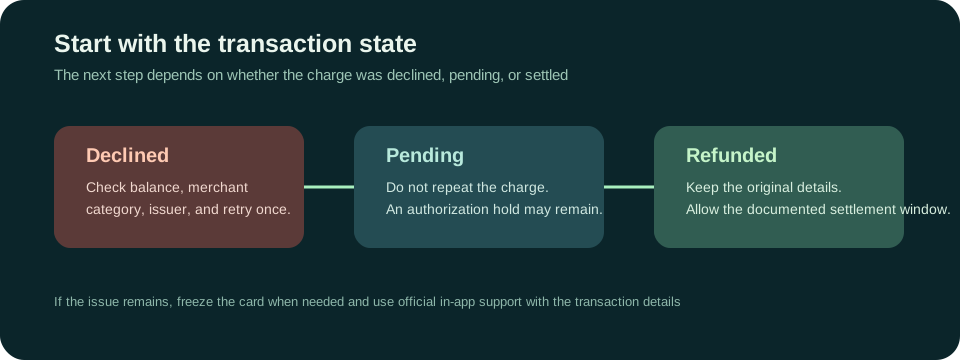
Once the card is frozen, review the transaction history and write down the merchant name, amount, currency, date, and reference shown. A payment can be pending or settled, and those states matter when you contact the issuer. Do not assume that an unfamiliar merchant descriptor proves fraud; first compare it with receipts and purchases made by anyone authorized to use the card.
Report a transaction you still do not recognize
The Jupiter Spend FAQ says cardholders can dispute a fraudulent transaction through the card issuer, Rain or DCS. The issuer is assigned based on residence. Use the route shown in the app or the official support hub and follow the issuer’s instructions. A dispute is a review process; this guide cannot promise that a charge will be reversed or estimate an outcome. Card dispute and security information
Keep relevant receipts, order confirmations, cancellation messages, and the transaction reference together. Share only the information requested through the verified support channel. Never provide a password, one-time sign-in code, recovery phrase, or private key to someone claiming they can recover funds or speed up a dispute. Jupiter’s risk guidance explains that card services are operated through regulated partners and that partner terms and processes apply. Partner and security risks
If the card was physically lost or stolen
Leave it frozen. Contact support and ask about cancellation and replacement through the official process. If you later find the card, do not unfreeze it until you have checked with support whether the existing card remains active or has been cancelled. Use the in-app status and instructions for your account.
Freezing a card and disputing a transaction are separate steps: freezing blocks further card transactions, while the issuer reviews a charge already made. Preserve the evidence for both. If you see a pending or refunded transaction rather than a completed unauthorized charge, the card refund guide explains those transaction states. For other decline messages, see common Jupiter Card decline checks. If a completed card charge needs a dispute record, use the card chargeback evidence guide for the evidence boundary.
A safe next step
Use only the Jupiter app or the official support hub, keep the original transaction reference, and follow the response channel for the issuer assigned to your account. Only the app, Jupiter support and the issuer can cancel the card, handle a dispute or decide on reimbursement.
Use Safety Practice to rehearse the freeze, evidence and support boundaries without entering card or identity details.
Don’t have the Card yet? Check your residence and assigned issuer first, then sign up for Jupiter Global and find the Freeze control before your first purchase. Eligible Jupiter Card purchases earn 2% cashback, up to $100 a month.
Lost or stolen Jupiter Card FAQ
What should I do first if my Jupiter Card is missing?
Open the official Jupiter app and freeze the card from the Cards screen immediately. Then preserve the transaction details and contact official support about cancellation and replacement.
Should I unfreeze a card that I found after reporting it lost?
No. Keep it frozen until official support confirms whether the existing card is still active or has been cancelled. A found card may already need replacement.
How do I report a transaction I do not recognize?
Freeze the card, check the merchant descriptor against receipts and authorized users, then use the in-app or official support route for the issuer assigned to the account. Keep the merchant, amount, currency, date and reference available.
Does freezing reverse an unauthorized transaction?
No. Freezing blocks further card transactions; the issuer separately reviews a transaction dispute. Preserve receipts, order records, cancellation messages and the original transaction reference.
What should I never send to someone offering card recovery?
Never share a password, one-time sign-in code, recovery phrase, private key or full card security details. Use only the official app, verified support hub and the issuer route shown for the account.
Sources
Checked against these sources on 1 October 2026.