
Community concept illustration—not an actual app screen.
Searching for “Jupiter Global supported countries” sounds like it should produce one list. In practice, the useful answer depends on the feature you need, your country of residence, the issuer assigned during verification, and the payment rail you want to use.

Start with residence, not citizenship
Jupiter’s card documentation says eligibility is based on where you reside rather than the passport you hold. A citizen of an unsupported country may be able to apply while living in a supported country, subject to identity verification and any proof-of-address request. The opposite is also possible: having a supported passport does not automatically make an account eligible where you live. Card country documentation
That distinction matters for travelers, expats, students, and anyone who has recently moved. Keep the address and residence information you provide consistent with the provider’s current verification requirements. Do not use a relative’s address or a temporary hotel stay to try to force a country selection.
Card availability is its own check
The documented card list includes countries across Latin America, Africa, Asia-Pacific, and other regions, with separate entries for some US states. The same page marks some countries or states as paused and says physical cards are rolling out in phases. Treat the published list as a dated starting point, not an approval decision. The app may ask for additional evidence or show a different issuer for your residence. Current card list
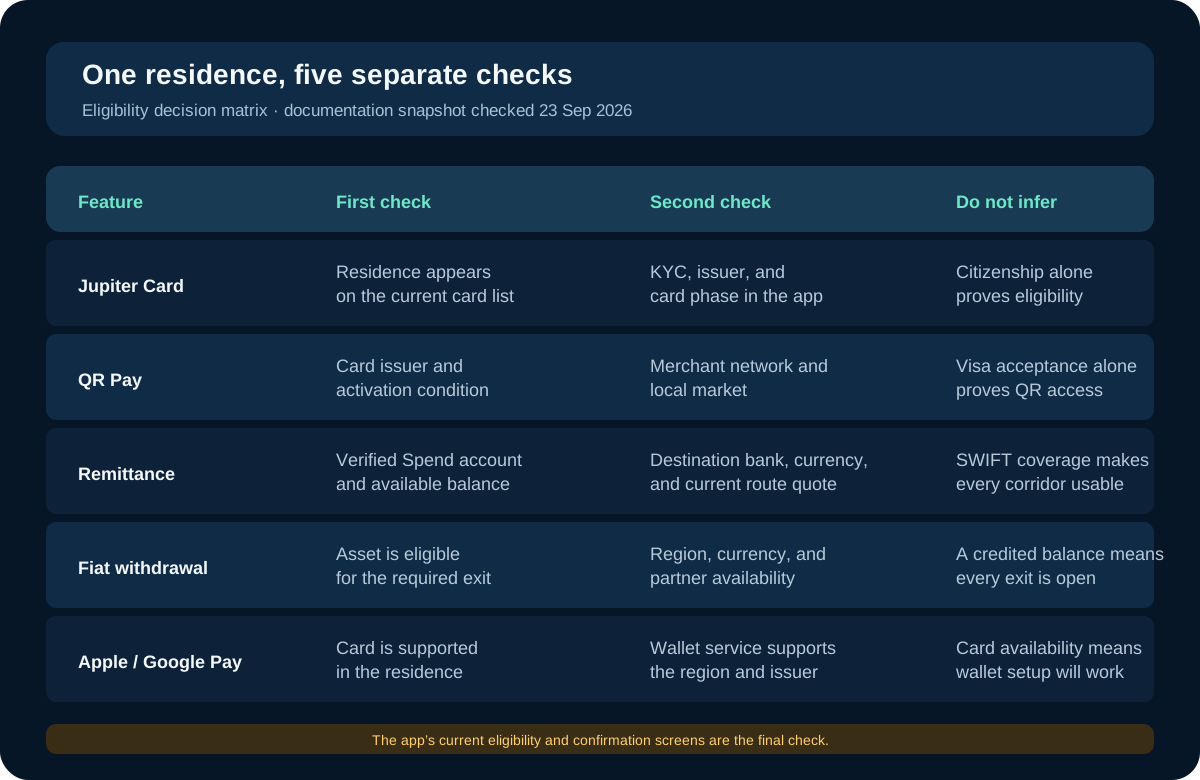
The fastest way to avoid a wrong conclusion is to name the feature before you search. A residence can be listed for the card while QR Pay, a bank payout, a fiat withdrawal, or a mobile wallet remains unavailable. The matrix above is a checklist of questions, not a promise of access.
The card issuer affects more than the name on a disclosure. The current documentation describes Rain and DCS as the two issuing partners, with issuer assignment based on residence. Their foreign-exchange fees and spending limits differ, so a country check should continue through to the issuer and fee screen before you decide whether the product fits.
QR Pay is narrower than card acceptance
A card that works on the Visa network does not automatically mean every QR network will work. Jupiter’s documentation describes QR Pay as a separate Asia-Pacific payment route, currently dependent on the card and available on DCS-issued cards. The listed merchant networks include KHQR in Cambodia, QRIS in Indonesia, LAO QR, DuitNow in Malaysia, QPay in Mongolia, QR Ph in the Philippines, and VietQR in Vietnam. Singapore’s SG QR and Thailand’s PromptPay are marked temporarily unavailable in the checked documentation. QR Pay availability
Use the merchant’s actual QR standard and the in-app scanner as the final check. A personal QR code, a bank transfer QR, and a merchant QR can look similar while belonging to different payment flows. QR Pay also has its own transaction and daily limits, and the documentation says QR transactions do not earn card cashback.
Bank transfers have a different geography
Global Fiat Remittance supports virtual accounts, SWIFT transfers, and local payouts. The documentation lists local payout currencies including PHP, VND, MYR, SGD, THB, IDR, INR, and others, while SWIFT coverage is described as more than 200 countries. That broad coverage still depends on the recipient bank, corridor restrictions, local regulation, and the route shown in your account. Remittance overview
The bank-transfer question is therefore not simply “Is my country supported?” Ask four narrower questions: can I complete Jupiter ID verification, can I fund the account using the method I have, can the destination currency and receiving bank be selected, and what total fee and delivery estimate does the current quote show?
Use this five-minute eligibility order
- Confirm the country of residence you will use for verification.
- Open the official card page and check whether that residence is listed or paused.
- Check which issuer, card type, and foreign-exchange fee the app assigns.
- For QR payments, check the exact merchant network and card requirement.
- For a bank payout, select the destination and read the current route, fee, and receiving fields before funding.
Do not treat a successful signup as proof that every feature is enabled. Identity verification can unlock the Spend account while a physical card, QR market, withdrawal route, or EUR virtual account remains unavailable.
What this guide cannot certify
The site cannot query your Jupiter account, see your residence, or approve a feature. Product documentation can change and provider partners can apply additional checks. A supported country list is useful for narrowing the question; the current app and its confirmation screens are the evidence you should act on.
If the route you need is not shown, do not substitute a similar country, token network, or payment method. Save the exact error or restriction and contact official support through the app. Keeping a backup payment method is sensible when the transaction is time-sensitive.
The best use of a country guide is to prevent a wasted deposit or an unnecessary verification attempt. It should help you ask a more precise question before you move money.
Sources & what was checked
Public documentation reviewed 23 September 2026. This is a documentation-based guide, not a first-hand account, identity-verification or payment test. Open the current sources before acting.