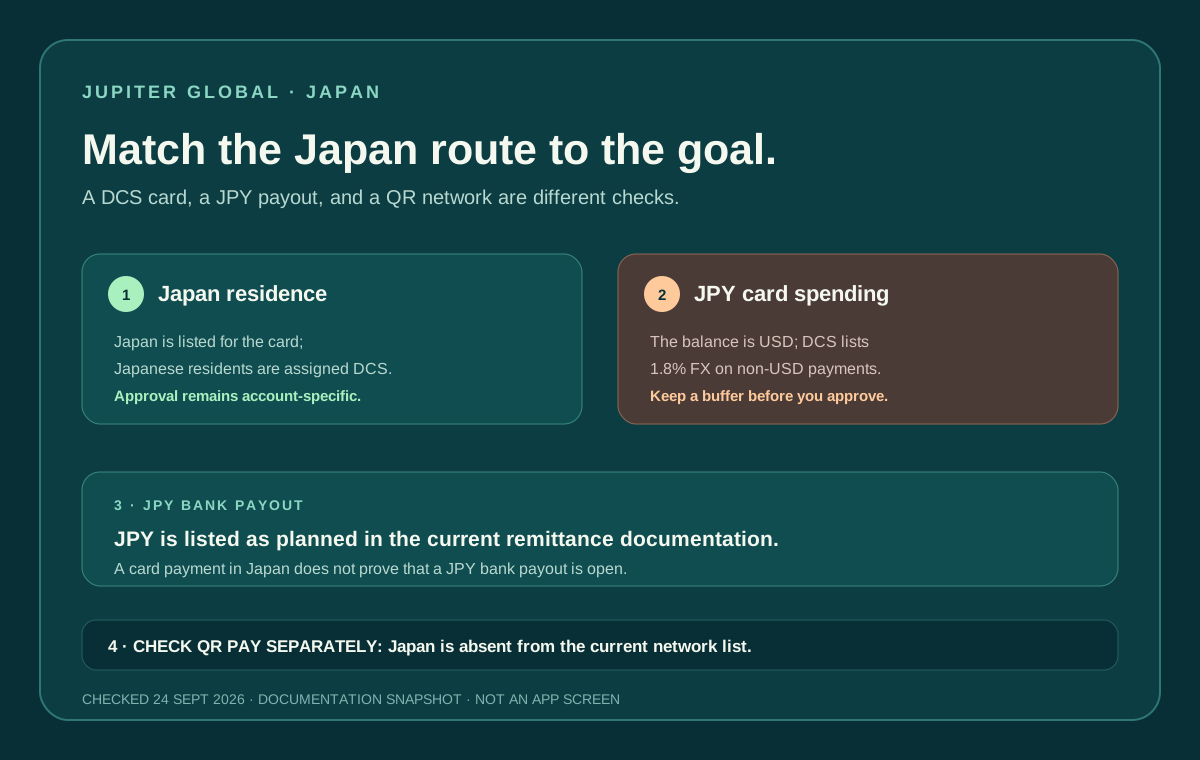
Japan is listed in Jupiter’s current Card documentation as a supported country of residence, and Japanese residents are assigned the DCS issuer. That makes Japan a real card-eligibility route, but it does not mean every Japan payment rail is available. The card spends from a USD balance, the current DCS table charges 1.8% on non-USD payments, JPY local payouts are listed as planned, and Japan is absent from the current QR Pay network table. Japan card residence and issuer · Current payment rails
Jup Global Community is an independent learning site published by StonkBuilder.
The short answer for Japan
If your residence is Japan, the published Card page gives you a route to an account-specific eligibility check. Japan appears in the supported-country list, and DCS is the assigned issuer for Japanese residents. You cannot choose Rain instead, and the live verification flow still decides whether your account is approved. Current Card documentation
For ordinary Visa spending, budget from a USD Spend balance. The app displays the Spend balance in USD; deposited USDC and USDT are not automatically converted to USD on arrival. With Rain, the stablecoins remain on-chain as card collateral. A Japanese-yen purchase is therefore a non-USD card payment; the current DCS fee table lists a 1.8% FX fee for that conversion. Balance mechanics · DCS fee table
If your goal is to receive JPY into a Japanese bank account, do not treat the card as a payout product. The current remittance page lists JPY among currencies whose support is planned, not among the current local-payout currencies. Local payout status
Japan also does not appear in the current QR Pay network list. A DCS card is a requirement for QR Pay today, but DCS issuance by itself does not create a Japanese QR network. QR Pay markets
Four checks before you fund
1. Residence and issuer
Eligibility follows the country of residence recorded during KYC. The current Card page lists Japan and assigns Japanese residents to DCS. Citizenship, a temporary visit, a Japanese phone number or a shipping address alone does not establish the residence recorded by the verification process.
If you live in Japan but hold another passport, prepare the residence evidence requested by the official flow. If you are travelling in Japan with an account opened elsewhere, your original residence and issuer remain the relevant context. The supported-countries guide explains why a destination country and an account residence are different checks.
2. USD balance and JPY spending
The card does not hold a Japanese-yen balance. It draws from the USD Spend balance created when the supported deposit arrives. Before a JPY purchase:
- write down the merchant’s final amount in yen;
- keep enough USD for the purchase and the current DCS FX fee;
- confirm the card is active and not frozen; and
- keep a backup payment method for transport, lodging or another deadline-sensitive purchase.
The current DCS spending table shows a $50,000 daily limit and $990,000 annual limit. Those are issuer-level documentation limits, not an approval, balance guarantee or promise that a particular merchant will accept the card. Spending limits
When a terminal offers to convert a JPY amount into USD, read the final confirmation carefully. A merchant’s own dynamic-currency conversion can be separate from the issuer’s published fee. Preserve the receipt and the app reference until the transaction settles.
3. JPY bank payout status
The current Global Fiat Remittance page lists local payouts in AED, BRL, CAD, EUR, GBP, IDR, INR, MYR, NGN, PHP, SGD, THB, TRY, USD and VND. JPY is in the planned list. That means a guide should not promise a Japanese-yen bank payout, even if an account can spend in Japan or display another currency.
If you actually need money credited to a Japanese bank account, check the live remittance flow for the exact account, destination, currency, beneficiary fields and quote. A successful JPY card payment is evidence about a merchant transaction only; it is not evidence that JPY remittance is open. Remittance documentation
The same separation applies to virtual accounts. The documentation describes USD and EUR virtual accounts funded by incoming fiat transfers. It does not turn a USD or EUR account into a JPY local account. Virtual-account route
4. QR Pay and Japanese merchants
The current QR Pay page lists Cambodia, Indonesia, Malaysia, Mongolia, the Philippines, Singapore, Thailand and Vietnam. Japan is not listed. The safest answer to “Can I scan a Japanese QR code with Jupiter?” is therefore not documented as an available Japan route.
A QR image from a Japanese bank, wallet or merchant processor can still be valid for that service while being outside Jupiter’s current QR route. Do not repeatedly scan a code after the app reports that the feature is unavailable, and do not hand card details to someone offering an unofficial workaround. QR limitations · Security guidance
For an ordinary merchant purchase, ask which route is being used: Visa card, a local wallet, or a QR network. These are different rails with different eligibility, fees and settlement states.
Virtual card, physical card and mobile wallet
The virtual Card is available through the app, while physical cards are rolling out in phases. If the order option appears, the current documentation lists a $13.13 card price plus shipping, charged to the Spend balance. A $30 tracked-shipping discount is described for an available balance of at least $1,500; untracked shipping is not discounted. Physical-card details
Apple Pay and Google Pay are separate regional checks. The Card page provides setup steps but also warns that a supported country does not guarantee wallet availability where Apple or Google do not support the service. Use the mobile-wallet guide after the card actually appears in your account.
For a first Japanese purchase, use the first-payment checklist. For hotel deposits or rental-car holds, use the travel hold preflight and leave room for an authorization that may remain pending while the merchant completes its release.
If the Japan route is missing
- No card option: recheck residence, verification status and the current country list; do not change location data to force eligibility.
- JPY payment declined: check the USD balance, DCS FX buffer, card state and merchant category before retrying once.
- JPY payout absent: treat JPY as planned in the current remittance documentation and ask official support about the exact account instead of funding a guessed route.
- QR option missing: Japan is absent from the current QR network list; use an ordinary Visa route or another payment method until the official documentation changes.
- A supposed helper asks for secrets: stop. Never share a recovery phrase, private key, password, one-time code or full card security data.
Use the site’s Route Finder to keep residence, funding asset and goal lined up. If the DCS card fits how you spend in Japan, create your Jupiter Global account and budget for the 1.8% fee on yen payments. Eligible Jupiter Card purchases earn 2% cashback, up to $100 a month.
Seeing Japan on the list is a starting point. You still need a confirmed residence, a DCS card, a known currency cost, the right payment rail and a completed result for the exact thing you want to do.
Jupiter Global Japan FAQ
Can residents of Japan get the Jupiter Global Card?
Japan is listed as a supported Card-residence country in the checked documentation, and Japanese residents are assigned DCS. Approval still depends on the live verification flow, genuine residence evidence and current account status.
Can the Jupiter Card be used for JPY purchases?
The Card spends from a USD Spend balance, so a JPY purchase is a non-USD payment. The checked DCS table lists a 1.8% FX fee, subject to the live issuer and confirmation screen.
Can Jupiter Global send JPY to a Japanese bank account?
The checked remittance documentation lists JPY as planned rather than a current local-payout currency. Do not treat a JPY card purchase or display option as proof that a bank payout is open.
Can I use Jupiter QR Pay in Japan?
Japan is absent from the checked QR network list. A Japanese bank or wallet QR code may work in its own service, but it is not documented as a Jupiter QR route; use an ordinary Visa route or another payment method until the official status changes.
What should I check before a large Japanese purchase?
Confirm the active DCS card, USD balance buffer, 1.8% non-USD fee, merchant currency, category and pending-hold risk. Keep a backup payment method and preserve the receipt and transaction reference until settlement.
Sources
Checked against these sources on 21 October 2026.