If you live in Colombia and are researching Jupiter Global, keep the card question separate from the Colombian-peso exit question. Jupiter’s current Card documentation lists Colombia among the countries where the Card is actively offered. The same table assigns Rain to supported countries outside the named DCS markets, so the published mapping points to Rain for a Colombian residence. That is a reading of the documentation, not an account approval. Card country and issuer table
The short Colombia answer
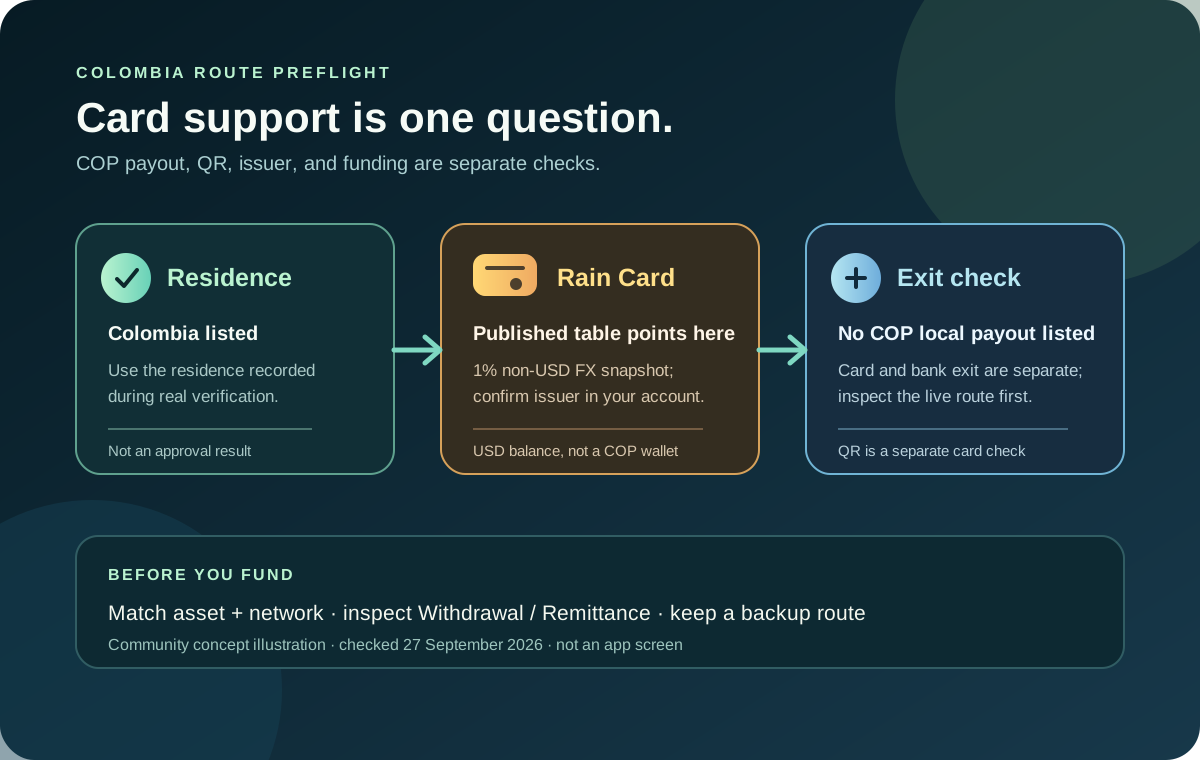
Colombia can be a plausible card-spending route, but the current documentation does not list a COP local-payout route. The practical checks are:
- Colombia appears on the active Card country list.
- The published issuer table points to Rain for Colombian residents because Colombia is outside the named DCS group.
- Rain’s current non-USD card-payment fee is listed as 1%; USD payments have no published FX conversion fee.
- The local-payout currency list does not include COP. A bank route may instead depend on USD or EUR virtual-account access, SWIFT, and the receiving bank.
- Colombia is not one of the restricted countries in the checked EUR/USD off-ramp table, but that does not create a COP payout or guarantee that a specific account has a withdrawal route.
- Colombia’s Bre-B network is documented for QR Pay. Wallet-funded QR uses USDC on Solana after Global ID verification; Spend-balance QR requires an eligible DCS card.
These points come from Jupiter’s documentation. They don’t promise approval, a bank payout, a withdrawal route, or access to every Spend feature. Fees and limits · Remittance limitations
Residence is the first eligibility check
Jupiter says Card eligibility uses your country of residence, not your citizenship. Use Colombia only when it is the place where you genuinely live and can support the information requested during verification. A Colombian passport held by someone living elsewhere does not automatically establish Colombian residence, and a temporary visit to Colombia does not change the residence recorded for the account. Residence rules
The official flow can ask for identity and address evidence. Keep the name, address, phone number and identity details consistent. Do not choose a different country to seek a preferred issuer or payout currency. A country appearing on a public list still does not guarantee that a particular account receives a Card, virtual account, QR feature, or withdrawal option.
What the published issuer table implies
The Card page names Rain and DCS as the two issuing partners. It lists DCS for Australia, Japan, Malaysia, the Philippines, Singapore, South Korea, Taiwan, Thailand and Vietnam. It then says residents of the other supported countries receive Rain. Colombia is on the supported-country list and outside that named DCS group, so the published table points to Rain for a Colombian residence. Confirm the issuer shown in the live account before using a fee or limit estimate. Issuer table
For a Rain-issued card, the current fee table lists a 1% FX conversion fee on non-USD payments and no published daily or annual spending limit. A merchant can still apply its own currency conversion, preauthorisation, tip, or acceptance rule. Before a large purchase, read the final amount in the app and keep a backup method. Current card fees
Card spending is different from a COP bank payout
The Card draws from a USD Spend balance. The app displays the Spend balance in USD; deposited USDC and USDT are not automatically converted to USD on arrival. With Rain, the stablecoins remain on-chain as card collateral. If a merchant charges in COP, treat the transaction as a non-USD card payment and check the issuer’s current FX terms before authorizing. Spend balance and card mechanics
The remittance documentation lists local payouts in AED, BRL, CAD, EUR, GBP, IDR, INR, MYR, NGN, PHP, SGD, THB, TRY, USD and VND. COP is not in that list. Support for several other currencies is described as planned, but that does not create a current Colombian-peso route. Current payout currencies
Colombia is not shown in the checked restricted EUR/USD off-ramp table. That is narrower evidence than a positive COP payout listing: the app may still require a supported USD or EUR route, a named beneficiary, completed verification, and an available corridor. Check the actual Withdrawal or Remittance screen before funding. Current withdrawal limits
SWIFT coverage is broad, but it is not the same as a guaranteed Colombian bank payout. The remittance documentation says SWIFT reaches over 200 countries while specific corridors can be restricted by the receiving bank and local rules. If the goal is a Colombian bank account, confirm the exact corridor, beneficiary fields, currency, fee, and final credited amount before funding. SWIFT and corridor limits
Do not treat QR Pay as a Colombia shortcut
The current QR Pay documentation includes Colombia’s Bre-B merchant network. Wallet-funded QR uses USDC on Solana after Global ID verification and does not require a Card. Spend-balance QR is a separate route requiring an eligible DCS card. A Colombian QR code must still be recognized by Jupiter’s scanner; check the amount, exchange rate and limit before authorizing. QR Pay availability
Use the ordinary Card route only when the merchant and the account support it. Do not scan repeatedly when the first payment is pending, and do not send money to a QR destination because a third party says it is “the same as” a bank transfer.
Fund the account with the exit in mind
The direct Spend deposit address currently accepts USDC on Solana, Ethereum, Sui, Arbitrum and Base, plus USDT on Solana. Sending a different token or an unsupported network can result in permanent loss. If the funds already sit in a Jupiter Mobile wallet, the documented Send → Send to Spend path can convert the token into USDC while showing the estimated amount and fees before confirmation. Funding rules · Security guidance
The asset choice still matters for an intended bank exit. Jupiter’s current documentation says only USDC deposits can be withdrawn to fiat; USDT deposits cannot. For Colombia, where COP is not in the published local-payout list, treat a deposit as spending liquidity only after the live app shows the route you actually need. Do not deposit money you cannot afford to leave inside the product while a corridor is unavailable.
A Colombia preflight before opening the app
1. Confirm that Colombia is your real country of residence and that you can complete the requested verification. 2. Decide whether you need card spending, a bank payout, or both. Do not use “the card is supported” as proof of a COP withdrawal. 3. Check the issuer shown after approval and apply the current Rain FX rule to non-USD purchases. 4. Inspect the live Remittance and Withdrawal screens before funding; look for the exact currency, beneficiary fields, corridor, and fee. 5. Match USDC or USDT with the exact network shown by Spend, or use Send to Spend from Jupiter Mobile. 6. Make a small ordinary test only after the route and balance are clear, and keep the transaction reference until it settles.
The supported-countries guide explains why a listed country is not an approval result. The card-fee guide covers non-USD spending, while the withdrawal guide explains the asset and region boundary. Use the Network Check tool to confirm the deposit asset and network before funding.
If card spending in Colombia is what you need, open an account with Jupiter Global and confirm your eligibility and issuer in the app. Eligible card spending earns 2% cashback (up to $100 a month). Contact official support with the transaction or transfer reference when the live route differs from the documentation.
Jupiter Global Colombia FAQ
Can residents of Colombia get the Jupiter Global Card?
Colombia appears in the current Card country-of-residence table. Approval still depends on genuine residence evidence, identity verification and the live account decision; a passport or short visit is not a substitute for documented residence.
Which issuer is mapped to a Colombian residence?
Colombia is outside the named DCS country group, so the public issuer table points toward Rain. Treat that as a documentation inference and confirm the issuer shown in the live Card screen before using the 1% non-USD fee assumption.
Can Jupiter Global send COP to a Colombian bank account?
COP does not appear in the current local-payout currency list. A broad SWIFT reach or a card that works in Colombia does not create a COP payout; confirm the exact destination, currency, beneficiary and quote in the live remittance flow.
Can a Colombian resident withdraw Spend funds in USD or EUR?
Colombia is not shown as restricted in the checked EUR/USD off-ramp table, but that is not a positive approval. The live Withdrawal screen, account verification and available corridor determine whether a particular route can complete.
Does Jupiter QR Pay support a Colombian merchant QR code?
Colombia’s Bre-B is listed for QR Pay. Wallet-funded QR uses USDC on Solana after Global ID verification without requiring a Card. Spend-balance QR requires an eligible DCS card. The merchant code must still be recognized by Jupiter’s scanner.
Sources
Checked against these sources on 21 October 2026.