When Jupiter Global cashback looks missing, start with the original transaction rather than the percentage. Cashback is attached to an eligible Jupiter Card purchase after that payment fully settles. A pending card line, QR payment, ATM withdrawal, transfer, refund, or monthly cap can each produce a different result.
The short answer
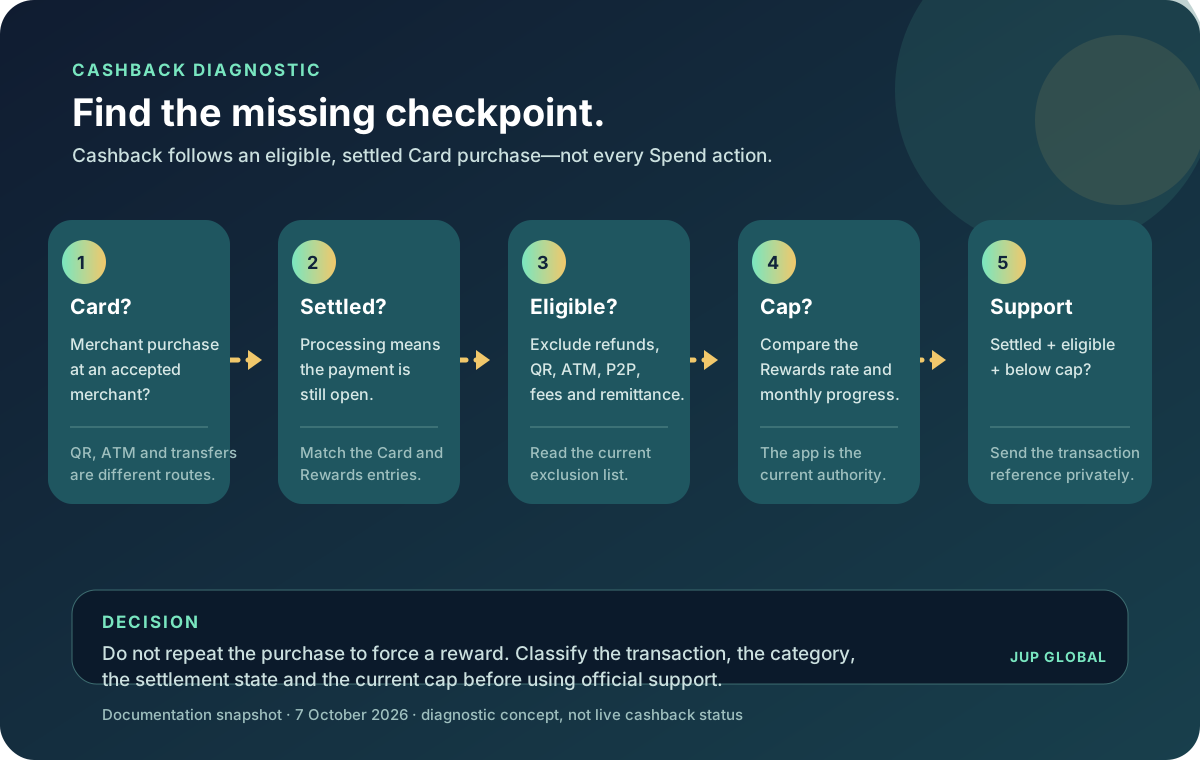
Check these five facts in order:
1. Was this an ordinary Jupiter Card purchase at an accepted merchant? 2. Is the Card transaction fully settled, or does Rewards still say Processing? 3. Is the transaction excluded, refunded, reversed, disputed, or charged back? 4. Is the current monthly cashback cap already reached? 5. If it is settled, eligible and below the cap, do you have the original reference for official support?
The current Rewards documentation says qualifying Card purchases earn cashback automatically after settlement; there is no activation step. It also says the Rewards screen shows the current rate and monthly progress. Current cashback rules For the separate issuer ceiling and available-balance checks, see the Card spending-limits guide.
First separate “pending” from “not eligible”
Open the Card transaction and the matching Rewards entry together. If the Card payment is pending, the Rewards entry can remain Processing until the merchant transaction settles. That is a timing state, not proof that cashback failed. The existing cashback-pending guide covers that settlement clock in detail.
If the Card transaction has settled but no Rewards entry exists, move to the purchase type and exclusion checks. Do not make another purchase to test the system. A duplicate payment creates a second financial obligation and still may not qualify.
Confirm it was a qualifying Card purchase
The product separates Card purchases from other ways to spend or move a Spend balance. The current exclusion list includes:
| Activity | Why it can look like missing cashback | What to check instead |
|---|---|---|
| QR Pay | It is a different payment rail, even when it uses the same Spend balance. | Confirm whether the merchant payment was QR Pay or an ordinary Card purchase. |
| ATM withdrawal or cash disbursement | Cash routes are not treated as qualifying purchases. | Keep the ATM receipt and check the Card transaction type. |
| P2P, remittance, or account funding | Moving money is not the same as buying from an accepted merchant. | Identify the transfer or funding reference. |
| Fees and charges | A fee line is not a merchant purchase. | Match the fee to the underlying transaction. |
| Financial, gambling, government, or quasi-cash activity | These categories are excluded by the current terms and risk controls. | Check the merchant category and final settled descriptor. |
| Refunded, reversed, disputed, or chargeback transaction | The transaction outcome changed after the original authorisation. | Reconcile the original entry, reversal or refund, and Rewards state. |
The exclusion list is not limited to the examples above. A normal-looking merchant name does not override the current category or risk decision. Rewards exclusions · Card transaction states
Check the current rate and monthly cap
The current documentation lists a 2% base cashback rate with a monthly cap, while the app’s Rewards screen shows the rate and progress that apply to your account. If a settled, eligible purchase earned less than a simple percentage calculation, compare it with the remaining cap before opening a case.
Use the site’s Cashback Tier Check to model the arithmetic from your own settled amount and current rate. Your actual status is on the Rewards screen.
Keep the calculation honest:
- use the final settled Card amount, not a pending authorisation or a merchant estimate;
- use the rate shown in the current Rewards screen;
- check whether earlier purchases have already consumed the month’s allowance; and
- do not count a refund or reversed purchase as ongoing eligible spend.
The Rewards balance is held separately from the Card balance. The current documentation says it can be moved to the Card balance instantly without a fee, but the Rewards screen and the account’s current terms remain the authority for the amount and timing. Rewards balance guidance
Keep a private evidence packet
If the purchase is fully settled, appears eligible, remains below the current cap, and cashback is still absent or wrong, prepare one concise packet for official support:
1. merchant name and final descriptor; 2. amount and currency actually settled; 3. transaction date and original reference; 4. Card status and whether the entry is settled, reversed, refunded, or disputed; and 5. the Rewards entry or missing-entry state, with private screenshots redacted before sharing.
Do not include a recovery phrase, private key, password, one-time code, or complete identity document. Use the in-app support path or the official support hub, not a stranger offering to “release” cashback.
A safer first purchase sequence
If you are deciding whether Jupiter’s Card route fits, use a small ordinary merchant purchase that you can afford to leave pending. Check the issuer, USD Spend balance, merchant currency, final amount, and Card status before confirming. Keep a backup payment method for a deadline-sensitive purchase. The first-card payment checklist and merchant-decline guide cover the separate balance and decline checks.
Do not choose QR Pay or an ATM because you expect the same cashback treatment. The route must be the qualifying Card purchase you intend to evaluate, and the transaction must fully settle.
Jupiter Global cashback not working FAQ
Why is my cashback still showing as Processing?
The underlying Card purchase may still be pending. An eligible cashback entry can remain Processing until the merchant transaction fully settles, so compare the Card status and the Rewards entry before treating it as missing.
Do QR Pay or ATM transactions earn the same cashback?
No route should be assumed to have the same treatment. The current Rewards terms distinguish ordinary Jupiter Card purchases from QR Pay, ATM withdrawals, transfers, funding, fees and other excluded activity. Confirm the actual transaction type and current terms.
What if a settled purchase earned less cashback than expected?
Use the final settled amount and the rate shown in the current Rewards screen, then check the remaining monthly cap. A simple percentage of the merchant estimate can be wrong when the purchase hit the cap or the final settled amount changed.
Can a refund or reversal remove cashback?
It can change the result. Reconcile the original Card transaction, the refund or reversal state, and the corresponding Rewards entry before opening a support case. Keep both references private and share them only through official support.
What evidence should I send to support?
Send the merchant and final descriptor, settled amount and currency, date, original reference, Card status, and the Rewards entry or missing-entry state. Redact screenshots and never send a recovery phrase, private key, password, one-time code, or complete identity document.
You’re done when the purchase shows Processing while it settles, a posted eligible cashback entry appears within the current cap, or you have an official support case tied to one traceable transaction. If the Card fits how you spend, create your Jupiter Global account and earn 2% cashback on eligible Jupiter Card purchases, up to $100 a month. Read the current Card terms and Rewards screen before funding or making a test purchase.
Sources
Checked against these sources on 7 October 2026.