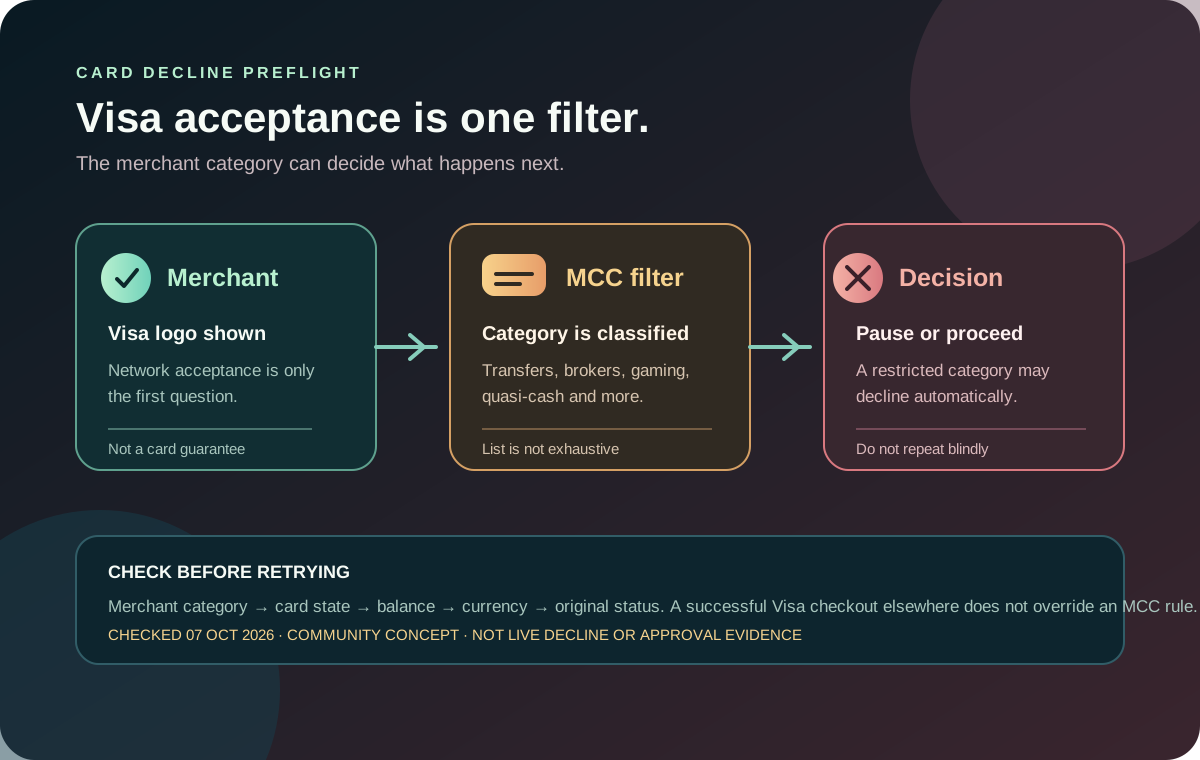
A Jupiter Card can be declined even when the merchant accepts Visa. The current Fees & Limits documentation says some merchant category codes (MCCs) are automatically declined for compliance, regulatory and risk reasons. That makes a restricted-category check different from a balance, card-status or network problem. Current restricted merchant categories
The short answer
Before retrying a declined Jupiter Card payment, ask whether the merchant’s business category is one of the documented restricted groups. The current list includes, among others:
- money transfers, remittance services, quasi-cash and stored-value loads;
- securities brokers, trading platforms and certain financial institutions;
- gambling, betting, lotteries and gaming-related services;
- explosives, firearms and weapons-related merchants;
- escort, dating and adult-related services;
- debt collection, bail or bond services;
- some government-related payments, loan services and political, religious or labor organizations; and
- certain high-risk digital services, gaming platforms and online marketplaces.
The list is not exhaustive. Jupiter also says some merchants can be dynamically restricted by fraud, abuse or risk monitoring. A successful purchase at one merchant therefore does not prove that another merchant or category will work. Fees & Limits · Risks & Security
Visa acceptance is only the first filter
“Visa accepted” describes the payment network a merchant connects to. It does not override issuer rules, local regulation, the merchant’s MCC or a dynamic risk decision. A checkout may display Visa and still route the transaction under a category that the card cannot support.
That distinction explains several confusing outcomes:
| What you see | What it proves | What it does not prove |
|---|---|---|
| Merchant displays a Visa logo | The merchant accepts some Visa cards | This Jupiter Card, issuer or category is accepted |
| Card has enough USD balance | The account may cover the amount | The merchant category is permitted |
| A small purchase succeeded elsewhere | One route settled | This merchant or category will settle |
| The app shows a pending authorization | An attempt was recorded | The payment will settle or be safe to repeat |
The generic card-declined guide handles balance, card state and ordinary troubleshooting. The payment-reversed guide covers the separate case where a recorded attempt later returns. This page answers the narrower question: could the merchant category itself be the reason?
Categories that deserve a pause
Money movement and quasi-cash
Transfers, remittance services, cash-equivalent products and stored-value loads are explicitly named in the documentation. That includes situations where a website looks like an ordinary checkout but the transaction actually loads another wallet, moves money between financial accounts or purchases a cash substitute.
Do not repeatedly submit the same payment or disguise the purpose of the transaction. Choose an ordinary merchant route only when it matches the real purchase, and use the documented bank or remittance product when your goal is to send money. The route comparison tool can compare complete quotes; it cannot turn a restricted card payment into an allowed transfer.
Brokers and financial platforms
Securities brokers, trading platforms and certain financial institutions appear in the restricted list. A card may work at a normal retailer but fail at an exchange, brokerage, lending platform or other financial service. The failure does not necessarily indicate a wrong card number or insufficient balance.
If the intended action is to acquire, trade, deposit or withdraw a financial asset, read the platform’s funding rules and Jupiter’s current documentation separately. Do not infer permission from the fact that both services use familiar payment rails.
Gambling, gaming and adult categories
Gambling, betting, lotteries, gaming-related services, escort, dating and adult-related services are named categories. Some ordinary-looking digital businesses can also be classified under a restricted MCC by the acquiring bank. The merchant’s brand description is not a reliable substitute for its payment classification.
A decline in this group is not a reason to keep trying different card presentation methods or to ask another person to pay on your behalf. Check the merchant’s official alternative payment method and the applicable terms instead.
Weapons, government and other controlled services
The list also names explosives, firearms and weapons-related merchants, debt collection, bail or bond services, some government-related payments, loan services, and political, religious or labor organizations. These restrictions can apply even when the transaction is legitimate and the card has funds.
Keep the transaction reference and the exact merchant name if you need support. Never send card secrets, passwords or one-time codes to a person claiming to be able to override a decline. Official support
A better decline sequence
1. Stop repeating the attempt. A pending entry is not a confirmed failure, and multiple retries can create multiple authorizations. 2. Read the merchant identity. Check the exact legal or checkout name, not only the brand shown in an advertisement. 3. Separate the category check. Ask whether the purchase moves money, loads value, trades financial assets, or falls into another listed risk group. 4. Check ordinary card conditions. Confirm the card is not frozen, the USD balance covers the final amount, the merchant currency is understood, and the card details are current. Card process 5. Use the right product route. A bank transfer, remittance rail or supported deposit flow is not interchangeable with a card purchase. 6. Contact official support when needed. Include the transaction reference, timestamp, amount, merchant and visible status. Redact card numbers and personal documents.
The first-payment checklist is a good low-risk test for an ordinary merchant. It cannot certify a restricted merchant category or predict a future authorization.
Funding and card checks are still separate
The card draws from the USD Spend balance. The official Card page says USDC can be deposited on Solana, Sui, Arbitrum or Base, while USDT is accepted on Solana; another token or network should not be sent to the direct deposit address. Funding FAQ · Deposit safety guide
A correct deposit does not make every merchant category available. Conversely, a restricted-category decline does not mean that the deposit was wrong. Keep the funding, issuer, card state, merchant category and settlement status as separate checkpoints.
Merchant preflight before signup
If your main use case is a normal purchase, write down the merchant, currency and intended amount before opening the app. If your use case involves a broker, exchange, transfer service, stored value, gambling, adult service, government payment or another controlled category, do not assume the card is the right rail.
Read the Jupiter Global review for the broader product boundaries, then confirm the current official terms. If your intended purchase is an ordinary permitted merchant and your residence, verification state, assigned issuer, USD balance and route fit the current app, sign up for Jupiter Global and start with one modest purchase. Eligible Jupiter Card purchases earn 2% cashback, up to $100 a month.
Jupiter Global Restricted Merchants FAQ
Why can a Jupiter Card decline when a merchant accepts Visa?
Visa acceptance is only the network layer. The issuer, merchant category code, compliance rules, dynamic risk controls, card state, balance and currency still determine whether a transaction can authorise and settle.
Which merchant categories should I check first?
Pause when the purchase involves money movement, quasi-cash or stored-value loads, brokers or financial platforms, gambling, adult services, weapons, debt collection, some government or loan services, or another category named in the current Fees & Limits documentation. The list is not exhaustive.
Should I keep retrying a declined restricted merchant?
No. Stop repeating the attempt, especially while an authorisation is pending. Keep the transaction reference and use the appropriate bank, remittance or merchant payment route instead of disguising the purchase or asking another person to bypass the restriction.
Does a successful card purchase elsewhere prove this merchant will work?
No. A different merchant may have a different MCC, acquiring bank, currency, issuer path or risk decision. Treat each purchase as its own route and test only an ordinary, modest transaction when the category is permitted.
What should I send official support about a decline?
Provide the exact merchant name, amount, currency, timestamp, transaction reference and visible status. Redact card numbers, passwords, one-time codes, identity documents and wallet secrets. Support cannot turn a prohibited category into an allowed one.
Sources
Checked against these sources on 7 October 2026.