

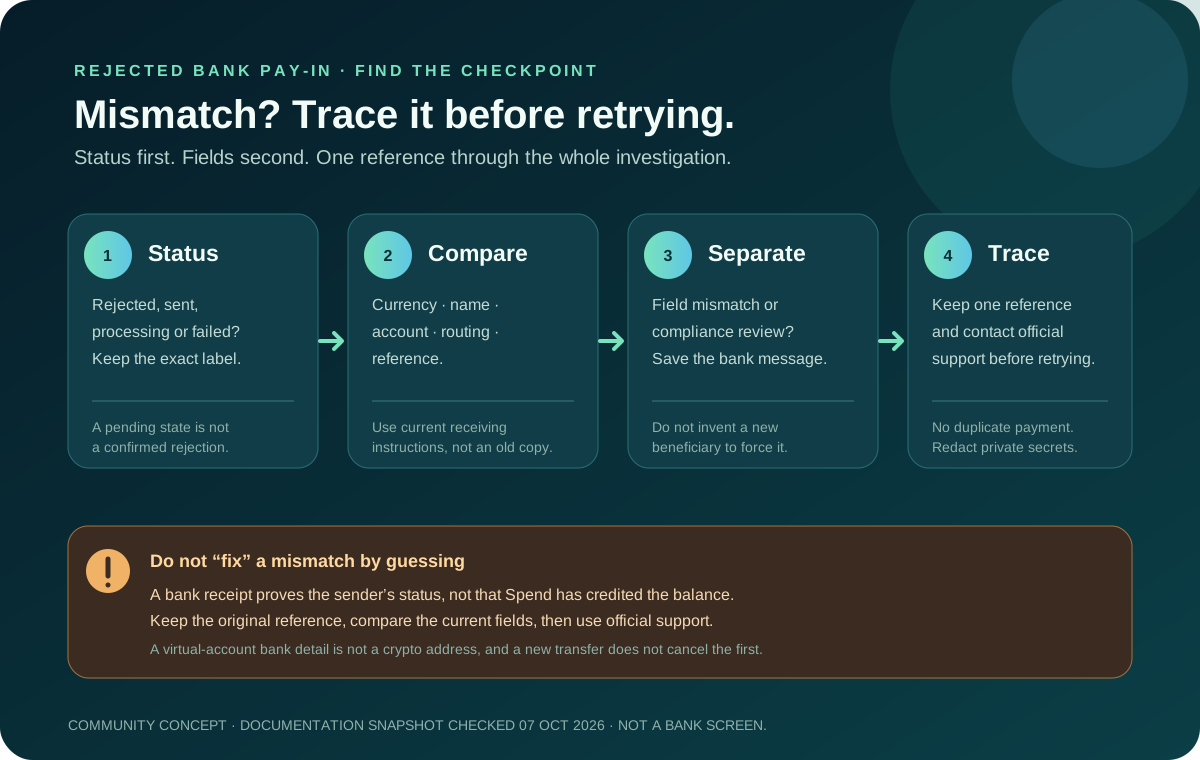
A bank transfer can be rejected even when the account number looks familiar. Don’t guess at fields. Work out which checkpoint stopped the payment and what evidence shows it. Separate the sender-bank status, the beneficiary data, the currency and rail, and the Spend status before you send anything again.
This guide is for a bank transfer involving a Jupiter Global USD or EUR virtual account. It does not diagnose a live account and cannot tell whether a specific transfer will be accepted. Use the beneficiary-field preflight before a new payment, and the support-packet guide when an existing payment needs tracing.
Name the status before changing a field
The same phrase, “beneficiary mismatch”, can describe different states:
- The sender bank rejected the payment before release. The sending bank or its compliance team is the first place to ask what field or restriction stopped it.
- The sender bank says sent, but the Spend balance is unchanged. Preserve the transfer reference and compare the exact receiving instructions used. Do not assume a visible bank receipt means the balance has credited.
- Spend marks an outbound transfer failed. Check the balance and refund history before considering a replacement. Jupiter’s FAQ says failed transfers are automatically refunded to the balance; that statement is about a transfer the product marks as failed, not every missing incoming deposit. Read the transfer FAQ
- The transfer is processing or under review. A pending state is not a confirmed rejection. Keep the original reference and do not create a duplicate while the first payment is unresolved.
Jupiter’s FAQ lists incorrect recipient details, bank compliance holds and receiving-side network issues as reasons a bank transfer can fail or be delayed. Treat those as investigation categories, not proof of the cause in your case. Current bank-transfer guidance
Compare the five fields that most often diverge
Open the current receiving screen in the legitimate Jupiter app and compare it with the bank receipt or saved payment instruction. Use the exact details shown for your verified account, not a screenshot from another person.
1. Currency
Confirm that the sender instructed USD to the USD virtual account or EUR to the EUR virtual account. A bank may offer conversion, but an automatic conversion is not evidence that the receiving account accepts the resulting payment. EUR account availability may depend on residence, and virtual accounts appear after Jupiter ID verification. Virtual-account rules
2. Beneficiary name
Copy the beneficiary or account-holder name exactly as shown, including a partner name, punctuation or legal suffix when present. Do not substitute your own name simply because you are funding your own Spend balance. Do not shorten a name to fit an informal contact field unless the bank’s form explicitly requires a documented format.
A sender-bank warning about the name may be a hard validation failure, a review prompt or a display-only warning. Ask the sender bank what it requires and keep the exact message. Do not “solve” it by changing the beneficiary to an invented person.
3. Account identifier
Check every character in the account number, IBAN or other identifier. Leading zeroes, country prefixes and spaces can matter. Compare the destination used in the submitted transfer with the current receiving screen, because a bank template can retain an older beneficiary.
If the identifier changed after the transfer was submitted, do not send a second payment to the new details until the first reference is reconciled. A corrected destination does not cancel the original instruction.
4. Routing and rail
A routing code is meaningful only with its currency and rail. The remittance documentation states that EUR remittances are supported through SEPA only and warns that EUR SWIFT transfers are not supported and may fail or not be credited. A familiar “international wire” button does not override that restriction.
For USD, follow the rail and routing values displayed for your own account. Do not choose ACH, Fedwire or SWIFT because a search result lists it or another account used it. A fee table describes a possible rail and cost; it does not prove that the route is enabled for your account or residence. Read the current remittance limitations
5. Payment reference
If the receiving instructions show a reference, enter it exactly in the bank’s memo, message or end-to-end reference field. An omitted or altered reference can make reconciliation harder even when the account identifier is correct. If the screen does not provide a reference, do not invent one from the article title or your own notes.
Separate mismatch from compliance review
A rejected name does not always mean the receiving details are wrong. Banks and regulated payment partners can hold a transfer for compliance review, and the FAQ says supporting documentation may be requested for large or unusual transfers. The right response is to keep the bank’s message and answer the official request truthfully.
Do not split a payment, change the sender identity or disguise the payment purpose to force it through. Do not ask a stranger in a social channel to “whitelist” the beneficiary. Support and the bank that controls the hold are the only appropriate places to ask what documentation is needed.
A virtual-account bank transfer is also not a crypto deposit. Jupiter says USDC cannot be deposited directly into virtual accounts. If the sending balance is crypto, stop and use the separate supported asset-and-network instructions instead of pasting a bank identifier into a wallet form. Bank versus crypto funding
What to preserve before contacting support
Keep a private record of:
- the exact in-app status and transfer reference;
- the currency, amount and approximate submission time with time zone;
- the beneficiary name, account identifier, bank and routing fields used;
- the sender bank’s rejection, return or compliance message; and
- whether the Spend balance shows a refund, reversal or no change.
Jupiter’s FAQ says to have the transaction hash or transfer reference ready for a deposit or transfer issue. For a fiat bank transfer, the bank reference is the relevant trace; a crypto hash belongs to the separate onchain flow. Use official in-app support or the Jupiter Support Hub.
Redact recovery phrases, private keys, passwords, one-time codes, full card security codes and unrelated account history. The support-packet guide helps you format the message but doesn’t check its contents or submit a ticket for you.
Decide whether a replacement is safe
Only consider a new transfer after the original status is clear. If the sender bank rejected it before release, correct the documented field and confirm the rail. If the transfer was released, keep the original reference attached to the investigation. If Spend marks it failed and the balance shows the automatic refund, re-run the route from the current receiving instructions rather than editing an old payment.
Use the Route Finder to identify the incoming-bank route before correcting a beneficiary, and keep Quote Compare for non-sensitive fee figures.
Aim for one traceable, correctly matched transfer rather than two uncertain ones. If you’re setting up a virtual account for the first time, sign up for Jupiter Global and copy the beneficiary, currency and rail straight from the app before sending. Funding the account doesn’t earn cashback; spending on the Card does, at 2% cashback on eligible purchases, up to $100 a month.
Jupiter Global Virtual Account Name Mismatch FAQ
What should I check when my bank reports a beneficiary name mismatch?
Compare the exact beneficiary or account-holder name in the current Jupiter receiving screen with the name submitted to the bank, including punctuation, legal suffixes and any partner name. Ask the sender bank what validation failed instead of inventing a replacement name.
Can I change the beneficiary after the transfer was sent?
Do not send a second payment to a newly displayed beneficiary until the original transfer is reconciled. Preserve the original reference, amount, currency, time and sender-bank message, then use official support for the correction path.
Does a name warning prove that the Jupiter account details are wrong?
No. A bank message can be a hard validation failure, a review prompt or a display-only warning. Separate the bank’s exact response from the Spend status and the current receiving instructions before deciding what happened.
Can I send a EUR virtual-account deposit by SWIFT if the name matches?
No. The checked remittance documentation says EUR transfers are supported through SEPA only and that EUR SWIFT transfers are not supported. A matching beneficiary name does not make an unsupported rail valid.
What should I give support for a name-mismatch investigation?
Keep the transfer reference, status, currency, amount, submission time, beneficiary and routing fields used, plus the sender bank’s rejection or compliance message. Redact recovery phrases, private keys, passwords, one-time codes and full card security data.
Sources
Checked against these sources on 7 October 2026.