
An incoming bank deposit to a Jupiter Global virtual account has a different trail from a crypto deposit and a different clock from an outbound bank payout. Start by naming the route: external bank account → your USD or EUR virtual account → your Jupiter Spend balance. Naming it up front avoids the most expensive troubleshooting mistake: following instructions meant for a different rail.
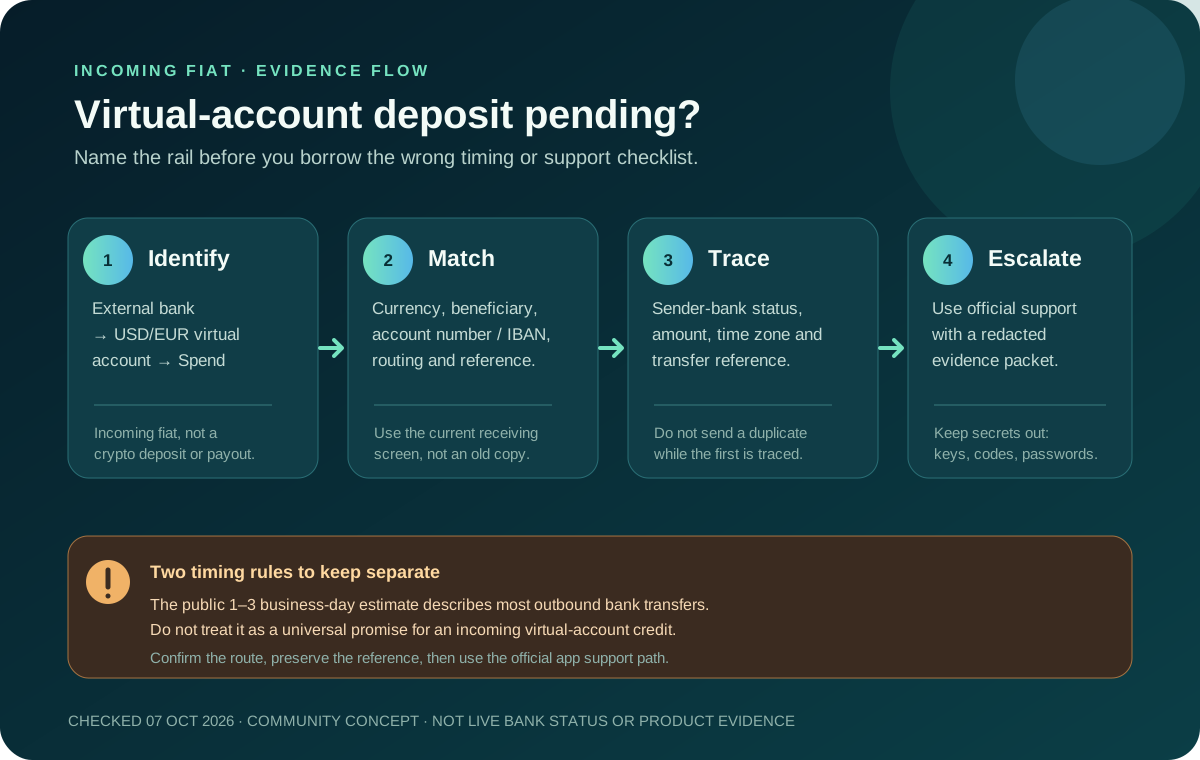
Use the checklist in this guide to gather the evidence, then compare every field with the current app and your bank record.
First classify the transfer
A virtual-account deposit is an incoming fiat bank transfer from an external bank account. Jupiter’s remittance documentation says incoming funds received on the USD or EUR virtual accounts credit the Spend balance used by the card and QR Pay. The account details are banking instructions, not a blockchain address. Read the virtual-account documentation
An outbound payout is the opposite direction: money leaves Spend for another person’s bank account. Its timing, recipient fields and failure handling are different. The FAQ says most outbound bank transfers arrive within 1–3 business days, but that estimate should not be copied onto an incoming virtual-account credit when the documentation does not give the same promise. Compare the outbound transfer guide
A crypto deposit is a third route again. The Spend deposit screen accepts only the documented asset and network pairs; it is tracked with an onchain transaction hash and confirmations. Sending a token to a bank beneficiary cannot make a virtual-account deposit work. If you are looking at a hash rather than a bank reference, use the crypto deposit pending guide.
Confirm the virtual account and currency
Before asking why a deposit is missing, open the current Spend receiving screen and compare it with the sending instruction:
- Account type: it should be the USD or EUR virtual account assigned after Jupiter ID verification. EUR availability can depend on residence.
- Currency: the transfer currency should match the virtual account you selected. Do not assume a bank will convert an amount sent to the wrong account.
- Beneficiary data: copy the legal name, bank name, account number or IBAN, routing details and any required reference exactly as shown. A familiar-looking account number is not enough.
- Availability: the documentation currently says bank deposits are temporarily unavailable in California, New York, Connecticut and Puerto Rico. A visible marketing page or another person’s account is not proof that your account has the same capability.
USDC cannot be deposited directly into a virtual account. If the money starts as crypto, stop and choose the supported crypto deposit flow or an explicitly available conversion route. Do not paste a bank account number into a wallet form, and do not send USDC or USDT to banking details.
For the fee and rail choices that apply before you send, see the USD and EUR virtual-account fee guide. The current rail, currency and beneficiary shown in your own account take priority over an educational example.
Trace the sender before blaming the balance
A bank can display “submitted,” “pending,” “completed,” “returned” or “under review.” Those labels describe the sender’s or correspondent bank’s state; they do not all mean that the receiving Spend balance should already show the funds.
Keep one private record for this transfer containing:
- the bank transfer reference or end-to-end identifier;
- the date and approximate time the sender released it, including the time zone;
- the amount and currency;
- the sending bank and rail, such as ACH, SEPA, Fedwire or SWIFT when shown;
- the receiving virtual-account currency and the beneficiary details used; and
- the exact status shown by the sending bank and the last time it changed.
First ask the sending bank whether the payment actually left, is held for compliance, was rejected, or was returned. If it has not left the sender, a missing Spend balance is not yet evidence of a Jupiter crediting problem. If it says completed, keep the reference attached to the bank’s confirmation rather than starting a second transfer.
Do not borrow the wrong timing window
Jupiter’s public documentation gives a 1–3 business-day expectation for most outbound bank transfers and says destination banks and countries affect timing. It does not publish the same universal crediting promise for every incoming USD or EUR virtual-account deposit. Cut-off times, weekends, correspondent banks, compliance review, currency mismatches and incorrect beneficiary details can all change what happens next.
That uncertainty has a safe response: keep the original reference, check both sides of the route, and do not send a duplicate merely because the Spend balance has not refreshed. A second transfer can create two real obligations while leaving the first investigation harder to reconcile.
When to use official support
If the sending bank confirms the transfer was released and the beneficiary details match the current virtual-account screen, use the official in-app support path or the Jupiter Support Hub. Jupiter’s FAQ asks users with a deposit or transfer issue to have the transaction hash or transfer reference ready. For a fiat deposit, the bank transfer reference is the useful trace; a crypto hash belongs to the separate crypto route. Check the support guidance
Write the case so a support agent can follow one payment without guessing:
1. State that this is an incoming USD or EUR virtual-account deposit, not an outbound payout or crypto deposit. 2. Give the transfer reference, amount, currency, approximate send time and sender-bank status. 3. State which virtual account and beneficiary details were used, with unnecessary personal data redacted. 4. Say whether the sender bank reports pending, completed, returned or rejected. 5. Ask what additional evidence is required; do not attach unrelated account history by default.
The FAQ says failed transfers are automatically refunded to the balance. Keep that statement scoped to a transfer that the product itself marks as failed; it is not a promise that every missing incoming deposit has already been refunded or will be credited on a particular date.
Redact the packet before sending
A useful support case contains a traceable reference, not every secret you possess. Remove recovery phrases, private keys, passwords, one-time login codes, full card security codes and unrelated balances. If a screenshot is necessary, crop it to the status, reference, amount, currency and beneficiary context that support actually needs. Never send secrets to a person who approaches you through a public thread and claims to be support.
Use Route Finder to keep an incoming bank credit separate from a crypto deposit or outbound payout; Quote Compare can organize your route figures but cannot inspect a pending transfer.
Use the checklist above to write your support request. Check it against the official app, remove anything support doesn’t need, and submit it only through the official route.
You’re done when the credit shows in the intended Spend balance, or when an official case is tracing the completed bank transfer. If the virtual-account route fits your residence, verification state and intended USD/EUR funding path, create your Jupiter Global account and follow the receiving instructions shown in your own app. Bank transfers into the account aren’t cashback-eligible, but you’ll earn 2% cashback on eligible Jupiter Card purchases, up to $100 a month.
Jupiter Global Virtual Account Deposit Pending FAQ
What does a pending virtual-account deposit mean?
A pending label can describe the sender bank, a correspondent bank or the receiving process. Record the exact status and reference, then confirm whether the payment actually left the sender before treating the Spend balance as a Jupiter crediting issue.
Does Jupiter guarantee a 1–3 business-day credit for an incoming deposit?
The checked public FAQ gives a 1–3-business-day expectation for most outbound bank transfers. It does not provide the same universal promise for every incoming USD or EUR virtual-account deposit, so do not borrow the outbound timing window.
What should I verify before contacting support?
Match the current virtual-account currency, beneficiary, account identifier, routing fields and payment reference with the bank instruction. Keep the sender-bank status, amount, currency, send time, rail and transfer reference together.
Can I send USDC or USDT to a virtual-account bank number?
No. A virtual account is an incoming fiat bank-transfer route. Use the separate supported crypto asset-and-network flow for USDC or USDT and never place bank details into a wallet send form.
What should I include in a pending-deposit support case?
State that it is an incoming USD or EUR virtual-account deposit, then provide the bank transfer reference, amount, currency, send time, sender-bank status and the receiving details used. Redact recovery phrases, private keys, passwords, one-time codes and full card security data.
Sources
Checked against these sources on 7 October 2026.