
Community concept illustration—not an actual app screen.
USD and EUR virtual accounts are bank-transfer receiving details inside Jupiter Spend. They are not crypto deposit addresses, and the cheapest-looking rail can still be a poor choice when its fixed fee consumes a small deposit.
What the virtual accounts are for
Jupiter’s Global Fiat Remittance documentation says that, after Jupiter ID verification, eligible users receive virtual accounts in USD and EUR. EUR availability can depend on residence. Incoming fiat transfers credit the Spend balance used by the card and QR Pay. USDC cannot be deposited directly into these virtual bank details; crypto funding uses a separate deposit flow. Virtual-account documentation
The account details are therefore instructions for a bank payment. Match the currency, beneficiary information, routing details, and reference exactly. Do not paste a bank account number into a wallet form or send a token to a bank beneficiary.
Current published pay-in fees
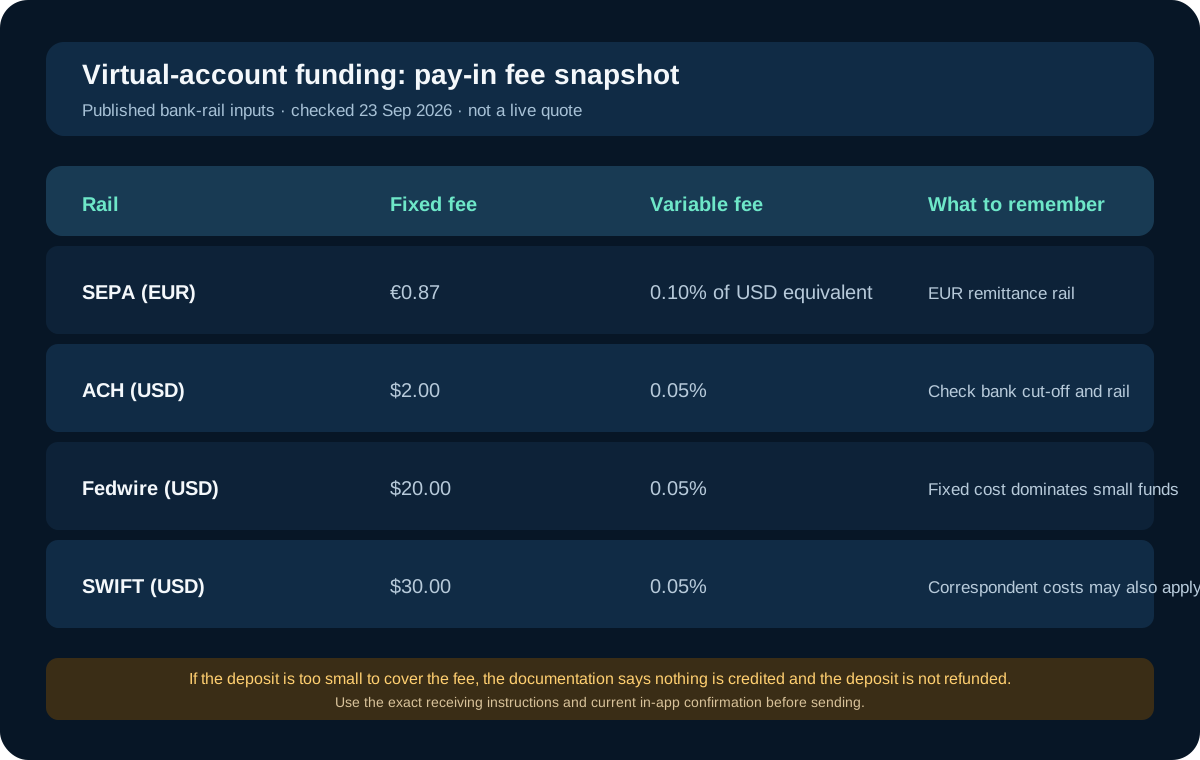
The detailed fee table lists these incoming bank-transfer inputs:
- SEPA: EUR 0.87 fixed plus 0.10% of the USD equivalent.
- ACH: $2.00 fixed plus 0.05%.
- Fedwire: $20.00 fixed plus 0.05%.
- SWIFT: $30.00 fixed plus 0.05%.
These are documentation snapshots, not a promise that every account, currency, bank, or corridor is available. Your sending bank may charge its own fee, and international transfers can involve correspondent-bank deductions. Current fee table
The fixed amount matters most on a small payment. A $20 Fedwire charge is already four percent of a $500 deposit before the variable fee, while a $2 ACH fixed charge is a much larger share of a $20 test. That arithmetic is a decision aid, not a quote. Check the receiving screen and your bank’s confirmation before authorizing.
The small-deposit trap
Jupiter’s fee documentation warns that bank-deposit fees are deducted from the amount received. If a deposit is too small to cover the applicable fees, nothing is credited and the deposit is not refunded. That means a “tiny test” can be the least reversible way to learn whether the rail works.
Before sending, calculate a conservative amount above the fixed fee, confirm your bank’s outgoing charge, and keep the receipt. If you need a small first check, verify the receiving instructions and support policy first rather than assuming a failed credit will return automatically. Funding limitations
EUR has a specific rail constraint
The remittance documentation states that EUR remittances are supported via SEPA only. EUR SWIFT transfers are not supported and may fail or not be credited. A bank form offering “international wire” does not make that route compatible with a EUR virtual account.
If your bank shows several delivery options, select the one that matches the current Jupiter instruction, not the option with the most familiar name. When the currency and rail disagree, stop and ask official support. EUR remittance limitation
USD rails need the same discipline
ACH is usually the rail most people compare against the USD account’s fixed charge, but eligibility, bank cut-off times, and sender-name requirements still matter. Fedwire and SWIFT can make sense for a larger or time-sensitive transfer, but their fixed costs should be included in the total amount needed to fund Spend.
Do not compare only the amount your bank debits. Compare:
1. The bank’s total debit, including its outgoing charge. 2. The amount Jupiter expects to credit after the pay-in fee. 3. The time the bank estimates for the exact rail. 4. The balance that is actually available for the card or next payout.
The FAQ says that virtual-account deposits are distinct from crypto deposits and that current availability depends on the user’s account and region. A successful bank transfer from one account does not prove that a different sender, purpose, or amount will be accepted. Jupiter Spend FAQ
Do not confuse funding with a bank payout
Funding a USD or EUR virtual account moves fiat into Spend. Sending PHP, VND, or another local currency to a recipient is a separate remittance action with its own payout fee, recipient bank checks, and per-transfer limit. Jupiter’s documentation lists a $10,000 remittance limit and says specific corridors can be restricted.
Keep the two legs in separate notes: bank pay-in to Spend, then optional payout or card/QR use. Pricing the first leg as if it were the whole journey can make a route look cheaper than it is.
Final preflight
Before sending money, confirm the account is visible in your eligible Jupiter Spend profile, the currency matches, the bank rail matches, the beneficiary details are copied from the current screen, and the total fee is tolerable for the amount. If any field is unclear, pause. A clean bank receipt is not proof that Spend has credited the funds, and a pending credit is not permission to send a second transfer.
Sources & what was checked
Public documentation reviewed 23 September 2026. This is a documentation-based guide, not a first-hand account, identity-verification or payment test. Open the current sources before acting.