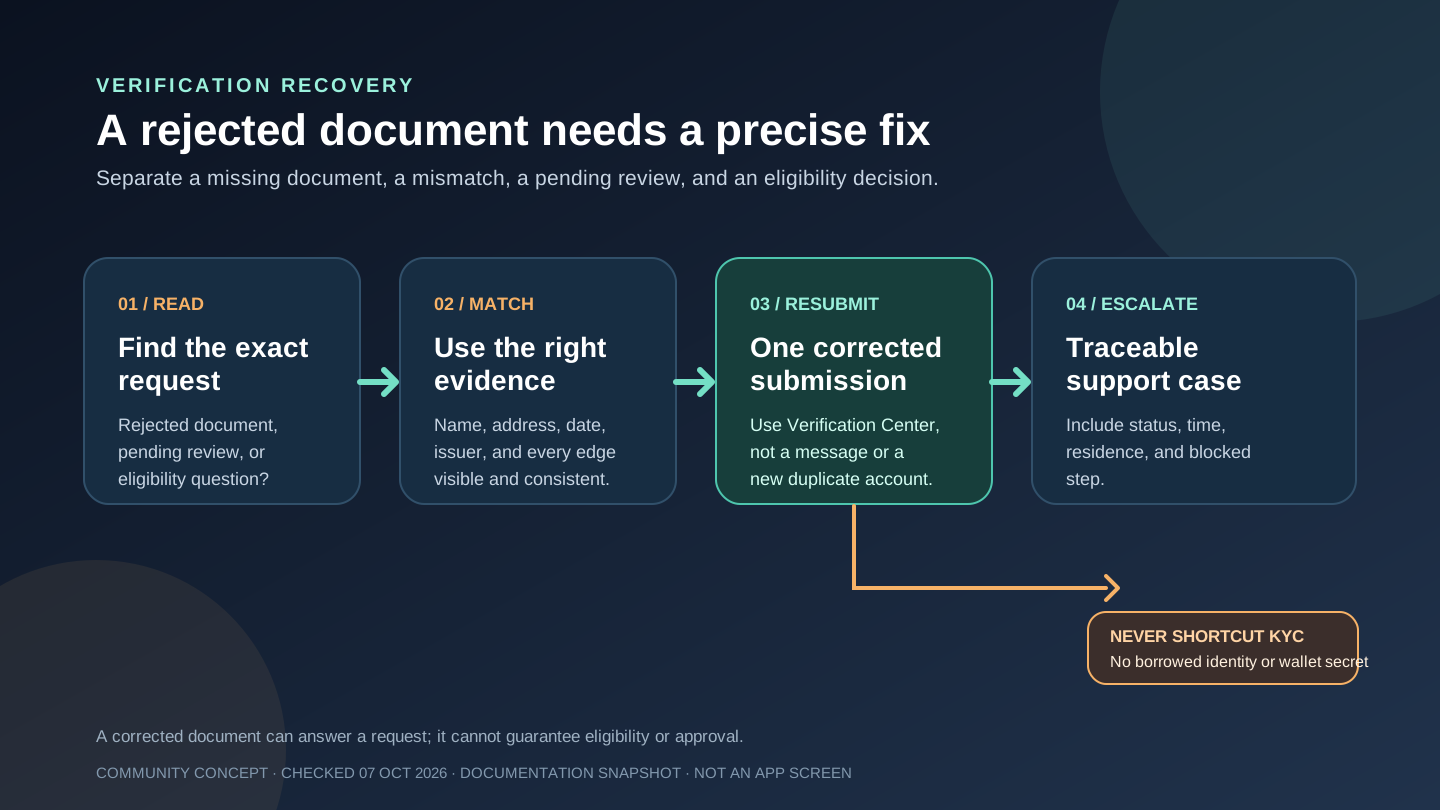
“My Jupiter Global KYC is pending” does not necessarily mean the application failed. Jupiter’s current documentation says verification typically takes a few minutes, but an application flagged for manual review can take 3 to 5 working days. The useful next step is to identify which part of the process is waiting, then use the legitimate Verification Center or support route.
Know which clock you are waiting on
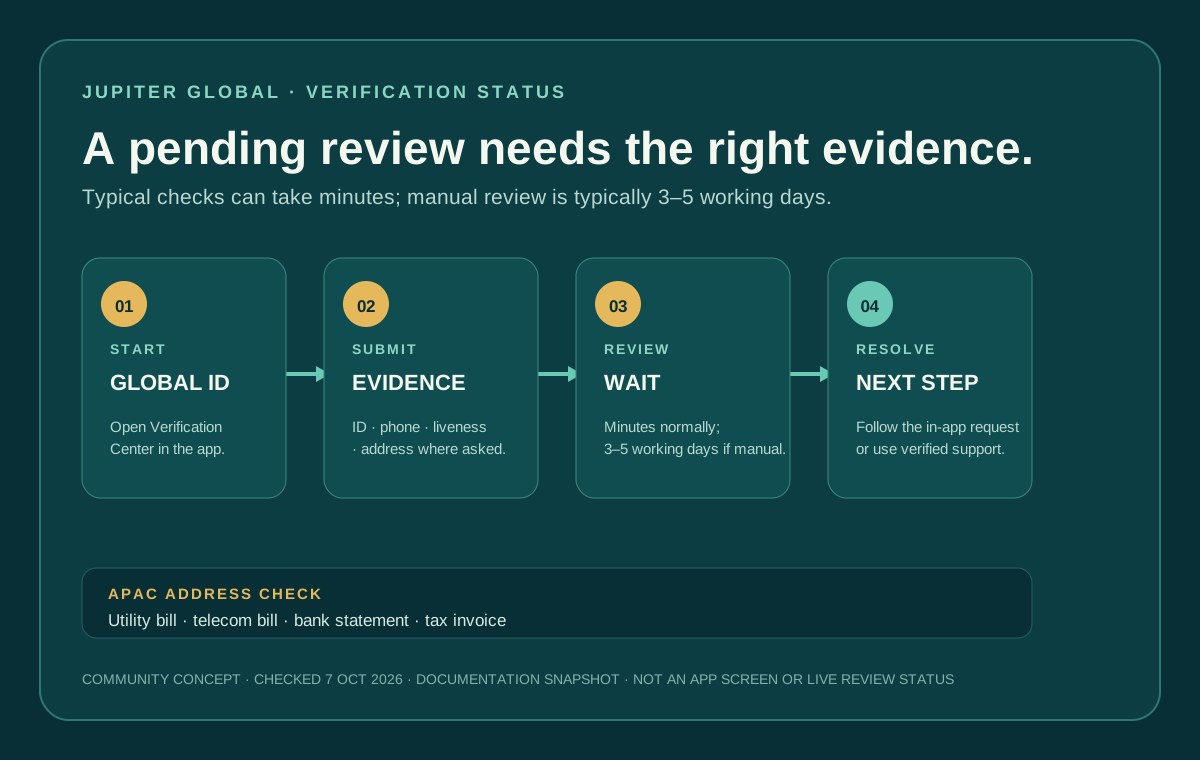
Global ID (previously called Jupiter ID) is the account and identity-verification layer required for Jupiter Spend. The documented flow has five steps: provide an identity document, verify your phone number, complete a liveness check, provide personal information, and answer a short questionnaire. In APAC regions, proof of address is also required. Verification steps · Global ID FAQ
Most applications finish in a few minutes. If automated checks flag the application for manual review, the FAQ gives a typical 3–5 working-day window. That is a review expectation, not an approval promise or a guarantee that every case will resolve at the end of the fifth day. Weekends, local holidays, requests for another document, and account-specific checks can change the practical wait.
Do not restart the process simply because the screen has not changed. First record the exact status shown in the Verification Center and the time you submitted the last step.
Prepare the document that is actually being requested
For APAC applicants, the FAQ lists utility bills, telecom bills, bank statements, and tax invoices as examples of proof of address. The list is not exhaustive. A document that proves identity is not automatically a document that proves residence, and a cropped screenshot may omit the name, address, date, or issuer needed for review. Accepted proof-of-address examples
Before uploading anything, check:
- The legal name matches the Global ID details.
- The address is complete and readable.
- The document is current enough for the instruction shown in the app.
- All corners, dates, and issuer information are visible.
- The file is submitted only through the official Verification Center.
If a document is rejected, the FAQ says you can resubmit a different accepted document. Follow the specific request shown in the app instead of uploading unrelated files repeatedly. Repeated mismatches can create more review work without answering the missing question.
A pending review is not a wallet problem
Jupiter says Global ID is separate from Jupiter Mobile’s DeFi wallets. Verification gives access to Spend services; it does not grant access to wallet funds, and Jupiter says it does not take custody of those DeFi funds. A KYC status therefore should be handled through the account and verification flow, not by sending crypto to prove identity. Account and wallet separation
Never send a recovery phrase, private key, password, or one-time code to anyone offering to accelerate verification. A legitimate reviewer may request an identity or address document through the verified flow, but no support agent needs wallet credentials. Security guidance
When to contact support
If the application remains pending beyond the documented manual-review window, the requested document cannot be submitted, or the account is locked out of the registered email or phone, use in-app support. Include the Global ID email, the current Verification Center status, the date and time of the last submission, the country of residence, and the exact step that is blocked. Do not post identity documents or full personal details in a public thread. Official support route · FAQ support guidance
Keep the original case reference and answer only the request made through that verified channel. Opening several tickets with different explanations can make the history harder to follow. If you have lost access to your registered email, the FAQ says the email cannot currently be changed; use the account-recovery option and support rather than creating a duplicate Global ID. Account recovery
How to know it’s resolved
Close the loop when the Verification Center shows completion and Spend features become available, or when official support has identified the missing evidence and opened a traceable case. Until then, do not fund an account you cannot access and do not treat a pending screen as approval.
The Global ID checklist (formerly Jupiter ID) covers document preparation before submission. The beginner guide explains the broader signup sequence, while the supported-countries guide separates country eligibility from an individual application decision. You can also use the residence preflight to check the country-level condition before resubmitting.
If you are setting up for the first time, read the app-download guide and use the residence preflight. Haven't started yet? Sign up for Jupiter Global and complete the live Global ID setup only if the official app shows your residence and Verification Center route. Confirm the current identity requirements and Spend access before funding. Once you’re signed up, eligible Jupiter Card purchases earn 2% cashback, up to $100 a month.
Jupiter Global KYC pending FAQ
How long does Jupiter Global KYC take?
Most applications finish in a few minutes, but an application sent to manual review typically takes 3–5 working days according to the current FAQ. That is a typical review window, not an approval promise or a guarantee that every case will finish on day five.
What should I do while KYC is pending?
Record the exact Verification Center status and the time of your last submission. Do not restart the flow or upload unrelated documents repeatedly; follow the specific request shown in the official app.
What proof of address can APAC applicants use?
The FAQ lists utility bills, telecom bills, bank statements and tax invoices as examples. Use a document that shows the legal name, complete address, date and issuer, and upload it only through the official Verification Center.
Is a KYC review connected to my self-custody wallet?
No. Global ID verification is separate from Jupiter Mobile’s DeFi wallets. Do not send crypto or wallet credentials to prove identity or speed up a Spend review.
When should I contact official support about pending KYC?
Use in-app support if the status remains pending beyond the documented manual-review window, the requested document cannot be submitted, or you lose access to the registered email or phone. Include the current status, last-submission time, residence country and blocked step, and redact passwords, one-time codes and wallet credentials.
Sources
Checked against these sources on 7 October 2026.