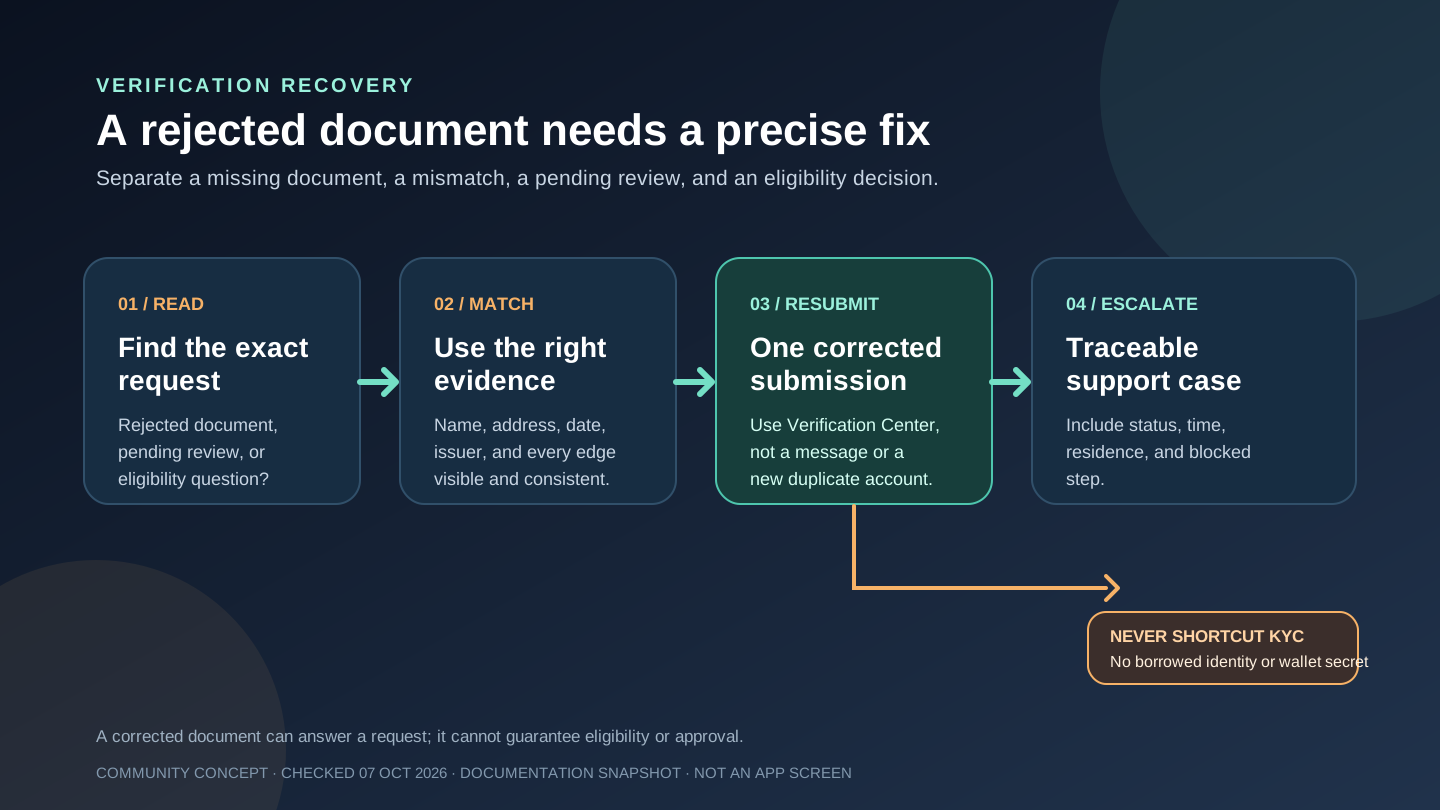
A rejected Jupiter Global identity document is a request to correct a specific evidence problem, not an invitation to guess, change your residence, or create another account. First separate a rejected upload from a pending manual review or a country-eligibility question. Then answer the exact request through the official Verification Center. The Jupiter Global guides directory keeps rejected, pending, checklist, residence, and support routes together while you identify the real block.
Identify what was actually rejected
Read the current status and message in the legitimate Jupiter app. A document rejection can mean that a requested field is missing, the information does not match, or the image cannot be reviewed. A pending status is different: Jupiter’s FAQ says routine verification often takes a few minutes, while applications sent to manual review typically take 3 to 5 working days. That estimate is a review window, not an approval promise. Global ID FAQ
An eligibility question is different again. Jupiter says Spend availability depends on country of residence and applicable regulations. Do not treat a rejected document as proof that a different country, address, or passport will make the account eligible. Use the residence information you can document truthfully. Spend overview
Match the document to the missing evidence
The FAQ says proof of address is required for users in APAC regions and lists utility bills, telecom bills, bank statements, and tax invoices as examples. The list is not exhaustive, so follow the exact request shown in the app rather than relying on an old screenshot or a generic internet checklist. Accepted address evidence
Before resubmitting, check the fields that a reviewer needs to compare:
- The legal name matches the Global ID information.
- The complete address is visible and belongs to your actual residence.
- The document date and issuer are readable when the app requests them.
- Every edge, page, and relevant field is visible; do not crop away context.
- The file is clear, unaltered, and uploaded through the authenticated Verification Center.
An identity document and an address document answer different questions. A passport may establish identity without proving current residence. A utility bill may show an address without replacing the identity document the flow requested. Submit the type of evidence named by the rejection message.
Resubmit once through the official flow
Correct the precise problem and use the app’s resubmission path. Do not repeatedly upload unrelated files, edit a document, borrow someone else’s address, or create duplicate Global IDs. Repeating a mismatch adds noise without answering the missing question.
If you cannot provide the requested evidence truthfully, pause. A paid “KYC helper” or a person promising instant approval cannot turn an unsupported residence or inconsistent identity into a valid application. Jupiter’s security guidance also means you should never share a recovery phrase, private key, password, one-time code, or wallet access while asking for verification help. Security boundaries
Know when the next state is still pending
After a corrected upload, preserve the status, submission time, and exact step. Do not fund Spend or plan an urgent transfer around an assumption that approval is immediate. If the app moves to manual review, use the documented 3–5 working-day range as a reference and wait for the current case to resolve.
If the document is still rejected, the requested upload cannot be submitted, or the Verification Center is locked, contact official support with the Global ID email, country of residence, current status, time of the last submission, and the blocked step. Do not post identity documents or full personal details in a public thread. Official support route
You’re done when the Verification Center shows a completed status, or when you have a traceable support case that names the missing evidence. The Global ID checklist (formerly Jupiter ID) helps before the first submission, while the pending-review guide covers timing without treating it as approval. If you are still deciding which Spend route fits your goal, use the Route Finder and residence preflight before funding. If you haven’t applied yet, create your Jupiter Global account and use your real residence and the live Verification Center route shown for your residence. Confirm the current requirements before funding. Eligible Jupiter Card purchases then earn 2% cashback, up to $100 a month.
Jupiter Global KYC rejected FAQ
What does a rejected Jupiter Global KYC document mean?
It means the submitted evidence did not answer the request clearly enough, or the status needs a correction. Read the exact message in the official Verification Center and separate a rejected upload from a pending manual review or a country-eligibility question.
Which proof of address should I resubmit?
For APAC users, the FAQ lists utility bills, telecom bills, bank statements and tax invoices as examples. Use the document type requested in the app, with your legal name, complete actual address, date and issuer visible.
Can I change my country or use someone else’s address after a rejection?
No. Submit only evidence for your truthful residence and identity. A rejected document does not prove that another country, address or passport would make the account eligible.
How many times should I retry a rejected upload?
Correct the specific issue and use the official resubmission path once. Repeatedly uploading unrelated files, editing documents or creating duplicate Global IDs adds noise and can leave the real missing evidence unresolved.
When should I contact official support after a rejection?
Contact support if the requested upload cannot be submitted, the Verification Center is locked, or the corrected document is rejected again. Include the current status, last-submission time, country of residence and blocked step, and never share passwords, one-time codes, recovery phrases or private keys.
Sources
Checked against these sources on 7 October 2026.