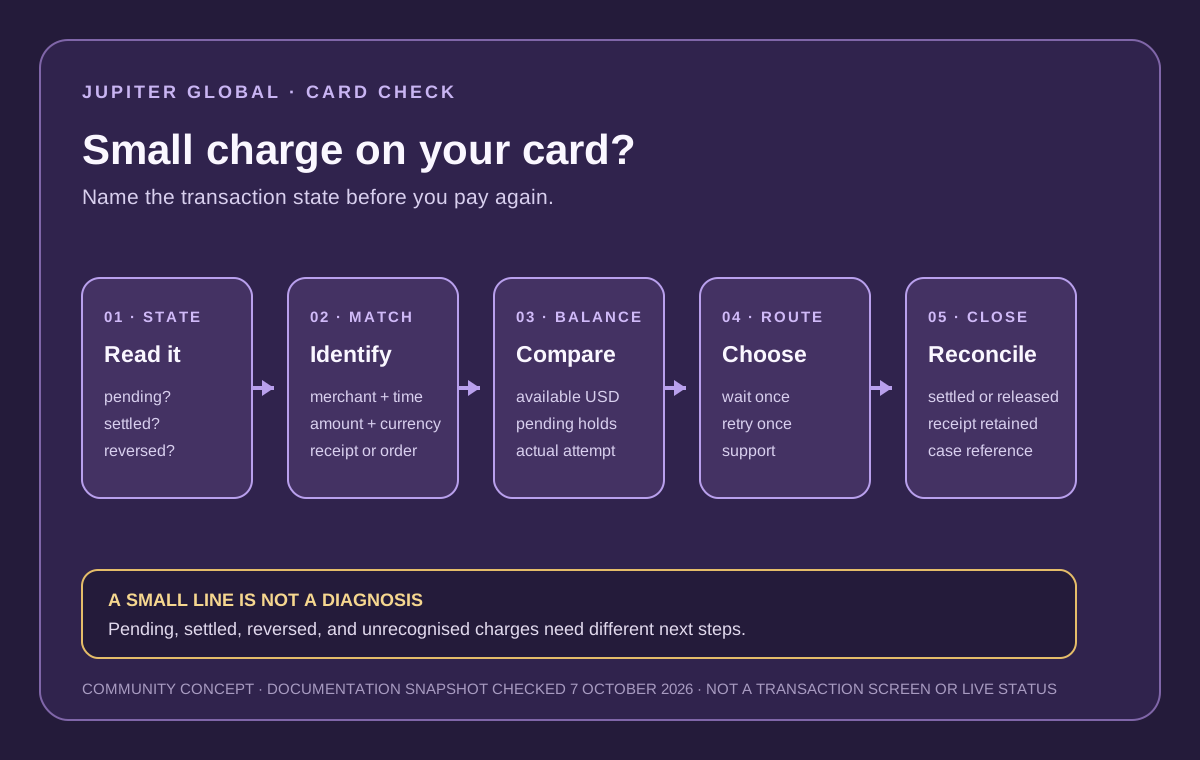
A small line in your Jupiter Global card history does not tell you what happened by itself. It may be a temporary authorisation that the merchant never captures, a genuine small purchase, a line that has already reversed, or a transaction you did not make. The safe response is to classify the state before you add more money or try the payment again.
The short answer
1. Open the official app and record the merchant descriptor, amount, currency, time, and transaction status. 2. Treat pending, settled, reversed, and unrecognised as different cases. 3. Compare the attempted amount with your available USD balance and any other pending holds. 4. Do not repeat the payment while the first line is pending or the merchant’s result is unclear. 5. Use official support when the line is unrecognised, remains unresolved, or does not match the merchant’s receipt.
Jupiter’s current FAQ explains that a merchant authorisation which is not captured can remain pending for up to 30 days, depending on the merchant, before the funds are released. That is a general authorisation boundary, not a promise that every small line will disappear on a fixed date. Read the current payment FAQ
If the question is really whether your next step is a card test, a bank payout, or another route, use the site’s Route Finder before funding.
A small charge is not automatically a Jupiter fee
The amount may come from the merchant’s checkout or payment processor rather than from Jupiter. A merchant can use a small authorisation to check that a card is usable, then release it or capture it as part of a real purchase. The visible line, its status, and the merchant’s own receipt are the evidence.
Do not label the line a “verification fee” simply because it is small. Check whether the app shows it as pending, whether the merchant describes a temporary check, and whether the amount or currency matches the checkout. Jupiter’s fee table describes product and issuer fees separately; a merchant-side line should not be folded into that table without evidence. Compare current Card and fee rules
The current fee table says that no fee applies to payments made in USD. That tells you how Jupiter documents its own USD payment fee; it does not identify a merchant’s temporary authorisation or prove that a small line will be released. Keep those two questions separate.
Name the state before choosing the next action
| App state | What it may mean | Safe next check |
|---|---|---|
| Pending | The merchant authorised funds but may not have captured the payment. | Keep the reference, check the merchant order, and wait for one clear state change. |
| Settled | The merchant captured a real debit, even if the amount is small. | Match the receipt and ask the merchant why the line exists before disputing it. |
| Reversed or released | The authorisation was not captured and the balance returned. | Confirm the available balance and do not pay twice for the same order. |
| Unrecognised | You cannot connect the descriptor or timing to something you authorised. | Freeze the card if appropriate and use the verified issuer or support route. |
A pending line is not proof that the merchant has been paid. A settled line is not proof that the merchant’s order succeeded. The status and the merchant’s record answer different parts of the question.
Compare the amount that was actually attempted
Start with the amount shown in the transaction, not the price you remember. A merchant may add tax, a tip, a deposit, or a different billing currency. A hotel, rental-car company, subscription service, or online processor can also authorise a larger amount than the first headline price. The available USD balance can therefore be lower than expected even when the purchase itself looks small.
Check these fields once:
- merchant descriptor and category;
- attempted amount and currency;
- pending or settled state;
- other authorisations reducing available balance;
- issuer shown for the account;
- order, invoice, or checkout reference.
If the card declined but a small pending line remains, do not keep retrying until you know whether the first authorisation will settle or release. The merchant-decline guide covers the one-retry boundary, while the card-payment status guide separates pending, declined, and refunded states.
When a hold is more likely than a completed payment
A line is more consistent with an uncaptured authorisation when the merchant says the order did not complete, the app marks it pending, and no final receipt or delivery record exists. That still does not prove the line will release immediately. Jupiter’s FAQ says the merchant controls the authorisation timing; Jupiter does not control the merchant’s capture or release decision.
Keep the original reference and check the balance periodically. Do not create a second order just to make the first pending line feel resolved. If the merchant confirms that it never captured the amount, keep that confirmation with the transaction record. If the line remains near the documented 30-day boundary, contact official support with the reference rather than opening repeated retries.
When it is a real small purchase
If the line is settled and the merchant’s receipt matches, treat it as a completed purchase even if the amount was only a few cents or dollars. Ask the merchant what the line represents and whether a larger payment will follow. A settled verification-style line can be a merchant-specific checkout practice; only the merchant can say whether it will be refunded or applied to the final order.
If the settled line does not match the merchant’s explanation, preserve the descriptor, date, amount, currency, and receipt. Use the card chargeback guide only after classifying the transaction and following the official issuer route. A chargeback is an issuer review, not an automatic refund.
When you do not recognise the charge
Do not message a stranger or share a one-time code to ask whether the charge is legitimate. Freeze the card through the official app when the situation suggests unauthorised activity, then use the issuer or support route assigned to your account. Jupiter’s security guidance says to protect account access, card details, and identity information; a small amount can still be a meaningful warning. Review the official security boundary · Open official support
Keep a private evidence packet with the transaction reference, descriptor, amount, currency, date, device or merchant context, and the action you took. Redact full card numbers, security codes, passwords, identity documents, recovery phrases, and one-time codes before sharing anything.
A clean first-payment sequence
For a new card route, choose an ordinary purchase you already need. Avoid using a hotel deposit, rental-car hold, large subscription renewal, or urgent travel payment as the first test. Confirm the card is active, the available balance covers the amount, the merchant category is allowed, and a backup payment method exists. The first-card payment checklist explains the evidence to keep.
If the Card fits, sign up for Jupiter Global and pick a small, ordinary first payment you can reconcile. You’ll earn 2% cashback on eligible Jupiter Card purchases, up to $100 a month.
What you want is a named state and a matching record: released hold, settled purchase, documented refund path, or official case reference. A small amount still deserves a check before you retry.
Jupiter Global card verification charge FAQ
Is a small Jupiter Global card charge automatically a verification fee?
No. It may be a merchant authorisation, a settled purchase, a reversed hold or an unrecognised transaction. Check the app status, merchant descriptor, amount, currency and receipt before calling it a fee.
How long can a small card authorisation stay pending?
Jupiter’s current FAQ says an authorisation that the merchant does not capture can remain pending for up to 30 days, depending on the merchant. That is a general boundary, not a fixed release date for every checkout.
Should I retry a payment while the small line is pending?
No. Keep the original reference, check whether the merchant captured or voided the attempt, and wait for a clear state before creating another order. A second attempt can create a duplicate charge or another hold.
What should I do if the small charge is settled but the merchant cannot explain it?
Keep the descriptor, date, amount, currency and receipt, then use the official issuer or support route. A chargeback is an issuer review and does not guarantee an automatic refund.
What if I do not recognise the small charge?
Freeze the card through the official app when appropriate and contact the issuer or verified support route. Never share passwords, one-time codes, recovery phrases, private keys or full card security details with a recovery helper.
Sources
Checked against these sources on 7 October 2026.