A bank transfer can leave Jupiter Global before the recipient’s bank shows a credit. That does not prove the money is lost, and it does not prove that waiting is always safe. Start with the transfer status and reference, then separate the normal receiving-bank window from an incorrect beneficiary, compliance review, corridor restriction, or a failed transfer that should return to your Spend balance. The Jupiter Global guides directory keeps delay, beneficiary, fee, and support routes together when the first diagnosis changes.
Check the sender status first
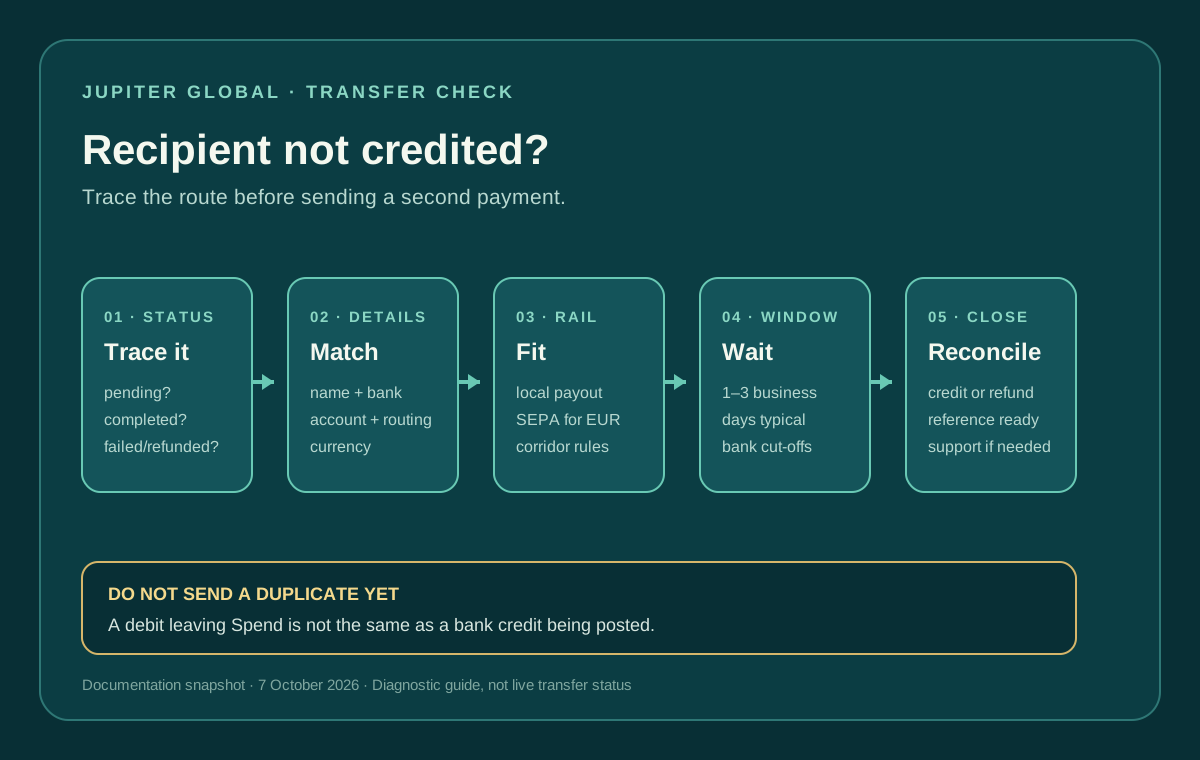
Open the official Jupiter app and record the transfer status, reference number, destination currency, amount, and submission time. Jupiter’s FAQ says most bank transfers arrive within 1–3 business days, but timing depends on the destination country and receiving bank. A transfer that is still processing is a different problem from one marked failed or completed. Current transfer timing
Do not send a second transfer just because the recipient has not seen the first credit. A duplicate can create two obligations while the first payment is still moving through the receiving bank. Ask the recipient to check pending, held, and incoming-transfer views rather than only the available balance.
Verify the beneficiary details without guessing
The transfer flow asks for the recipient’s full name, bank name, account number, and the routing details required by that country, such as a SWIFT/BIC or US routing number. Compare the submitted details with the recipient’s bank instructions, character by character. Required recipient information
Check the account holder name, not just the account number. Confirm the destination currency and whether the recipient expects a local payout or an international wire. A successful submission only proves that the request passed the app’s first screen; it does not prove that the receiving bank can post it to the intended account.
If a detail is wrong, do not try to repair the route by sending another payment to a different account. Save the transfer reference and contact official support through the app before taking further action.
Check the rail and corridor
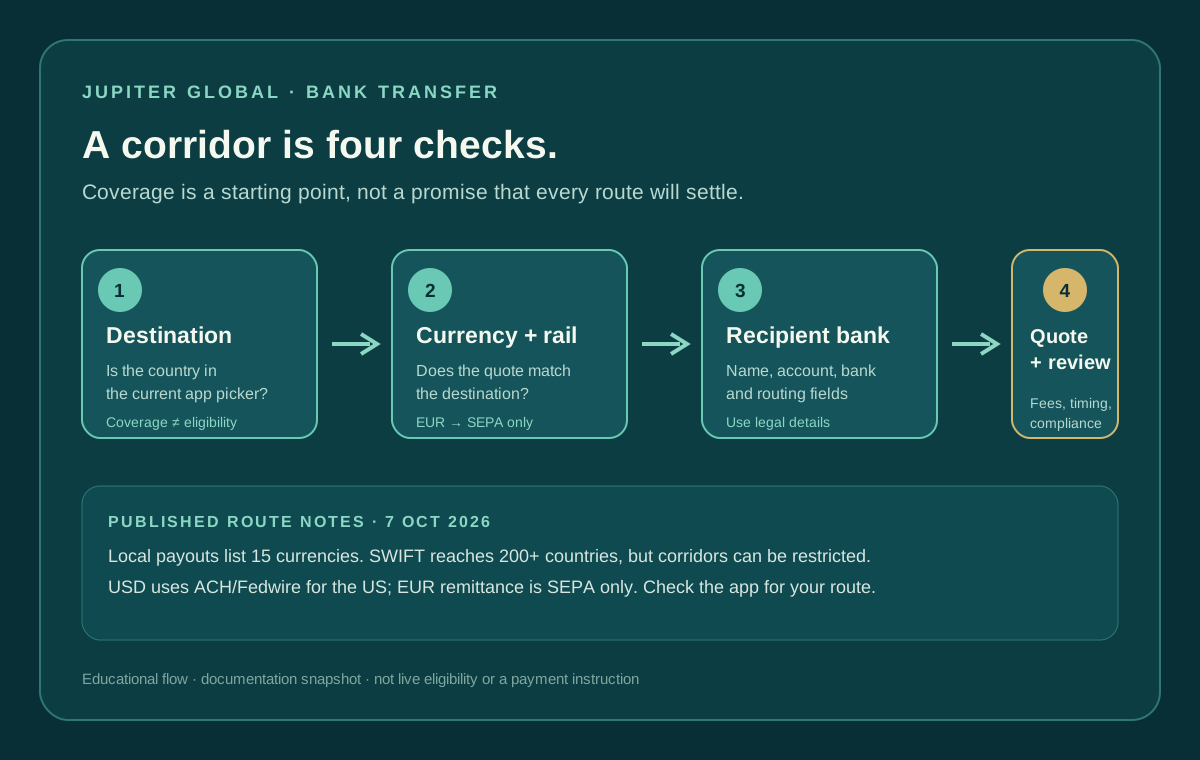
Jupiter Global Remittance supports local payouts in currencies including PHP and VND, while SWIFT covers more than 200 countries subject to recipient-bank and local regulatory restrictions. The product has payout limits set for each currency and shown in the app, and the available destination options in the app are the current authority for your account. Remittance routes and limits
EUR has a special constraint in the current documentation: EUR remittances are supported through SEPA only; a SWIFT EUR transfer may fail or may not be credited. A recipient who supplied an EUR account does not automatically make every EUR rail valid. Confirm that the route, currency, and receiving bank match the option selected in the app. Current fee and rail table
If the recipient’s account currency and the selected rail do not match, use the bank-transfer currency-mismatch guide before changing the beneficiary or sending again.
The route can also be delayed by a compliance or anti-money-laundering review. Jupiter says outbound transfers are screened by its regulated partner, and unusual or high-value transfers may require supporting documentation. That is a review state, not evidence that the recipient rejected the payment. Transfer review guidance
Separate a delay from a failed transfer
Use the status and the recipient’s bank response together:
- Processing or pending: keep the reference, confirm the 1–3-business-day window, and watch for a bank hold or support request.
- Completed in Jupiter, not credited: ask the recipient bank to search by amount, date, sender details, and any incoming reference; then contact Jupiter support with the same evidence.
- Failed: Jupiter’s FAQ says failed transfers are automatically refunded to the Spend balance. Check the balance and refund entry instead of assuming the recipient will receive a late credit.
- Returned or rejected by the bank: ask support whether the return has been reconciled and whether corrected beneficiary information is required.
The published timing is a guide, not a guarantee for every corridor. A bank’s local cut-off, holiday, intermediary, or compliance queue can extend the path. Do not describe a transfer as successful solely because the debit left your balance.
Build a support-ready evidence packet
Before contacting support, keep a private record of:
1. Transfer reference number and current in-app status. 2. Submission date, time, amount, and currency. 3. Destination country, rail, and recipient bank. 4. The beneficiary details submitted, redacted when sharing screenshots. 5. Any receiving-bank message, return notice, or hold explanation. 6. Whether the Spend balance shows a refund or reversal.
Jupiter’s FAQ asks for the transfer reference when a transfer is delayed. Do not send a seed phrase, private key, login code, full card security code, or identity document to anyone offering to “release” a payment. Use the in-app support route listed by Jupiter. Official support
For a general delay checklist, read Jupiter Global bank transfer delayed. For the first safe send, use your first international bank transfer. If the decision is whether to use a bank rail at all, compare the route with the quote comparison tool, using current inputs and keeping the result separate from live eligibility. The bank-transfer support-packet guide helps you keep the reference, route and redacted evidence together.
You’re done when the status is reconciled: the recipient bank confirms the credit, Jupiter confirms a valid refund, or support has the transfer reference and a documented next step. If the corridor and beneficiary route work for you, sign up for Jupiter Global and confirm the destination, currency and recipient fields before funding. When you sign up you earn 2% cashback on eligible Jupiter Card purchases, up to $100 a month; the transfer itself doesn’t earn it.
Jupiter Global Recipient Not Credited FAQ
How long can a Jupiter Global bank transfer take to reach the recipient?
Jupiter’s checked FAQ says most bank transfers arrive within 1–3 business days, but the destination country and receiving bank affect timing. Use the live transfer status and reference rather than treating the estimate as a guarantee.
Should I send the transfer again if the recipient has not been credited?
No. First check whether the transfer is processing, completed, failed or returned. A second transfer can create a duplicate obligation while the first payment is still moving through the receiving bank.
What beneficiary details should I recheck?
Compare the submitted recipient name, bank name, account number and country-specific routing details with the recipient’s bank instructions. Also confirm that the selected currency and rail match what the recipient’s bank can receive.
What happens when a Jupiter Global transfer fails?
The checked FAQ says failed transfers are automatically refunded to the Spend balance. Look for the refund or reversal entry and use the transfer reference with official support if the balance has not reconciled.
What should I send to support when the recipient is not credited?
Provide the transfer reference, current status, submission time, amount, currency, destination country, rail, recipient bank and any bank hold or return message. Redact recovery phrases, private keys, passwords, one-time codes and full card security data.
Sources
Checked against these sources on 21 October 2026.