
“Sign” is not one single kind of action. Depending on the wallet and application, you may be connecting an account, signing a message, approving a token permission, or authorizing an on-chain transaction. Before you approve anything, identify which one it is and whether it matches the task you meant to do.
This is Part 2 of the four-part wallet-safety series. The same routine applies whether you use Jupiter Wallet or another Solana wallet. No visual warning system can prove that every transaction is safe.

Start with the destination
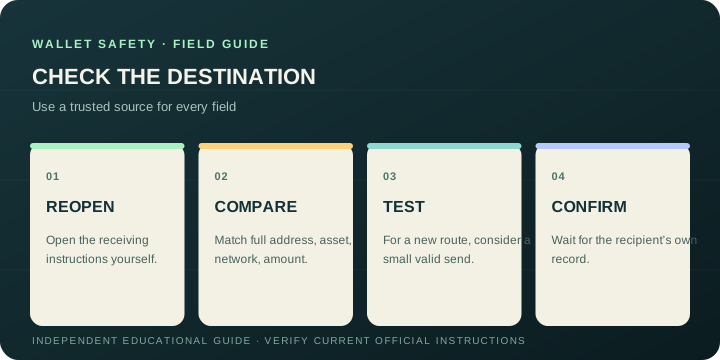
For a transfer, open the intended recipient’s receiving instructions through a channel you already trust. Compare the full address, token, network, amount, and any required reference against the wallet’s final confirmation. Address-book names can help, but inspect the actual address when setting up a new recipient or when details have changed.
If a message says that payment details were “updated,” verify that change through a separate trusted channel. Do not copy an address from the message and use that same message as proof it is correct. For a large or unfamiliar transfer, check minimums and fees, then consider a modest valid test amount and wait for the recipient to confirm it arrived.
Identify what the wallet is asking you to authorize
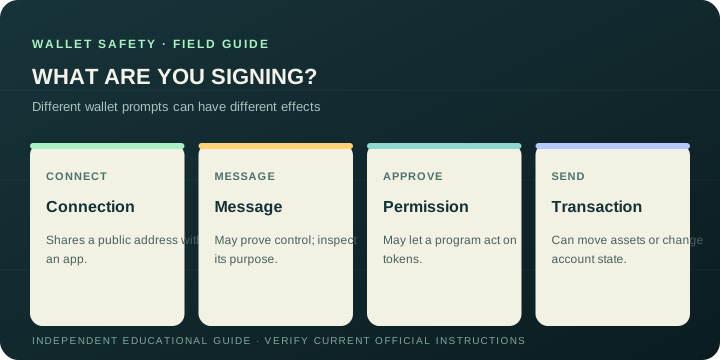
- Connection: often lets an app see a public wallet address. It is not the same as giving the site your recovery phrase, but connecting to an unknown site can still expose information or set up a later request.
- Message signature: may prove that you control an address or may carry other meaning. Read the stated purpose. Do not sign a message whose purpose is missing or different from the action you chose.
- Token approval or delegation: may allow a program to act on specified tokens, sometimes up to a stated limit. Check the asset, amount or scope, and program. Do not assume that “approve” only means logging in.
- Transfer or swap: inspect the token, source and destination, amount, network fee, and any extra instructions the wallet shows. Confirm that the output and recipient fit what you expect.
Wallet interfaces differ in how much detail they decode. If the screen shows unfamiliar addresses or program names without enough context, you do not have to guess. Reject or close the request, then independently look up the application’s official documentation. The Solana wallet overview explains that wallets manage keys and authorize signatures; the Solana safety guide advises understanding transactions before approval.
Some wallets also offer auto-approve or auto-confirm settings that can reduce or remove transaction-by-transaction prompts. Jupiter Wallet’s current product page says to enable the feature for use across Jupiter and Meteora, with per-transaction limits the user controls. It does not establish that the feature is enabled by default. Check the current wallet settings if you want to inspect each request yourself, and do not assume every action will show a confirmation prompt.
Recheck the page and the action together
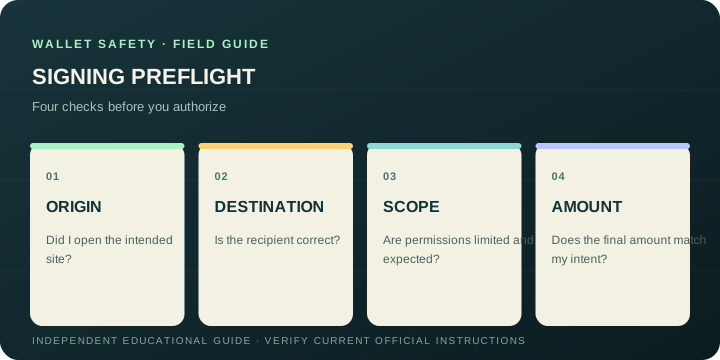
Confirm that you opened the service intentionally and that the domain is the one you expect. A legitimate-looking page can still request an unrelated permission. Conversely, a correctly spelled domain does not make every request from it appropriate.
Jupiter’s wallet product page describes its current transaction and domain-validation features. Treat product protections as an additional signal: keep the wallet updated, read the approval yourself, and do not approve a request just because a warning did not appear.
If you already approved something suspicious
Stop interacting with the page. From a clean, trusted route, check the account’s current activity and permissions using official wallet tools or documentation. If an approval may expose assets, seek timely help from the wallet provider’s independently verified support channel. For remaining assets at risk, get advice from a trusted security professional before moving them; rushing into a new address or a direct-message “recovery service” can create another loss.
Preserve transaction signatures, timestamps, domains, and relevant messages for your own records. Keep recovery phrases, private keys, login codes, and identity data out of screenshots or public reports.
Continue the series
- Part 1: Pause, check, then click
- Part 2: Review an address and transaction before signing (this guide)
- Part 3: Protect your recovery phrase and wallet backup
- Part 4: Spot fake wallet sites, giveaways, and support
For the short version, open the wallet safety checklist.
Wallet Safety Review Before Signing FAQ
What should I check before signing a wallet request?
Identify the request type, then match the origin, recipient, asset, amount, network, permissions and stated purpose to the action you intended. If the wallet cannot show enough detail to understand the request, reject it and verify the application independently.
Is a message signature the same as a token approval?
No. A message signature can prove address control or carry another meaning, while a token approval or delegation can allow a program to act on specified assets or scope. Read the request’s purpose and limits instead of treating every “Sign” button as a login.
Can I trust a copied wallet address?
Verify the complete address through a separate trusted channel and compare the token, network, amount and required reference in the final confirmation. A message that supplies a replacement address cannot also be the independent proof that the replacement is correct.
Does a correctly spelled domain make every wallet request safe?
No. The page’s origin and the requested action both need review. Product warnings and domain validation are useful signals, but they do not replace reading the approval or transaction yourself.
What should I do after approving something suspicious?
Stop interacting with the page, inspect activity and permissions through official wallet tools, preserve signatures and timestamps, and use an independently verified support route. Never send recovery phrases, private keys or login codes to a direct-message recovery service.
Sources
Checked against these sources on 29 September 2026.