
Wallet interfaces make it easy to move quickly. A familiar button, a countdown, or a message saying “act now” can turn a careful decision into an automatic click. A short routine helps put a moment of thought back between the request and the signature.
This is the overview for a four-part wallet-safety series. It applies to any wallet or Solana app and doesn’t endorse or audit a particular product. A wallet may provide warnings or transaction previews, but you remain responsible for deciding what to approve. Jupiter Wallet’s current product information describes its own wallet features; check the actual app and current documentation before relying on any feature.

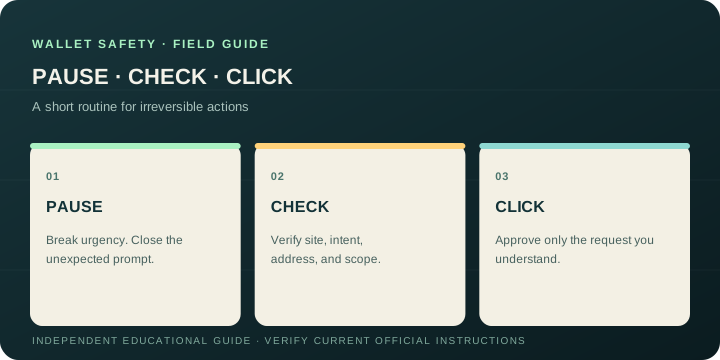
Pause: break the urgency loop
Stop when a prompt is unexpected, confusing, or unusually urgent. You can close the tab, put down the phone, and reopen the service from a bookmark or an app you already trust. A legitimate action will still be there after you verify it.
Pause especially before installing an extension, connecting a wallet, signing a message, approving token access, or sending funds. These actions are different: connecting may reveal a public address, a signature may prove control or authorize an action, and a transaction can transfer assets or change permissions. Read the specific request instead of treating each “Connect” or “Confirm” button as equivalent.
Check: inspect the request in context
Ask four questions before you proceed:
- Did I start this action? An unsolicited support message or surprise pop-up is a reason to stop.
- Am I in the right place? Reopen the known official address yourself and inspect the complete domain. A logo and matching page design are easy to copy.
- Do I understand what the wallet is asking? Look for the recipient, asset, amount, program, permissions, and any details the wallet exposes. If the summary is unclear or materially different from your intent, reject it.
- Can I verify the destination independently? Compare the full receiving address with the recipient’s trusted instructions. Do not take a replacement address from the same message that changed the payment details.
The Solana Foundation’s safety guide recommends checking addresses and understanding transactions before approval. A transaction preview is useful evidence, not a guarantee that every risk has been detected. If the wallet shows program names, token permissions, or decoded instructions you do not understand, wait and seek independent guidance.
Click: act only on the decision you checked
If everything matches your intent, approve only that request. For a new recipient, first check network and minimums, then consider a small valid test transfer you can afford to have delayed. Wait for the result and confirm it at the receiving end before sending more. A successful test reduces uncertainty; it does not guarantee future transactions or reverse a mistaken one.
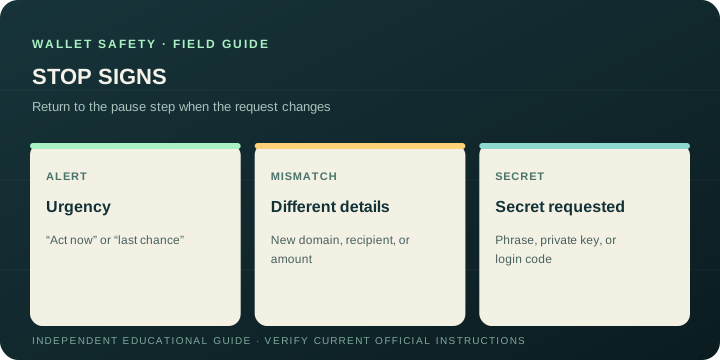
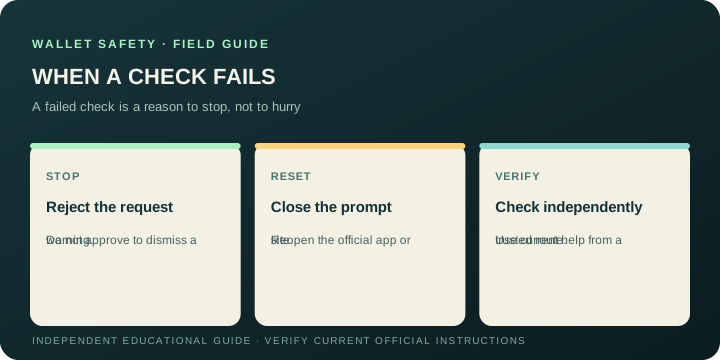
If anything changed after you checked (a new address, new domain, unexpected permission or a different amount), go back to the pause step. Do not let time pressure convert a failed check into a yes.
Keep this routine useful
You don’t need to memorize every protocol detail. You need to notice when a request falls outside what you intended, and stop before approving it. Save official sites as bookmarks, keep wallet software current, and learn the recovery method for the exact wallet account you use. Jupiter’s browser-extension learning guide distinguishes the extension from the websites and apps that connect to it; verify current installation instructions on an official Jupiter page.
Continue the series
- Part 1: Pause, check, then click (this guide)
- Part 2: Review an address and transaction before signing
- Part 3: Protect your recovery phrase and wallet backup
- Part 4: Spot fake wallet sites, giveaways, and support
Read the step-by-step wallet safety checklist for a broader set of precautions.
Wallet Safety Pause, Check, Then Click FAQ
What should I do when a wallet request feels urgent?
Pause. Close the prompt, reopen the known official site or app yourself, and verify the request without relying on the message or pop-up that created the urgency. Time pressure is a reason to check the destination and intent, not a reason to skip them.
Is connecting a wallet the same as signing a transaction?
No. Connecting can expose a public address, while a signature or transaction can prove control, authorize an action, transfer assets or change permissions. Read the specific request and the details your wallet displays before approving it.
What should I check before signing?
Confirm that you started the action, that the complete domain is correct, that the recipient, asset, amount, program and permissions match your intent, and that the destination can be verified independently. Reject or pause when the summary is unclear or materially different.
Is a transaction preview a guarantee that a wallet action is safe?
No. A preview is useful evidence, but it cannot prove that every risk has been detected. If the program, permission, address or instruction is unfamiliar, wait and seek independent guidance before signing.
Should I test a new wallet recipient with a small transfer?
A small valid test can reduce uncertainty when the route, network and recipient are independently verified, but it does not guarantee future transactions or make a mistaken approval reversible. Confirm the result at the receiving end before sending more.
Sources
Checked against these sources on 29 September 2026.