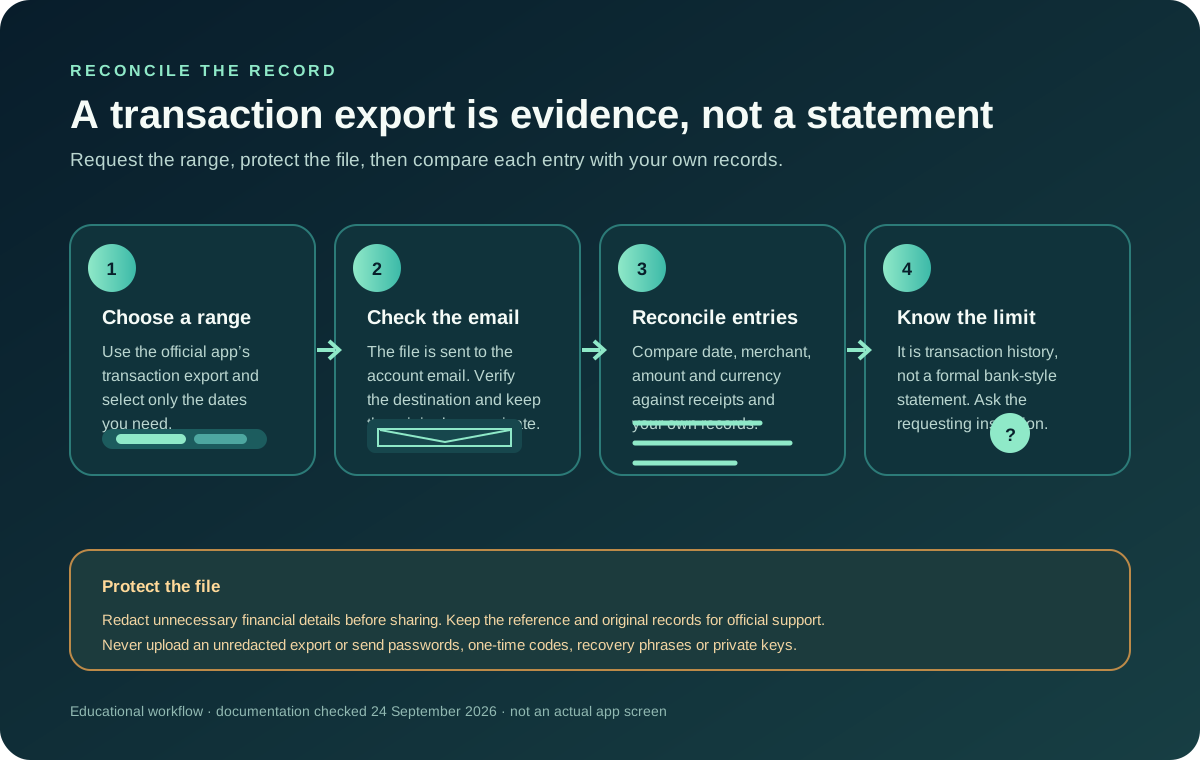
Jupiter’s current Spend FAQ says you can select a date range in the app and request an export of card transactions. The file is sent to your email. Jupiter describes it as a transaction-history export, not a formal bank-style statement. If an employer, bank, tax preparer, or other institution needs proof, ask that institution what it accepts before relying on the export. Transaction export details
For related card, refund and spending routes, browse the Jupiter Global guides directory and choose the question that matches the next decision.
Jup Global Community is an independent learning site published by StonkBuilder.
Request and protect the file
Use the transaction-history export option in the official app and choose the date range you need. Check the destination email address before requesting it, then look for the message in that account. Do not forward the file to an unknown person or upload an unredacted copy to a public forum. It may contain purchase dates, merchant names, amounts, and other financial details.
If the export does not arrive, first check the selected date range and the email account connected to the app. Then use the official in-app support route and provide the relevant request details. Official support hub
Reconcile entries against receipts
Use the export as one record to compare with your own receipts and account activity. Match transactions by date, merchant, amount, and currency, allowing for a merchant descriptor that differs from the name displayed at checkout. Mark entries you do not recognize for follow-up rather than assuming the export explains them.
A refund may not appear as an edit to the original purchase. Jupiter’s card documentation says a refund after settlement can appear as a separate credit marked “Reversed” under the original transaction. A pending authorization that the merchant voids follows a different path. Keep the merchant’s refund confirmation with the original entry until the result is clear. Refund and reversal details
Know what the export cannot establish
An exported transaction history does not by itself certify identity, account ownership, tax treatment, a bank balance, or a successful transfer to another person. It may also be the wrong document for a third party’s reporting requirements. Ask the organization requesting paperwork what document and date range it needs, and contact Jupiter support about records available for your account.
For a card refund that has not appeared, read the refund timing guide. For a bank transfer that failed or returned, see the failed-transfer checklist; card exports and bank transfer references are different records.
Keep the exported file in a private location, compare it with the original records, and avoid changing or annotating the only copy. If an entry looks wrong or unfamiliar, preserve the reference and ask support through the official channel.
If you’d like card records like these for your own spending, open a Jupiter Global account. You’d earn 2% cashback on eligible Jupiter Card purchases too, up to $100 a month.
Jupiter Card transaction export FAQ
How do I request a Jupiter Card transaction export?
In the official app, choose the transaction-history export option, select the date range, and request the file. Jupiter says the export is sent to the email address connected to the account.
Is a Jupiter transaction export a formal bank statement?
No. Jupiter describes it as a transaction-history export rather than a formal bank-style statement. Ask the employer, bank, tax preparer or other organization what document it accepts before sending the file.
What should I do if the export email does not arrive?
Check the selected date range and the email account connected to the app first. If the request still does not arrive, contact official support with the request details; the site cannot see whether Jupiter generated or delivered the file.
Can the export prove my identity, bank balance or tax treatment?
No. A transaction history does not by itself certify identity, account ownership, tax treatment, a bank balance or a successful transfer to another person. The requesting institution may require a different record.
How should I match a refund to an exported card transaction?
Keep the merchant’s refund confirmation with the original entry. A refund after settlement can appear as a separate credit marked “Reversed,” while a pending authorization that the merchant voids follows a different path.
Sources
Checked against these sources on 28 September 2026.