There are two different ways to move crypto into Jupiter Spend. Send to Spend starts with a token already in a Jupiter Mobile wallet. A direct deposit starts with an external wallet or exchange and requires the exact supported token and network. The paths are not interchangeable, and the wrong choice can turn a simple top-up into an unsupported transfer.
Jup Global Community is an independent learning site published by StonkBuilder.
The decision in one minute
| Where the asset is now | Safer documented path | What you check before confirming |
|---|---|---|
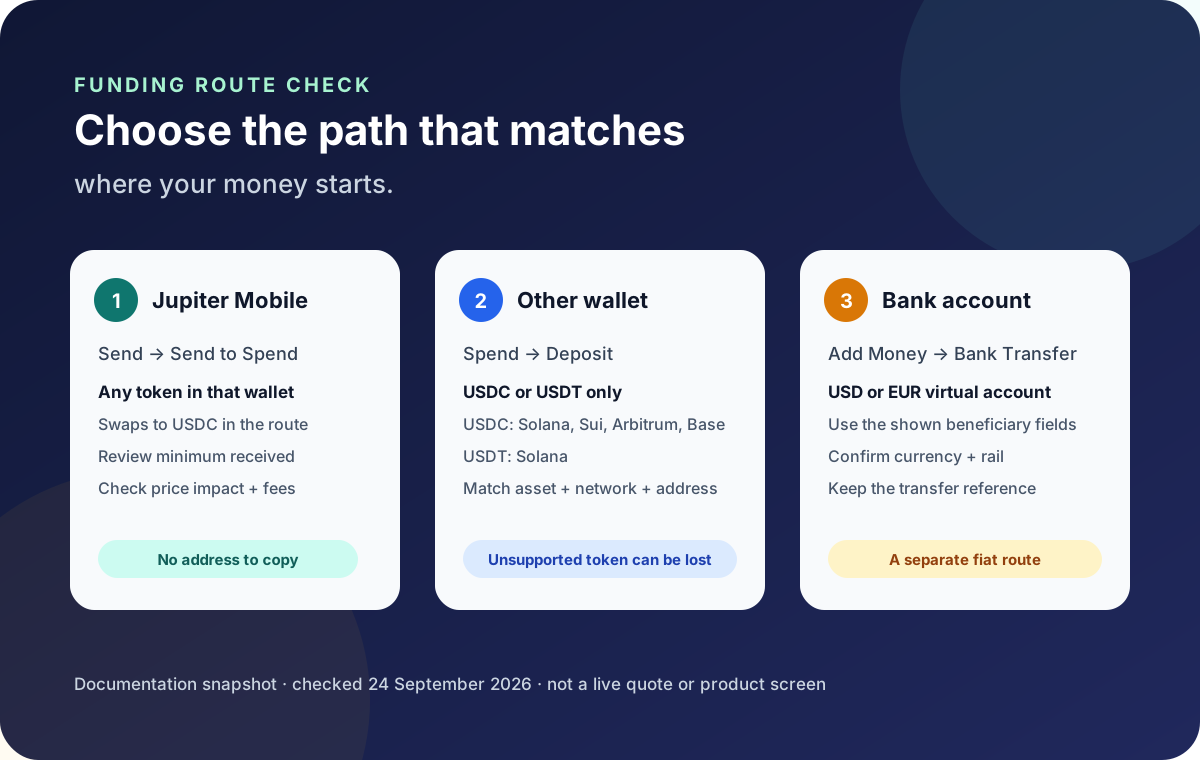
| Jupiter Mobile wallet | Send → Send to Spend | Token, estimated USDC, minimum received, price impact, swap fee, and network fee |
| Exchange or another wallet | Spend → Deposit | USDC or USDT, the exact supported network, address, amount, and withdrawal fee |
| Bank account | Add Money → Bank Transfer | Virtual-account currency, beneficiary fields, transfer rail, and recipient-bank route |
The official overview describes Spend as a USD balance used by the Card and QR Pay. Incoming fiat transfers to the supported virtual accounts can credit that same balance. That makes the source of funds the first question: a token in Jupiter Mobile, a token elsewhere, or fiat in a bank account. Spend funding overview
If the token is already in Jupiter Mobile
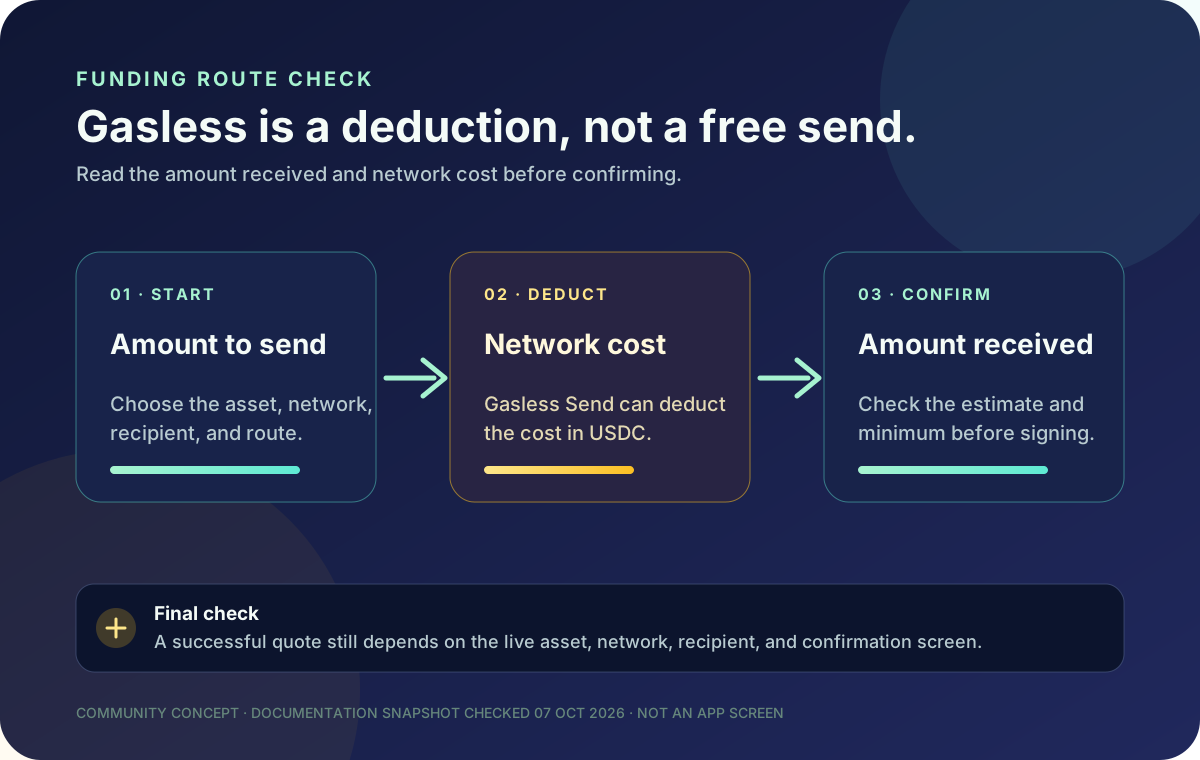
The current Spend FAQ says to use Send → Send to Spend from a Jupiter Mobile wallet. The flow can take any token you hold there, swap it into USDC through Jupiter Ultra, and deliver it to Spend in one transaction. The review screen shows an estimated amount, a minimum amount to receive, and price impact before you confirm. The swap has a pair-specific Jupiter Mobile fee and a small SOL network fee. Current Send to Spend and deposit guidance
Read that summary as a quote for the transaction you are about to authorize. Check the token, amount, estimated USDC received, minimum received, price impact, and fees. The current fee table describes the conversion fee as 0.1% or 0.2%, depending on the token, plus a small SOL network fee. Treat the in-app confirmation as the current value because a guide cannot reproduce a live quote. Spend fee table
If the quote is outside your tolerance, stop instead of confirming and hoping for a better outcome later. A displayed amount is an estimate until you authorize the transaction; it is not a promise that the same amount will be available after a price moves.
If the token is held somewhere else
The Spend deposit address is not a general-purpose wallet address. The FAQ currently lists USDC on Solana, Ethereum, Sui, Arbitrum, and Base, and USDT on Solana. For funds at an exchange or another wallet, open the Spend deposit screen and match both the asset and network before you send. Do not infer that another network works because the token has the same ticker. Supported token and network pairs
The documented Send to Spend route applies to tokens held in Jupiter Mobile. It does not make an unsupported token or network safe to send directly to the Spend deposit address. Jupiter’s FAQ says that anything other than USDC or USDT sent to that address is lost and cannot be recovered by support. If you need a network bridge or swap, evaluate that as a separate transaction with its own steps, risks, and cost. Deposit risk guidance
Compare the full cost and the way out
A direct USDC or USDT deposit and an in-app token swap have different costs. The current fee table lists a $3 minimum on Solana, Base, Arbitrum and Sui, and $10 on Ethereum. Solana has no processing fee; Ethereum, Base, Arbitrum and Sui charge the higher of $0.30 or 0.02%, plus network gas. These are current route costs, not a promise of a zero-cost transfer. Current fee and route details
Send to Spend adds the swap fee for the token pair and a small SOL network fee. That can be the cleaner route when the asset is already in Jupiter Mobile, because the user does not copy a deposit address. It is not automatically the cheapest route: compare the live quote with the cost of holding or converting USDC before sending. Jupiter Mobile funding model
Decide how you expect to use or withdraw the funds before moving them. The same FAQ says bank-withdrawal availability depends on region and that USDT deposits cannot be withdrawn to fiat; Send to Spend delivers USDC to Spend. That still does not guarantee a withdrawal option for a particular account or destination. Confirm the current app route and quote before funding. Spend limitations and risk context
A short preflight before you authorize
- Identify where the token is held: Jupiter Mobile wallet, external wallet, or exchange.
- If it is in Jupiter Mobile, review Send to Spend’s token, amount, minimum received, price impact, and fee summary.
- If sending directly, match the exact token and network shown by Spend.
- Confirm the intended spending or withdrawal route is available to your account.
- Copy the destination address only from the current Spend deposit screen; do not trust a chat message or an old screenshot.
- Keep the transaction reference and wait for the status to resolve before sending again.
For a more detailed direct-deposit checklist, read how to deposit USDC or USDT safely. To compare bank-account funding with crypto funding, see virtual account vs. crypto deposit. Use the site’s Route Finder to keep the funding and exit choice visible, then use Network Check for the documented network pairs. Neither tool can check your address or approve a transfer.
The right route is the one whose asset, network, cost and exit all make sense before you authorize it. If one of those is unclear, pause and check the official app or support channel. When you’re ready to top up, create your Jupiter Global account. Once your Spend balance is funded, eligible Jupiter Card purchases earn 2% cashback, up to $100 a month.
Send to Spend versus direct deposit FAQ
When should I use Send to Spend?
Use Send to Spend when the token is already in a Jupiter Mobile wallet. The review screen lets you inspect the token, estimated USDC, minimum received, price impact and fees before authorizing the swap.
Which tokens and networks can I deposit directly to Spend?
The checked FAQ lists USDC on Solana, Ethereum, Sui, Arbitrum and Base, plus USDT on Solana. Match both the asset and network shown in the current deposit screen; a matching ticker alone is not enough.
What does Send to Spend cost?
The current fee table describes a 0.1% or 0.2% pair-specific conversion fee, plus a small SOL network fee. The live confirmation screen is the current quote and may differ from a static example.
Can support recover an unsupported token sent to the Spend address?
Jupiter’s FAQ says unsupported tokens or networks sent to the Spend deposit address may be permanently lost and cannot be recovered by support. Stop and verify the exact deposit pair before sending.
Can I withdraw a USDT deposit to fiat later?
The current documentation says USDT deposits cannot be withdrawn to fiat. Withdrawal availability is region-dependent even for supported assets, so confirm the account’s actual exit route before funding.
Sources
Checked against these sources on 7 October 2026.