Losing access to a Global ID (formerly called Jupiter ID) is different from losing access to a self-custody wallet. Global ID is used to sign in to Jupiter and access Spend. The recovery steps depend on whether you can still use your registered login method. Current account-access FAQ
The highest-stakes account questions are separate from a forgotten password: after identity verification, the current FAQ says you cannot change the Global ID email or delete the Global ID. If you are deciding whether to start verification, treat that as a product commitment and read the current official terms first. Jupiter Spend FAQ
Jup Global Community is an independent learning site published by StonkBuilder.
If you forgot the password
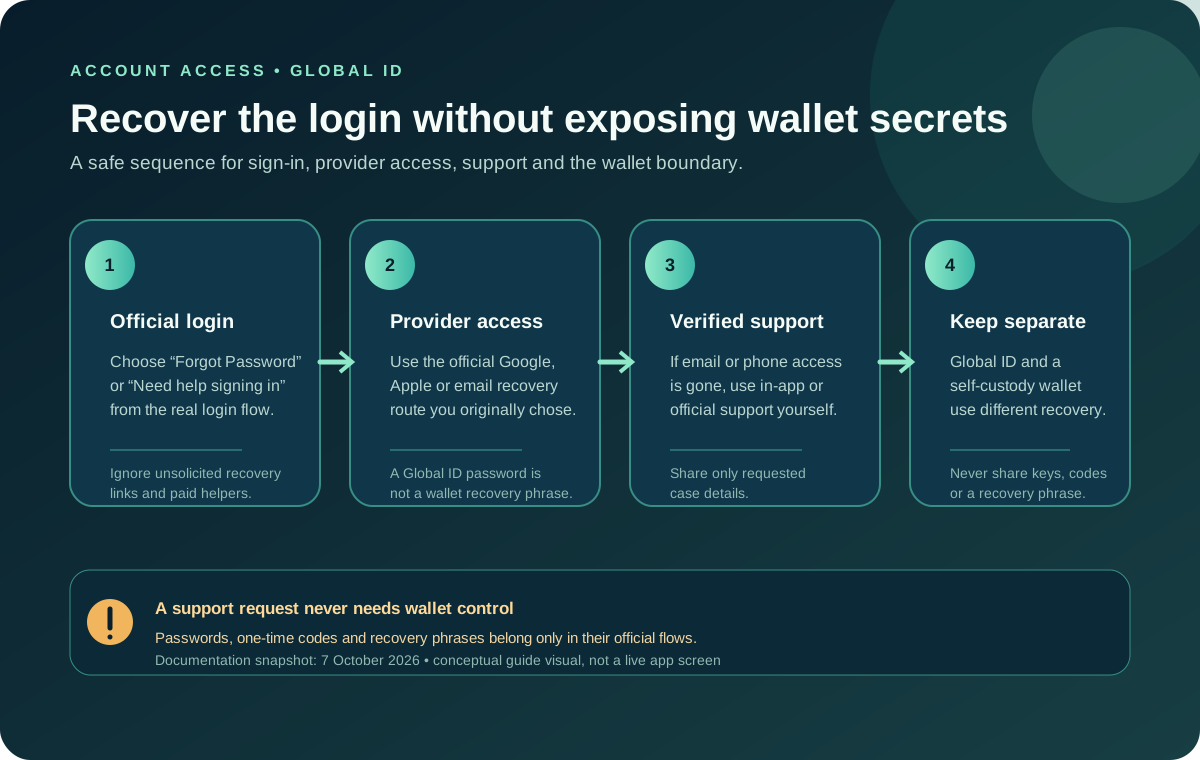
Global ID has no password to reset. It uses an email verification code or Google or Apple sign-in. Recover access through that email or identity provider; if access is permanently lost, contact official Jupiter support for identity-checked recovery to a new email. Use only the official Jupiter app or a website address you entered or verified yourself. Do not follow a recovery link sent unexpectedly by a social-media account or a person who says they can unlock the account for a fee.
If your login uses Google or Apple, recover access through that provider’s own official account-recovery process. Do not create a second Global ID to get around a sign-in issue; the current Spend FAQ says only one Global ID can be logged in at a time. If the official flow does not resolve access, contact Jupiter support. Jupiter Support Hub
If you lost access to the registered email or phone
The current FAQ says to contact support if you have lost access to the registered email or phone. It also says that, after identity verification is complete, the Global ID cannot currently be deleted and its email cannot be changed. Do not rely on an old tutorial or a third party’s promise that they can replace the address. Ask support what options apply to your situation. Account recovery and email limits
Share information only through the authenticated support process and only when requested. A legitimate recovery process should not need your wallet recovery phrase or private key. Never send a one-time code, password, or full identity document to someone in a chat who offers to recover your account. Spend security guidance
Keep Global ID separate from your wallet
Jupiter’s FAQ describes Global ID and Jupiter Mobile wallets as separate: Global ID supports Spend sign-in and identity verification, while a self-custody wallet has its own keys and recovery method. Recovering a Global ID sign-in method is not a wallet recovery procedure. Likewise, a wallet recovery phrase cannot restore a Global ID login. The Global ID boundary
Before opening a support request, note the exact message shown, when the issue began, and whether you still control your sign-in provider, email, and phone. Keep the original case reference if support gives you one. Avoid repeated account creation or unrelated profile changes while the request is being handled.
For the broader sign-in and verification distinction, read what Global ID does and the identity-verification checklist. Neither guide can see or change your account. The safety practice tool also rehearses the rule that a recovery phrase is never a support credential.
If you can’t confirm a recovery message is genuine, stop and go to the official app or support hub yourself. Only Jupiter’s official support can perform its identity-checked Global ID recovery to a new email. Don’t have a Global ID yet? Sign up for Jupiter Global and review the live sign-in and verification requirements before starting. You’ll earn 2% cashback on eligible Jupiter Card purchases, up to $100 a month.
Global ID account recovery FAQ
How do I recover a Global ID password?
Global ID uses an email code, Google or Apple sign-in rather than a password. Restore access to that sign-in method through its provider. If you still cannot sign in, use the official support route and keep the case reference.
What if I lost access to my Global ID email or phone?
Contact official support through the authenticated support process. The current FAQ says support should handle lost access to the registered email or phone after identity verification; do not rely on a third party to replace the address.
Can I change the Global ID email or delete the account after verification?
The current FAQ says the verified Global ID email cannot currently be changed and the Global ID cannot currently be deleted. Ask official support what options apply rather than creating duplicate accounts.
Is Global ID recovery the same as recovering a wallet?
No. Global ID sign-in and a self-custody wallet use separate recovery boundaries. Global ID account recovery cannot restore wallet keys, and a wallet recovery phrase cannot restore a Global ID login.
What information should I never send to a recovery helper?
Never send a wallet recovery phrase, private key, password, one-time code or full identity document to someone who contacts you in chat or social media. Use only the official app, verified site and authenticated support flow.
Sources
Checked against these sources on 21 October 2026.