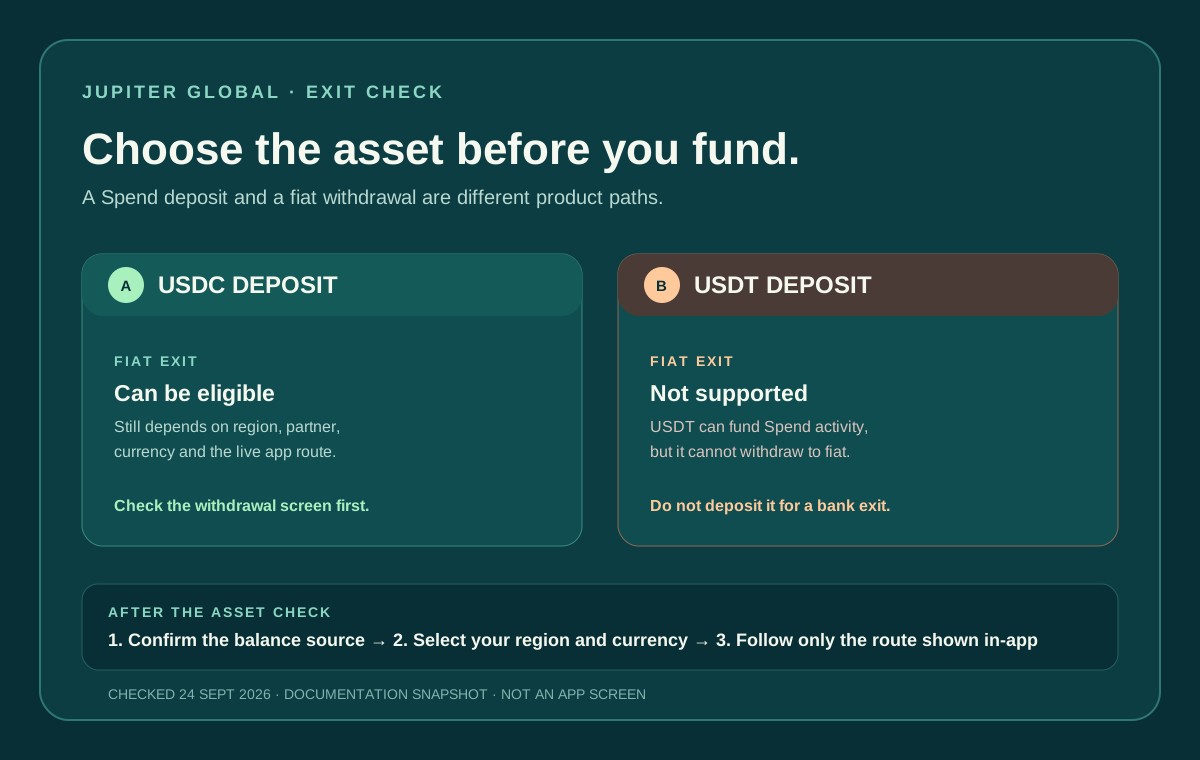
If your plan is to move money from Jupiter Global to a bank later, choose the asset with that exit in mind. The current documentation makes a sharp distinction: only USDC deposits can be withdrawn to fiat; USDT deposits cannot. USDT may still be accepted for Spend activity, but that does not turn it into a bank-withdrawable balance. Current withdrawal rule
Jup Global Community is an independent learning site published by StonkBuilder.
The short answer
Do not send USDT to Jupiter Global if you need to withdraw it to a bank as fiat. The FAQ and fees documentation say the off-ramp partner supports fiat withdrawal only for funds deposited as USDC. USDT deposits cannot be withdrawn to fiat, even if the balance can be spent through other Spend features. Spend FAQ
That is an asset rule, not a forecast about a particular bank or country. Switching assets later may introduce a new conversion, a new network step, price movement, or an account-specific restriction. Decide from the exit backward before you copy an address or approve a transfer.
Spend balance and withdrawal balance are different questions
The amount visible for card spending is not proof that an off-ramp exists. Jupiter’s fee documentation says withdrawal support is powered by a partner and is region-dependent. It also describes a separate distinction for Rain users: the Spend Balance is used for card purchases, while the Withdrawal Balance is the amount that can be withdrawn back to a wallet. A card refund can return to Spend Balance without becoming withdrawable. Fees, limits and withdrawal conditions
Use these questions separately:
1. Can this asset be deposited? The current FAQ lists USDC on Solana, Ethereum, Sui, Arbitrum and Base, and USDT on Solana. The exact Add Money screen is the authority for your account. Deposit networks 2. Can this balance be spent? Card, QR and remittance features have their own eligibility, limits and route checks. 3. Can this balance leave as fiat? The documented off-ramp asset rule is USDC only, followed by region, currency and partner checks. 4. Can this balance leave as crypto? A wallet withdrawal is a different action from a bank payout; use the route and asset shown in the official app.
Do not collapse those four questions into “the deposit worked.” A successful onchain receipt proves that a transfer reached the shown address. It does not prove that a fiat withdrawal, local bank payout or future card refund will be available.
What to check before funding
Open the official Jupiter app and identify the actual goal before moving funds. If you need a bank account to receive local currency, write down the destination currency, country, account ownership and deadline. Then check the withdrawal or remittance route that the app exposes for your verified profile.
The conservative sequence is:
1. Confirm that your residence and verification status are current. 2. Select the destination country and currency before choosing the deposit asset. 3. If you need a fiat off-ramp, use the documented USDC path and confirm the route is visible. 4. Read the displayed fee, limit, timing and beneficiary requirements. 5. Fund only after the route still makes sense for the amount and deadline.
Use the site’s Deposit Network Check to compare the asset and sending network, then use the Route Finder to separate card spending, a bank payout, and a wallet withdrawal.
The fees page lists separate payout limits for each currency, shown in the app for remittance and shows different local-payout charges by currency. A local payout is not identical to an off-ramp from a card balance, so do not use a remittance row as proof that a crypto withdrawal is enabled. Compare the published route types · Read the complete fees guide
If you already sent USDT
First identify the exact status without sending a second transaction. Keep the transaction hash, asset, network, amount, destination address and timestamp private. Check whether the transfer is confirmed on the correct network and whether the official app shows the expected balance.
If the USDT deposit is visible, treat it as a Spend balance that cannot use the documented fiat off-ramp. Do not invent a bank beneficiary, ask a stranger to “unlock” it, or send another asset to an address copied from a different route. Review the current in-app options and official support path for your account. Jupiter’s security guidance says account and payment questions belong in verified support channels. Security boundaries
If the transfer is confirmed onchain but missing from the balance, use the deposit evidence checklist rather than attempting a second send. The FAQ says deposits generally arrive after the required confirmations, and a confirmed deposit that remains missing after the documented waiting point should be taken to support with the transaction hash and deposit address. Deposit troubleshooting
Common assumptions that fail
| Assumption | What the documentation actually supports |
|---|---|
| “USDT is accepted, so I can cash it out.” | Deposit acceptance and fiat withdrawal eligibility are separate; the documented fiat exit is USDC only. |
| “My card balance is visible, so a bank payout is ready.” | Spend access, off-ramp support and remittance use different partners and checks. |
| “I can swap after depositing and withdraw normally.” | A later swap can add cost and does not guarantee the resulting asset or route is eligible. Check the live app first. |
| “A country on the card list guarantees an off-ramp.” | Withdrawal support is region- and currency-dependent; the account-specific route is decisive. |
The broader bank-withdrawal guide covers off-ramp versus remittance in more detail. For the initial funding choice, compare the USDC versus USDT guide and the deposit-network checklist.
A successful deposit is only the first step. Before you rely on a bank exit, the asset, destination, route and fee all need to match. If that works for you, sign up for Jupiter Global and check the live withdrawal screen before moving funds. Spending from your balance counts too: eligible Jupiter Card purchases earn 2% cashback, up to $100 a month.
Jupiter Global USDT Withdrawal FAQ
Can Jupiter Global withdraw USDT to a bank?
The checked fees and FAQ documentation says only USDC deposits can be withdrawn to fiat. USDT deposits cannot use the documented fiat off-ramp, even when the asset is accepted for another Spend function.
If USDT is accepted for deposit, can I convert it later and withdraw?
Do not assume that a later swap creates an eligible exit. It can add conversion cost, a network step or a new account restriction. Check the live withdrawal route and supported asset before funding.
Is a visible USDT Spend balance the same as a withdrawable balance?
No. Deposit acceptance, card spending, remittance and fiat off-ramp eligibility are separate questions with different partners and rules. A visible balance does not prove that a bank payout is available.
What should I do if I already sent USDT?
Keep the transaction hash, network, amount, destination address and timestamp private, then check the official app for the confirmed deposit. Do not send a second transaction or follow an unofficial “unlock” request; use the documented support path for the account.
Which asset should I choose if my end goal is a bank payout?
The checked documentation identifies USDC as the supported fiat-exit asset, subject to regional, currency, partner and account checks. Confirm the route in the current app before choosing an asset or moving funds.
Sources
Checked against these sources on 21 October 2026.