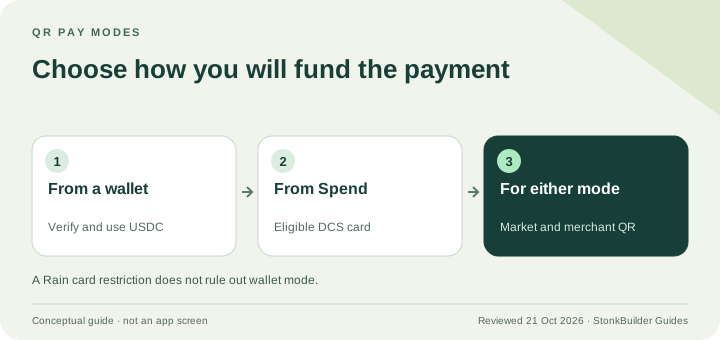
Spend-funded Jupiter QR Pay requires an eligible DCS-issued card; Rain cards do not support that mode. Wallet-funded QR Pay is a separate route and does not require a card. Both depend on verification, a supported merchant QR and the current market rules. Choose the mode before interpreting a card-eligibility table. Current QR Pay documentation
The distinction matters: “my Rain Card cannot fund QR” is not the same as “I cannot use any wallet-funded QR route.” Check what the official app offers for your verified account and the merchant code.
Compare the two modes
| Check | Wallet-funded QR | Spend-funded QR |
|---|---|---|
| Card required? | No card required | Eligible DCS-issued card |
| Starting funds | USDC on Solana in the selected wallet | Available Spend balance |
| Verification | Global ID and required verification | Verified Spend account |
| Limit | Minimum and maximum shown for the merchant QR | Published Spend-mode limits |
| Cost screen | Exchange rate and any network fee shown before confirmation | Published no-fee merchant conversion structure |
The current Spend-mode limits are $500 per transaction and $5,000 per day. Wallet mode uses limits from the merchant QR instead. Do not apply the Spend ceilings to every wallet payment. Mode-specific fees and limits
Card issuer and activation checks
For Spend-funded QR, the official support table gives these card conditions:
| Card issued in | Documented activation condition |
|---|---|
| Vietnam, Philippines, South Korea, Taiwan | All cards in the current support table |
| Malaysia | Activated before May 13, 2026 |
| Thailand | Activated before May 28, 2026 |
| Singapore | Activated before mid-May 2026 |
These are Card eligibility conditions, not proof that a merchant network is currently operating in that country. Singapore and Thailand merchant networks remain temporarily unavailable in the current market table. Passing an old activation cutoff does not override that pause. Card conditions and markets
The issuer is assigned from genuine residence under the Card rules. Do not change residence information or use another person’s account to try to obtain DCS. Issuer assignment
Check the market and the merchant code
The QR Pay product page lists QR Bolivia (Bolivia), Pix (Brazil), KHQR (Cambodia), Bre-B (Colombia), QRIS (Indonesia), DuitNow (Malaysia), QPay (Mongolia), QR Ph (Philippines), Seoul Pay and Jeju Pay (South Korea), and VietQR (Vietnam). The fee page has a shorter market list, so confirm the merchant QR in the app before relying on a route. Current network table
A personal transfer code, a familiar square pattern or a payment logo does not establish supported merchant checkout. Read what the scanner identifies and what the review screen says the merchant will receive. Use a different payment method if the route is unclear.
Prepare a wallet-funded payment
- Choose the wallet: use the wallet containing the intended USDC on Solana.
- Complete verification: follow the official Global ID and verification prompts.
- Scan the merchant QR: verify the merchant and amount.
- Inspect the review screen: check exchange rate, limit and total USDC including any network fee.
- Confirm once: save the result and reconcile the merchant’s receipt before trying again.
If the wallet has no SOL, Jupiter says the network cost can be added in USDC and shown as gas conversion. A no-QR-service-fee claim is not a promise that the blockchain cost is zero. Wallet payment flow
Prepare a Spend-funded payment
Confirm the issuer and activation eligibility, an available balance, the supported merchant network and the Spend-mode amount limits. Open the scanner from Spend and read the final amount before confirming.
Funding costs already paid to reach Spend are separate from checkout pricing. A funded balance also does not establish an available bank withdrawal; choose a funding amount that suits the use you actually have.
If the payment fails or remains pending
Check the mode, verification state, merchant code, balance and connection. Keep the original amount, currency, time and transaction reference. If funds have left but the merchant says the payment failed, reconcile the original result through official support before paying again. Support
The QR troubleshooting guide covers incident evidence. Use the Card overview for issuer setup and Route Finder for an alternative supported payment method.
Which cards support Jupiter QR Pay FAQ
Does a Rain card support Spend-funded QR Pay?
Not under the current documented rule. That mode requires an eligible DCS card. A separately eligible wallet-funded QR payment does not require a card.
Does wallet-funded QR Pay require verification?
Yes. Current documentation requires Global ID and verification, with USDC on Solana in the wallet.
Do the $500 and $5,000 limits apply to wallet-funded QR?
They are the published Spend-mode transaction and daily limits. Wallet mode uses the minimum and maximum for the merchant QR, displayed in the flow.
Do eligible Singapore or Thailand activation dates guarantee checkout there?
No. Current merchant-network availability is a separate check, and those market networks are marked temporarily unavailable at this review.
Do QR payments earn Card cashback?
No. Current reward guidance excludes QR payments, whether funded from a wallet or Spend. Only qualifying Card purchases earn Card cashback.
Sources
Checked against these sources on 21 October 2026.