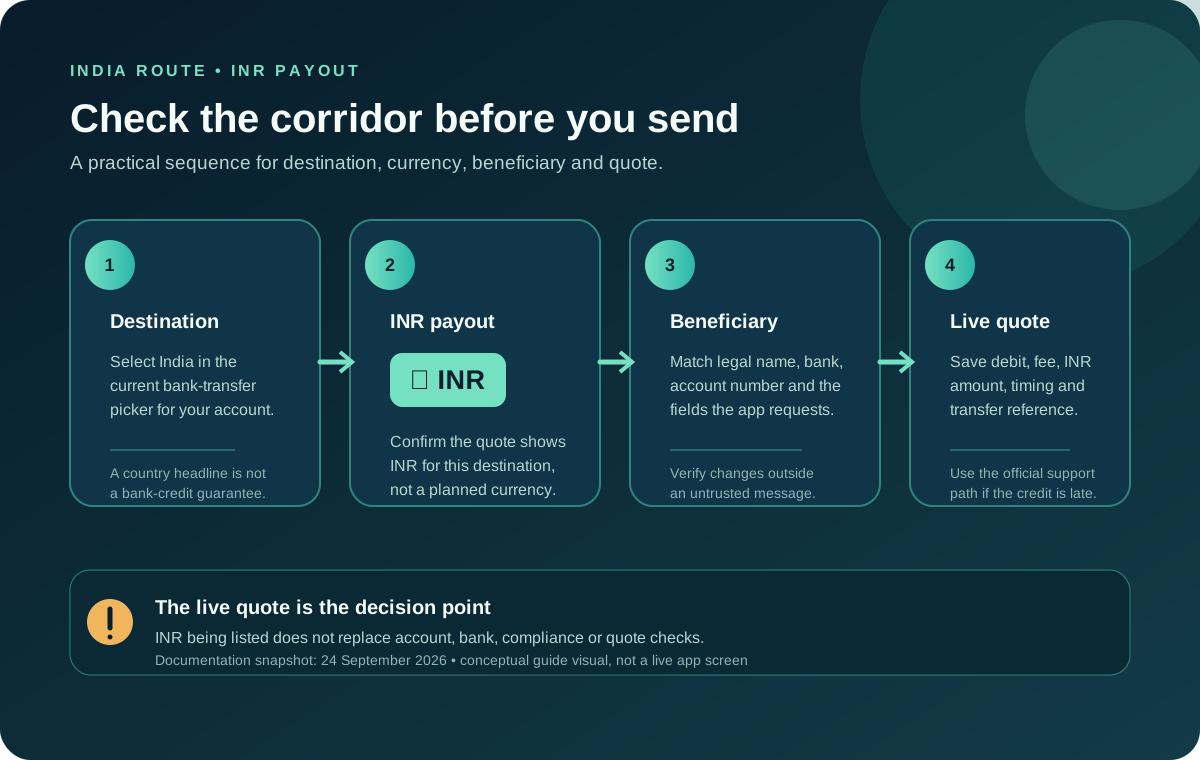
If you want to send money to India with Jupiter Global, start with the receiving route rather than an exchange-rate headline. Jupiter’s current remittance documentation lists INR among its local-payout currencies, but the published currency list does not guarantee that every Indian bank, beneficiary, account type, or sender account will be available. Your goal is a live quote in the official app that shows the destination, INR payout route, recipient fields, total debit, and delivery estimate together. Read the current remittance documentation
Jup Global Community is an independent learning site published by StonkBuilder.
What INR support actually tells you
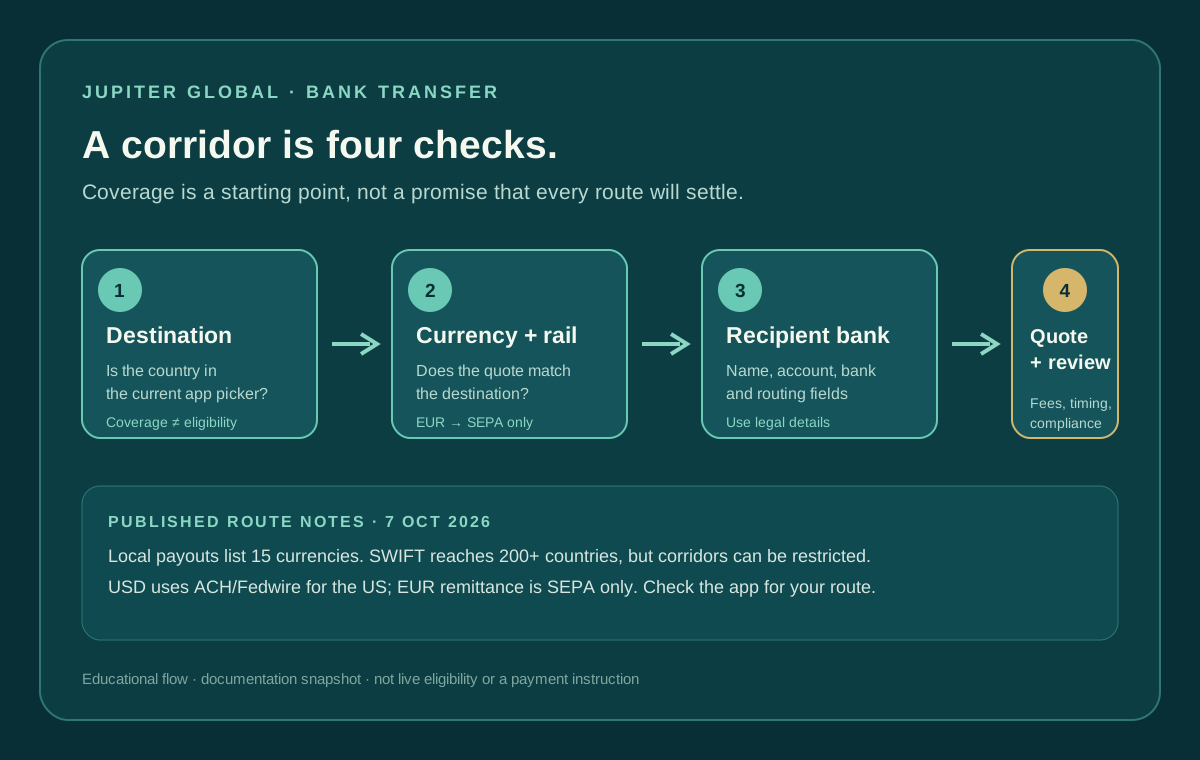
The remittance page lists local payouts in AED, BRL, CAD, EUR, GBP, IDR, INR, MYR, NGN, PHP, SGD, THB, TRY, USD, and VND. It also says that specific corridors can be restricted by the receiving bank and local regulations. That makes INR a useful starting signal, not a promise that a transfer will be accepted by a particular Indian bank.
The FAQ says the full destination list appears in the app when you select a bank-transfer destination. Use that picker and the quote screen as the current authority. A blog post, a search result, or a transfer that worked for someone with a different residence does not establish that your account can send the same route. Check the bank-transfer FAQ
Confirm the recipient before choosing the amount
Ask the recipient for the exact details required by the route, copied from their bank’s current instructions:
- legal account-holder name, including spelling and order;
- bank name and account number;
- the Indian routing details the app requests for that destination;
- the account type or purpose information if the form asks for it; and
- a phone or email contact only when the official flow explicitly requests it.
Do not replace a legal beneficiary name with a nickname, and do not infer missing bank fields from a screenshot. If the recipient sends an updated account number or asks you to change a detail after you have saved a quote, verify the change through a separate trusted channel. The FAQ says the app prompts for the country-specific routing details; complete those fields from the current recipient instructions rather than from memory. Review the required transfer fields
Separate the route from the price
Jupiter documents fixed and variable charges for deposits and payouts, with the actual fee depending on the rail and destination currency. The published table is useful for understanding the shape of the cost, but it is not a live quote for your residence, funding method, or Indian bank.
Compare the complete result: source amount debited, fixed charge, variable charge, conversion rate, INR amount the recipient should receive, and any delivery estimate. A route that advertises a small percentage can still cost more when a fixed charge or funding step is included. Use the fee break-even calculator to understand fixed-versus-variable math, then replace every example with the live quote before confirming.
Do not compare a Jupiter INR payout with another service’s cash pickup or wallet credit unless both deliver the money the same way. “Amount sent” and “amount received” are different numbers. Keep the budget constant and record the final INR amount, not only the exchange rate shown at the top of a comparison screen.
Verify the route in this order
Use four checks before funding or confirming:
1. Destination: India is available in the current bank-transfer picker for your account. 2. Currency: the quote offers INR for the recipient’s selected destination, rather than a planned or assumed currency. 3. Rail: the quote identifies the payout method and any required bank details. 4. Beneficiary: the recipient has supplied matching legal details and can receive the selected route.
The corridor checker can help you distinguish a published pairing from a hard mismatch, but it cannot see your account, bank acceptance, compliance review, quote expiry, or an intermediary’s decision. Before you send, go by the official confirmation screen.
Timing and review are part of the route
The current FAQ says most bank transfers arrive within one to three business days, while also warning that timing depends on the destination country and receiving bank. Outbound transfers are screened by the regulated partner. An unusual or high-value transfer may be held while supporting information is requested.
Save the quote and transfer reference privately after confirming. Ask the recipient to check the actual bank account, including pending or incoming views, rather than relying only on a notification. If the route is delayed beyond the displayed window, do not submit a duplicate transfer. Use the original reference and the recipient-not-credited checklist before contacting official support. Official support hub
Five questions before you send to India
Before you send, you should be able to answer five questions: Is India selectable for this account? Is INR offered on this route? Which bank fields are required? What total amount will leave your balance? What reference will you use if the recipient cannot see the credit?
If any answer is unclear, stop at the quote stage and resolve it through the official app or support channel. When every answer is clear, sign up for Jupiter Global and check the live INR route before funding. If you also use the Jupiter Card, eligible card spending earns 2% cashback, up to $100 a month.
Jupiter Global India INR Transfer FAQ
Can Jupiter Global send money to India in INR?
The checked remittance documentation lists INR among local-payout currencies. That is a starting signal, not a guarantee for every Indian bank, beneficiary, account type, residence or sender account. Confirm INR in the live destination picker and quote.
What recipient details are needed for an INR payout?
Use the exact legal account-holder name, bank name, account number and any India-specific routing or purpose fields requested by the current app. Do not infer missing fields from another bank or an old screenshot.
How much does a Jupiter Global India transfer cost?
The complete cost can include fixed and variable payout charges, conversion effects and funding fees. Save the live quote showing the amount debited, INR amount expected, route, timing and all displayed charges before confirming.
How long does an INR bank transfer take?
The checked FAQ says most outbound bank transfers arrive within one to three business days, while destination country and receiving bank affect timing. Treat that as a guide and keep the original reference if the recipient cannot see the credit.
What should I do if the Indian recipient is not credited?
Do not send a duplicate. Ask the recipient bank to check pending and incoming views, keep the transfer reference, amount, currency, route and submission time, then use official support when the transfer is outside the displayed window.
Sources
Checked against these sources on 28 September 2026.