You don’t need to be a crypto trader to use this product, but you do need to know which balance you’re looking at.
Jupiter Global is the public-facing destination for Jupiter’s everyday money products. The detailed documentation calls the payment features inside the Jupiter app Jupiter Spend. Think of this guide as a map between the marketing name and the buttons you will actually use. For an evaluative overview before you choose a route, read the independent Jupiter Global review. Product overview
Three names, two very different responsibilities
The Jupiter app brings different services into one interface. Its Mobile wallet is self-custodial: securing access is your responsibility. Spend is the payment side, with identity verification and financial partners involved. A convenient shared interface does not make these the same account or give them identical protections. Mobile security model · Spend partner risks
Before funding anything, ask yourself: am I sending to a wallet, depositing into Spend, or sending a bank transfer to virtual account details? These are three different actions. An address copied from one screen should not be assumed to work for another.
A useful habit is to write the destination in plain English before proceeding: “I am funding my Spend balance to make a card purchase.” If you cannot finish that sentence, pause and read the relevant guide first.
What people might use it for
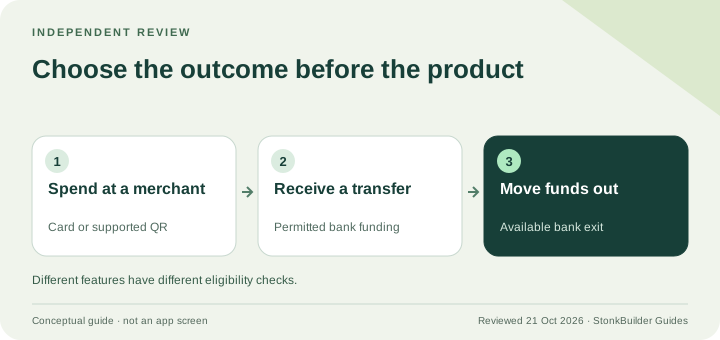
The payment tools cover card purchases, supported QR payments, and bank-transfer functionality. They serve different needs. Someone buying lunch needs a merchant payment method; someone helping family needs money to arrive in a usable account. Do not substitute one for the other just because both have a Send button. Jupiter Spend
Start with one actual need rather than activating every feature. You might want to pay for an ordinary purchase, compare a transfer to an existing remittance app, or understand whether receiving a bank payment would help your workflow. A single modest use case gives you a clearer test than moving a large balance and exploring afterward.
Check four things before signing up
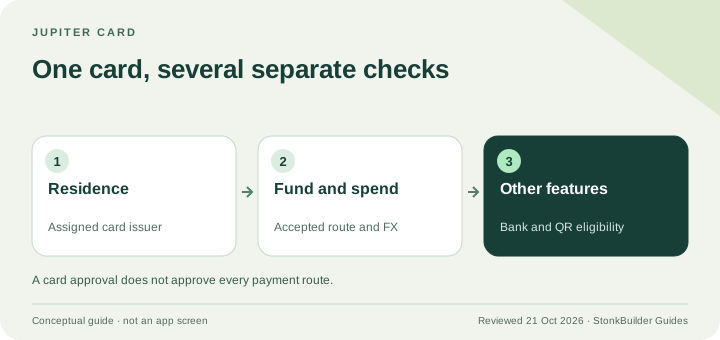
First, look at your residence and the specific service you need. A card’s acceptance network is not a list of countries whose residents can open an account. Second, inspect how you would fund it. Third, inspect how you would get money out. Finally, compare the costs with the method you already use. Availability and partner terms matter at each stage. Card eligibility · Remittance limitations
Do not treat approval, a virtual account, or a Visa logo as proof that every transfer route is available. The relevant test is much narrower: can your account, funded in your chosen way, deliver money to that recipient?
What this community site does
This is an independent learning hub by StonkBuilder, not Jupiter’s website, customer-service team, or payment processor. You can read guides and run comparison tools here. You can’t deposit, verify your identity, connect a wallet or send funds here.
No guide or calculator here will ever ask for your seed phrase or a photo of your passport. When you sign up, you do it in Jupiter’s own app, and Jupiter handles account setup, KYC and product terms.
Your most useful next step
Open the beginner checklist and move through it in order: understand the account, check availability, review verification, inspect funding, compare the full cost, and plan a small test. The Card application requirements guide covers the residence, age and identity gates in more detail. It is fine to stop before funding. Finding out that a service does not fit your needs is a successful outcome, too.
For a real account problem, start from the official support hub or support inside the app, not from a stranger offering help in a direct message.
Use the eligibility checker to separate residence questions from Card, funding and transfer features before you continue.
What is Jupiter Global FAQ
What is Jupiter Global?
Jupiter Global is the public-facing destination for Jupiter’s Spend payment products. The app can also show Jupiter Mobile self-custody wallets, but the wallet and Spend responsibilities remain separate.
Is Jupiter Global the same as Jupiter Mobile?
No. Jupiter Mobile wallets use self-custody keys, while Spend uses an account, identity verification, and financial partners. A balance or destination from one surface should not be assumed to work on the other.
What can I use Jupiter Global for?
Depending on your residence and the live route, Spend may support card purchases, supported QR payments, virtual-account or bank-transfer flows, and other documented payment features. Confirm the exact feature in the official app before funding.
Does approval guarantee a Card or bank transfer?
No. Residence, issuer, funding method, currency, recipient bank, corridor, and partner checks can still apply to the specific route you want.
Is this community site the official Jupiter support team?
No. This is an independent learning hub. Use the official support hub or authenticated in-app support for account, verification, or transaction issues.
If it sounds like a fit, sign up for Jupiter Global and check your residence, verification status and available features in the app before moving funds. You’ll earn 2% cashback on eligible Jupiter Card purchases, up to $100 a month.
Sources
Checked against these sources on 1 October 2026.