Community concept illustration—not an actual app screen.
Jupiter QR Pay can be useful when a merchant accepts the right local QR network. It is also easy to misunderstand: the country you are visiting, the QR logo on a counter, and the card attached to your Jupiter account are three separate checks.
Philippines: look for QR Ph
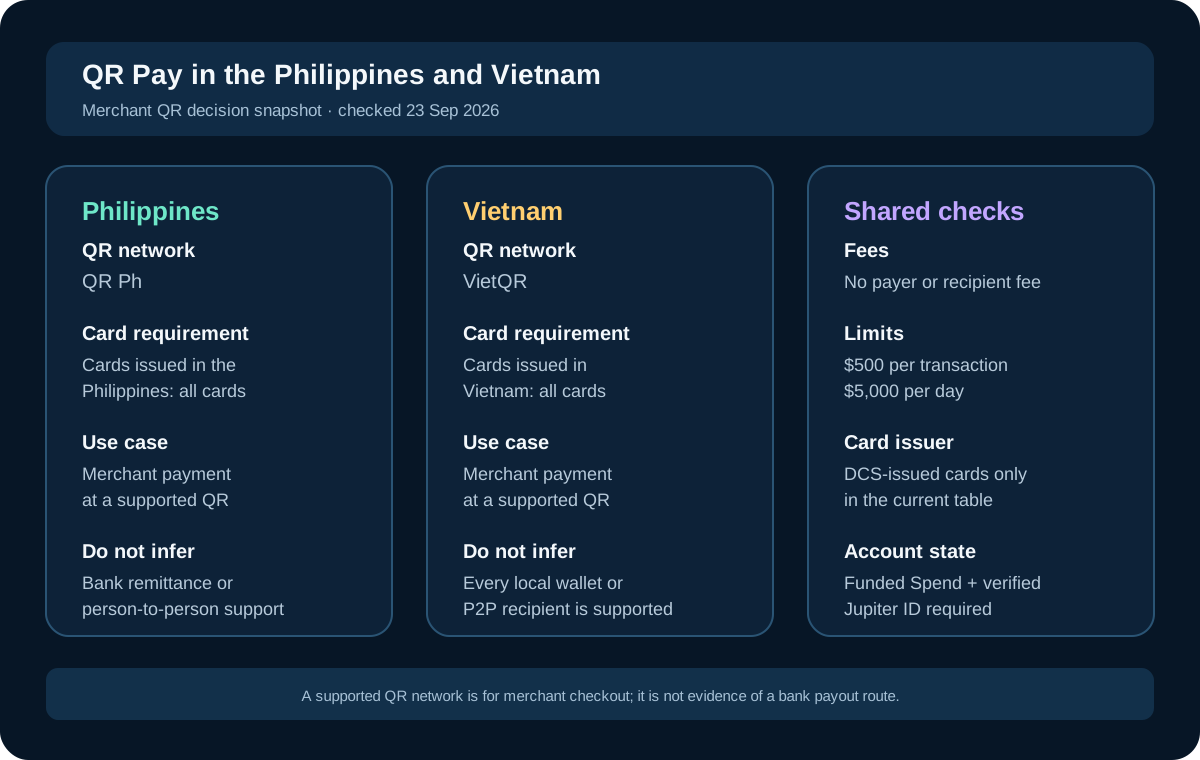
The current Jupiter QR Pay documentation lists QR Ph as the Philippines merchant network. If your card supports QR Pay, you can scan a participating merchant QR from the Spend app and authorize the payment from your USD Spend balance. The merchant receives local-currency settlement through the local payment processor. Jupiter QR Pay documentation
That does not mean every QR code in the Philippines is compatible. A printed code may belong to a personal wallet, a bank transfer flow, or another payment app. Ask the merchant which network the code uses, check the name and amount on the confirmation screen, and keep another payment method ready for a failed scan.
Vietnam: look for VietQR
The same documentation lists VietQR for Vietnam. The decision is the same but the visual code may look different from a Philippine QR. Do not choose a route by appearance alone. Scan only from the official Jupiter app, verify the merchant identity, and confirm the currency and amount before authorizing.
QR Pay is a merchant-payment feature. It should not be treated as a general way to send money to a family member, pay a bank account, or move funds between wallets. Person-to-person support is limited to selected jurisdictions, so a merchant network label is not proof that a P2P payment will work. QR Pay limitations
Card support is checked before country support
Jupiter’s current table says QR Pay is available on DCS-issued cards only. It lists cards issued in Vietnam and the Philippines as supported, while other issuance markets can have activation-date restrictions. Your card’s issuing country matters even if you are standing in another country.
Open the card details in the app before your trip and confirm that QR Pay is available. A successful card payment does not prove that QR Pay is enabled, and a supported destination does not override a card-level restriction. The feature also requires a funded Spend account and completed Jupiter ID verification. Jupiter Spend FAQ
Fees and limits still matter
The published QR Pay table lists no payer or recipient fee, including foreign-exchange conversion. It also lists a $500 per-transaction limit and a $5,000 daily limit. These are product limits, not a promise that a particular merchant, processor, or local network will approve every payment. Current fees and limits
The account still had to be funded. A network fee, bank funding fee, or conversion cost paid before the balance reached Spend is not erased by the QR checkout line showing no fee. Check the balance and funding route separately. If you are depositing crypto, use the current receiving instructions and confirm the asset/network pair before sending.
A safe checkout sequence
1. Confirm that your card and QR Pay status are eligible in the app. 2. Ask the merchant whether the code is QR Ph or VietQR, and whether it is a merchant code. 3. Scan from the official Jupiter app, not a link sent by a stranger. 4. Compare the merchant name, amount, and currency with what you agreed to pay. 5. Authorize once, wait for the result, and ask the merchant to check receipt. 6. Save the transaction reference privately if anything is delayed.
If the screen remains pending, do not immediately scan and pay again. Check whether the first attempt failed, is still processing, or completed. If the merchant cannot confirm receipt, use the official in-app support route and keep the exact time, amount, currency, merchant name, and status. Never send a login code, card security code, seed phrase, or private key to someone claiming they can release a QR payment. Official support
QR Pay versus a PHP or VND bank transfer
Someone who needs money in a Philippine or Vietnamese bank account needs a remittance route, not merely a merchant QR feature. Jupiter’s remittance documentation lists separate local payout currencies and a separate fee and limit schedule. The current per-transfer remittance limit is $10,000, which is unrelated to the QR Pay $500 transaction limit. Jupiter remittance
Choose QR Pay when the immediate need is a supported merchant checkout. Choose bank transfer when the recipient needs an account credit. The right route is the one that reaches the real recipient or merchant without an unplanned second step.
Sources & what was checked
Public documentation reviewed 23 September 2026. This is a documentation-based guide, not a first-hand account, identity-verification or payment test. Open the current sources before acting.