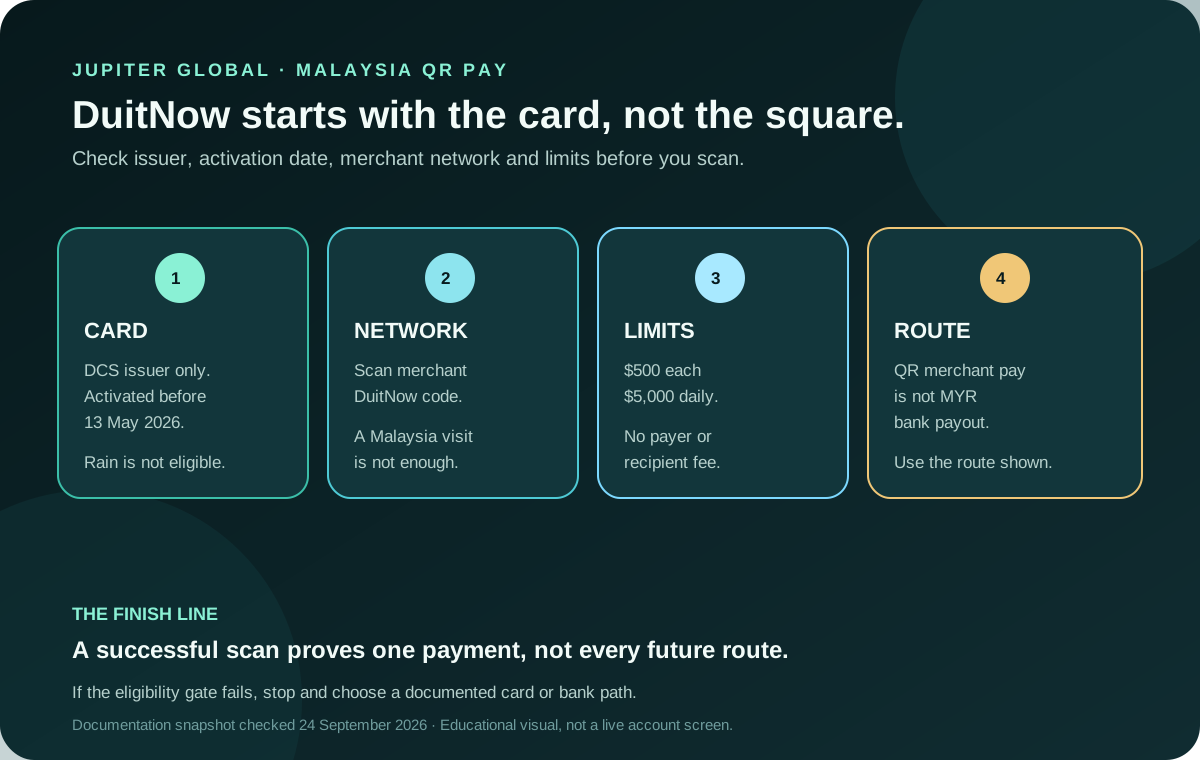
Jupiter Global’s current QR documentation lists DuitNow as the Malaysia merchant network, but a Malaysian QR code is only the last check. The card must also be eligible: the current table says QR Pay is available on DCS-issued Malaysian cards activated before 13 May 2026. That rule is dated and can change. Newer cards, Rain-issued cards and accounts with a different issuer should be checked in the live app before you plan around a scan.
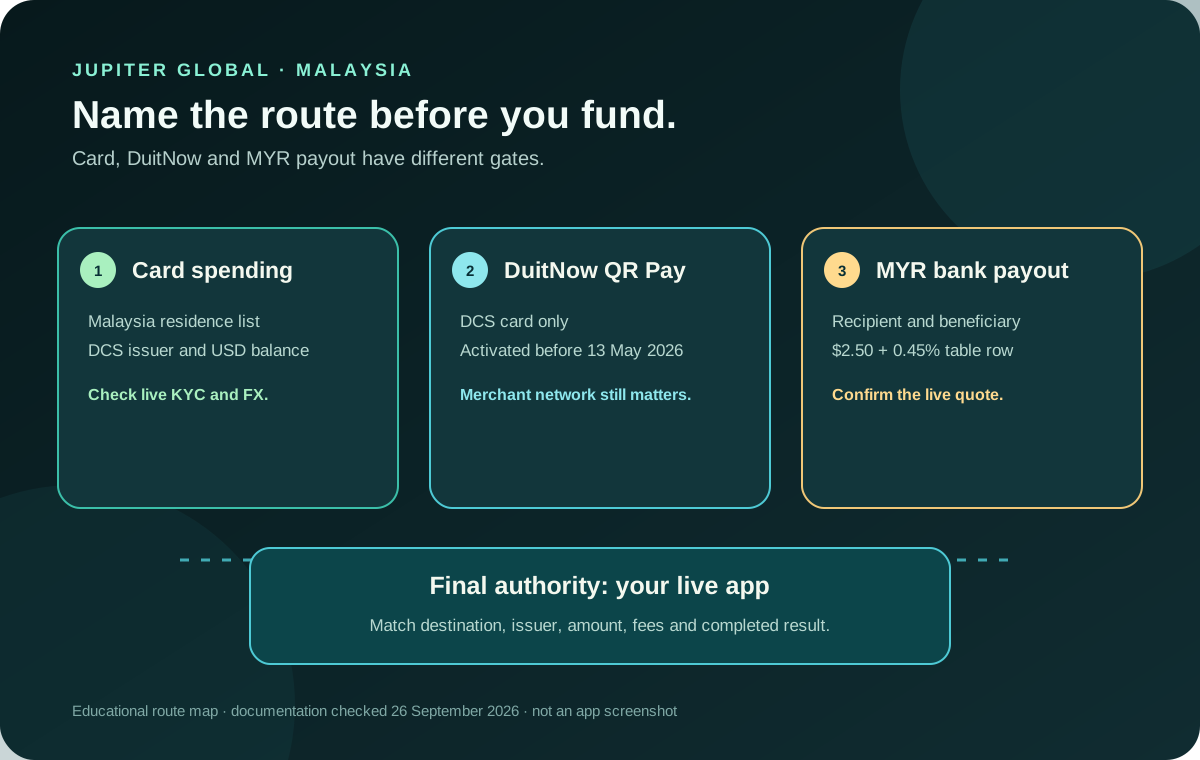
For the wider Malaysia decision (card residence eligibility, DuitNow and MYR bank payout), start with the Jupiter Global Malaysia route hub. This page focuses on the QR-specific card gate.
Jup Global Community is an independent learning site published by StonkBuilder.
The short answer: Malaysia is listed, your card still decides
The official QR page separates the merchant network from the card gate. Malaysia appears with DuitNow, while the card-support table says Malaysia is limited to cards activated before 13 May 2026. It also says QR Pay currently works only on DCS-issued cards; Rain-issued cards do not support QR Pay yet. Being physically in Malaysia, holding a Malaysian bank account, or seeing a familiar DuitNow logo does not replace those checks. Current QR availability
Use this order:
1. Open the legitimate Jupiter app and identify the card issuer. 2. Check the card’s activation date against the dated Malaysia condition. 3. Confirm that the merchant is presenting a DuitNow merchant QR code. 4. Read the amount and currency in the payment screen before approving. 5. Keep the payment reference until the merchant confirms receipt.
If the first gate fails, stop there. Repeated scans cannot turn a Rain card or a newer unsupported card into a DCS card that meets the documented cutoff.
DuitNow QR is a merchant payment route
QR Pay draws from the USD Spend balance. The QR documentation says the payment is settled through a local processor and the recipient receives local-rail settlement. It does not require the merchant to register with Jupiter or integrate a Jupiter-specific system, but the code still needs to be a supported merchant network. How QR Pay works
Do not confuse a DuitNow merchant QR with a bank payout to your own Malaysian account. Global Fiat Remittance lists MYR bank payouts as a separate route with its own beneficiary fields, fees, limits and corridor checks. A successful QR purchase does not prove that a MYR payout is available, and a visible MYR payout option does not prove that QR Pay is enabled on your card. Use the payment-route guide when the goal is money movement rather than a shop purchase.
What the current limit and fee table says
The current QR documentation lists $500 per transaction and $5,000 per day. It says there is no fee for the payer or recipient, including the documented currency conversion. The Spend balance is held in USD, while the merchant receives local-currency settlement through the QR rail. Read the final amount in the app rather than treating a zero Jupiter fee as a locked exchange rate. QR fees and limits
QR Pay transactions are not eligible for card cashback under the current documentation. That is another reason to choose the route because it fits the merchant and amount, not because a QR payment looks like an ordinary card purchase. Current QR limitations
The limits are ceilings, not approval promises. A payment below $500 can still fail because the card is not eligible, the code is unsupported, the balance is insufficient, the connection is poor, or the account is subject to a separate issuer or risk decision.
The four checks before you scan
1. Issuer and activation
Find the assigned issuer in the account and compare the card’s activation date with the current Malaysia table. Issuer assignment is tied to residence and product eligibility; you do not choose an issuer at the scanner. If the app does not show the QR route, treat that as account evidence and do not rely on an old screenshot or another person’s card.
2. Merchant code
Confirm that the merchant is asking for a DuitNow merchant payment. A generic QR-looking square can belong to another network or to a person-to-person flow. The current documentation says P2P availability is selective, while the listed country networks describe merchant payment coverage. Ask the merchant which network is being used before you approve.
3. Amount and balance
Check the available USD Spend balance, the amount shown in the app, the per-transaction ceiling and the day’s total. The display currency is a convenience view; it does not change the USD balance or the route’s settlement rules. Leave enough room for another necessary payment rather than funding exactly to the first scan.
4. Confirmation and evidence
Keep the in-app result, merchant receipt and reference private until the merchant confirms the sale. A scan animation or a merchant message is not the same as a completed debit. If the payment remains pending, do not scan again simply to force a result. Use the QR failure checklist and the official support path when the original reference needs investigation. Support route
If DuitNow does not work
Check the failure in this sequence:
- QR option missing: recheck issuer, activation date and account eligibility.
- Code rejected: ask whether it is a DuitNow merchant QR and whether the merchant is accepting a different local route.
- Amount rejected: compare the available balance, $500 per-payment ceiling and $5,000 daily total.
- Scan succeeds but status is unclear: preserve the reference and wait for the app and merchant to reconcile; do not create a duplicate payment.
Do not disclose identity documents, one-time codes, passwords or recovery phrases to a person who claims they can switch on QR Pay for you. Jupiter’s regulated partners and official support channels are the only appropriate place for account-specific eligibility or dispute questions. Security guidance
If you’re opening a new account, remember that the QR rule above covers cards activated before 13 May 2026, so check the live QR screen before counting on DuitNow. You can sign up for Jupiter Global here; eligible Jupiter Card purchases earn 2% cashback, up to $100 a month.
A DuitNow payment is done when the card gate, merchant code and amount match and the result shows as completed. Malaysia being listed is only the starting point; the card and the live app decide.
Use the Route Finder to separate a DuitNow merchant payment from a Malaysian bank payout before you continue.
Jupiter Global DuitNow Malaysia FAQ
Does Jupiter Global support DuitNow QR in Malaysia?
The checked QR documentation lists DuitNow as the Malaysia merchant network. Card eligibility still depends on the documented issuer and activation-date condition, so a Malaysian QR code alone does not prove that your card can pay.
Which Jupiter cards can use DuitNow QR in Malaysia?
The checked table says QR Pay currently works on DCS-issued Malaysian cards activated before 13 May 2026, while Rain-issued cards do not support QR Pay yet. Verify the live issuer, activation date and QR option in the account.
What are the Malaysia QR Pay limits?
The checked documentation lists $500 per transaction and $5,000 per day. These are ceilings, not approval guarantees; unsupported merchant codes, balance, issuer, risk or connection conditions can still cause a decline.
Is DuitNow QR the same as a MYR bank payout?
No. DuitNow is a merchant-payment route funded from the USD Spend balance. A MYR payout to a Malaysian bank is a separate remittance route with its own beneficiary fields, fees, limits and eligibility.
What should I do if a DuitNow payment remains pending?
Keep the in-app result, merchant receipt and payment reference, and do not scan again to create a duplicate. Wait for the original state to reconcile, then use the official support path with the reference if it remains unresolved.
Sources
Checked against these sources on 28 September 2026.